
Player with a crowded desk
Wants to play fighting games without placing a large controller beside their keyboard and mouse, so is comparing a handheld pad with a compact stick.


First, choose the control style you find most comfortable. Then check that the exact version works with your PC or console and the game you play. A handheld fight pad keeps your desk clear, while an arcade stick needs more space but gives you a physical joystick. A leverless controller replaces the joystick with directional buttons, which may take some getting used to.
Wants to play fighting games without placing a large controller beside their keyboard and mouse, so is comparing a handheld pad with a compact stick.
Wants to choose between a physical arcade joystick and separate directional buttons, and is prepared to get used to a new layout.
For example, uses a PC and a console, or switches between consoles. It’s important to check the exact platform version and connection mode.
First choose the control layout you want to use. Then check platform and game support, the space available and the connection.
A good fit if: you’d rather hold the controller or keep your desk clear.
Trade-off: it doesn’t have the joystick-and-button layout of an arcade stick.
A good fit if: you want to use a physical joystick and separate action buttons.
Trade-off: you’ll need space for the casing, your hands and the cable.
A good fit if: you want to enter movement using separate directional buttons instead of a joystick.
Trade-off: the different layout takes some getting used to. If necessary, check the SOCD mode selected and the rules of any event you’re entering.
| What to consider | What to look for | Who this matters to |
|---|---|---|
| Control style | Compare a D-pad, joystick or four directional buttons, as well as the position of the action buttons. | If I want to know which layout suits the way I play, I compare the controls themselves; the preferred control style is the main consideration for around 28% of consumers. |
| Platform and game | Check the full model name, the platform mode and whether your game is supported. | If I play on PC or console, I want to know in advance that both the controller and the game will work; platform compatibility is the main consideration for around 22% of consumers. |
| Desk space | Measure the available space and allow for your hands and the cable. | If my keyboard and mouse are also on my desk, I consider how much room the controller takes up; available space is the main consideration for around 22% of consumers. |
| Connection | Check which cable or receiver is included and which mode works with your platform. | If I don’t want a cable across my desk, I check whether the wireless mode is suitable for my system; connection type is the main consideration for around 17% of consumers. |
| Purchase and aftercare | Check what’s included and who the seller is. | If I want to be able to customise parts or need help after buying, I check what’s included and who the seller is; purchase and aftercare are the main consideration for around 11% of consumers. |
The standard 8BitDo Arcade Stick and the Arcade Stick for Xbox have different platform support.
Before buying, compare the full model name and the manufacturer’s compatibility information with your system.
According to HORI, the HORI Fighting Stick Mini has a casing measuring around 8 × 6 inches; your hands and the cable need space too.
Measure the space available and consider whether you’d rather hold the controller.
The Razer Kitsune uses directional buttons instead of a joystick. Razer’s claim that it reduces input errors is no guarantee of better performance in games.
Choose the input style you want to learn to use and, if necessary, check the SOCD setting for your needs.
For online purchases, statutory consumer rights and how the seller handles issues can be separate matters.
Keep your proof of purchase and check who is listed as the seller and who handles returns and faults.
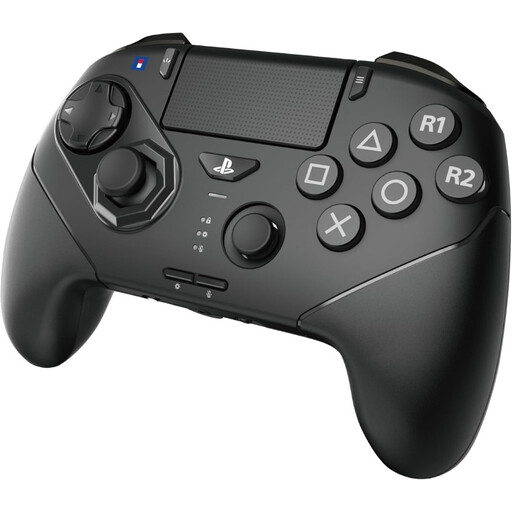
Compare the handheld Fighting Commander OCTA, wireless OCTA Pro and compact Fighting Stick Mini by their exact versions.
The PlayStation version of the Daija is a wired arcade stick for anyone looking for customisable parts for PS5, PS4 or PC.
The Kitsune is a leverless option for PS5 and PC, designed for players who want to use separate directional buttons.
The Arcade Stick for Xbox is designed for an Xbox or Windows set-up; don’t confuse this version with the standard Arcade Stick.
The Drone 2 is an arcade stick to compare for PS5, PS4 and PC.
The products below are handheld controllers for PS5 and PC set-ups, and for Switch and Switch 2 set-ups.
 No image available
A handheld controller for a PS5 or PC set-up. According to HORI, this OCTA Pro must be used in wired mode on PS4.
 No image available
A wired option for a Switch or Switch 2 set-up. The product information says that a USB cable isn’t included, so check whether you already have one.
No, support varies by version. According to 8BitDo, the standard Arcade Stick doesn’t support PS5, while Razer specifies the Kitsune for PS5 and PC. Check that your game supports the controller too.
According to Nacon, set the platform switch to PC and connect the cable. Nacon specifies support for XInput-compatible PC games; this doesn’t mean that other input protocols are supported.
No. HORI specifies wired mode for PS4; the manufacturer lists wireless support for PS5 and Windows 11/10.
For online purchases from a business, the Dutch government says you’ll often have a 14-day cooling-off period. The seller must provide information about the purchase and the cooling-off period, so check who the seller is and who handles returns. A manufacturer’s warranty doesn’t replace your statutory rights if a product is faulty.