What should you look for when choosing?
Wired fight pad
A good fit if: you want to hold a controller and play with a six-button layout. According to HORI, the wired Fighting Commander OCTA for PlayStation works with PS5, PS4 and Windows.
Consider: the layout and connection may vary between OCTA versions, so check the full model name and platform.
Arcade stick with joystick
A good fit if: a physical joystick suits the movements you use, or easy access to components for maintenance is important. HORI says the casing of the Fighting Stick α can be opened.
Consider: according to the manufacturer, the MAYFLASH F700 measures 37,4 × 24,6 × 6,3 cm and weighs 3,45 kg. These dimensions don’t apply to all arcade sticks.
Leverless controller
A good fit if: you’d rather enter directional inputs using separate buttons and are happy to get used to that layout. Razer lists PS5 and PC for the Kitsune; 8BitDo lists Xbox consoles and Windows for the Arcade Controller for Xbox.
Consider: check both the exact platform version and the SOCD mode allowed by the event and game.
Compare the exact model version with the tournament platform, then try the controls in your own game and check the rules on connections and settings before taking part.
| What to consider |
What should you check? |
Who is this most important for? |
| Platform and game |
Compare the full model name with the tournament game, console and available wired or wireless mode. |
If I’m entering a particular game on a specific console, I want to know in advance whether that exact version will work. Around 28% of consumers put compatibility with the competition platform first. |
| Input style |
Try the directional inputs and attack buttons in your own game before switching layouts. |
If I want to perform moves confidently, I’ll start with a layout that suits the way I play now. Around 22% of consumers give familiar inputs top priority. |
| Tournament rules |
Read the rules for the specific event and game, and check the connection type, macro assignments and active SOCD mode. |
If I’m entering a match with a configured controller, I want to know which features and settings are allowed. Around 22% of consumers put compliance with event rules first. |
| Use in the lounge |
Check the contrast and reflections in similar lighting, and make sure the controller suits your bag, table and cable setup. |
If I play in different locations, I want to be able to distinguish the buttons clearly and position my controller conveniently. Around 17% of consumers give portability and lounge use top priority. |
| Maintenance and aftercare |
Check how accessible the components are, which replacement parts are compatible and who to contact about a warranty claim. |
If I use my controller a lot, I want to know what maintenance involves and who to contact if it develops a fault. Around 11% of consumers put maintenance and aftercare first. |
Joybuy game controllers
These Joybuy products include gamepads for Xbox and Windows, a PS5 gamepad and a wireless HORI fight pad for PS5 and PC. Check the tournament rules and preferred connection mode for each version.
 No image available
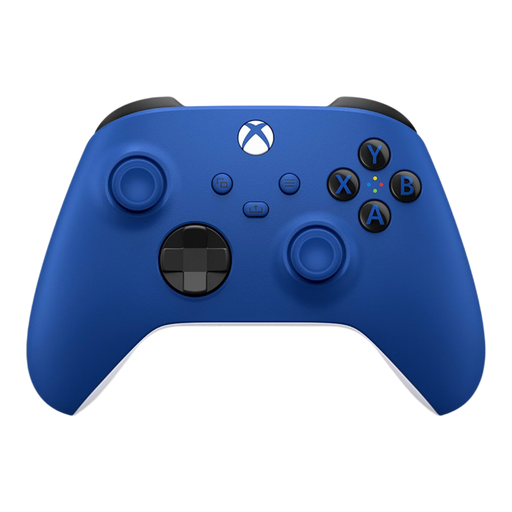
Xbox Wireless Controller Shock Blue
An option if you play on Xbox or Windows and want a traditional gamepad with D-pad controls.
The product information describes this version as wireless. Wireless use may be an issue at events that restrict wireless controllers, so check the rules.
View at Joybuy
 No image available
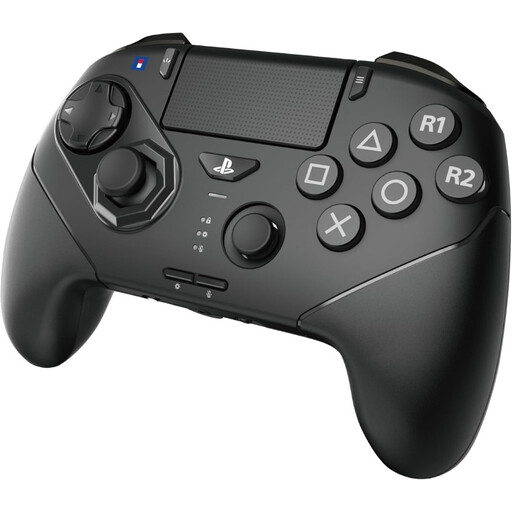
HORI Fighting Commander OCTA Pro, PS5/PC, Black
A fight pad option if you want to use a six-button layout on the listed PS5 or PC platforms.
The product information lists wireless use and a wired USB-C option. Its programmable macros are worth noting: Evo bans certain hardware-based assistance in its published rules, so check your event’s rules before configuring any features.
View at Joybuy
 No image available
Sony PlayStation 5 DualSense Wireless Controller, White
A traditional gamepad option if you want to play on PS5 using a D-pad, stick and action buttons.
The product information lists wireless use and a USB-C connection. Check that your preferred connection method complies with the tournament rules.
View at Joybuy
Frequently asked questions
Are wireless controllers allowed at every fighting game tournament?
Don’t assume they are. Evo’s published rules ban certain forms of hardware-based assistance, but that doesn’t in itself determine whether wireless controllers are allowed at another event. Check the rules for the specific tournament and game.
Can I use a leverless controller without checking its SOCD setting?
Check the setting before you play. Razer and 8BitDo list adjustable SOCD processing for the models mentioned. The 2023 Capcom Pro Tour rule applied, according to the archive, to Capcom-sponsored tournaments; it doesn’t determine which setting another event requires now.
What should I consider when maintaining an arcade stick?
Follow the maintenance instructions for the exact version and check that any replacement parts are compatible. HORI warns that compatibility with components from other manufacturers isn’t guaranteed.
Can I return a controller bought online in the Netherlands?
For an online purchase from a trader, you generally have a 14-day right to withdraw from the contract, starting from delivery, with some exceptions. According to Your Europe, you may have to pay the return costs if the seller informed you about them in advance. Check the terms and who the seller is.
In the Netherlands, does my warranty automatically expire after two years?
No. According to the Dutch government, the Netherlands has no fixed statutory warranty period. What you can expect from a product depends, among other things, on the product itself and the information provided. Contact the seller if a product doesn’t meet expectations.


