Who are these controllers for?

Players without a spare socket

If you don’t want to use a separate mains adapter, compare a rechargeable controller with one that connects to your console or PC via USB. PlayStation and 8BitDo’s product information describes these connection and power options.

Players using a specific platform

If you mainly play on PS5, Switch or a Windows PC, check that the exact model version and connection mode you want are compatible. According to PlayStation, 8BitDo, HORI and Razer, support varies by model.

Players considering a different button layout

If you’re choosing between a standard gamepad, a joystick and separate directional buttons, consider the space you have available and how the controller connects. 8BitDo, HORI and Razer describe models with different layouts.

What should you look for when choosing?

Rechargeable gamepad

Best for: anyone who wants a familiar handheld controller, for example for PS5.

Trade-off: wireless play means you don’t need a separate mains adapter while gaming, but you’ll need to recharge the battery later.

Wireless arcade stick

Best for: anyone looking for joystick controls and choosing a model that supports their platform.

Trade-off: the 8BitDo Arcade Stick offers Bluetooth, 2.4 GHz and wired USB-C. Using 2.4 GHz requires a spare port for the receiver.

Wireless button-only controller

Best for: anyone wanting to try separate directional buttons on a supported Switch or Windows setup.

Trade-off: the 8BitDo Arcade Controller has a rechargeable battery, according to the manufacturer. On Windows, this model uses a USB receiver.

Wired USB controller

Best for: anyone happy to connect a cable to their console or PC and keen not to rely on a charged controller battery.

Trade-off: you’ll need a suitable USB port and room for the cable.

What to consider What should you check? Who should pay attention?
No spare socket Check whether the controller has a battery or connects via USB, and how you charge it. If I don’t want to use a separate mains adapter while playing, I look at the power option and charging method; around 30% of consumers prioritise playing without needing an extra socket.
Platform compatibility Check the full model name, platform and required connection mode or adapter. If you mainly want to play on your own console or PC, you’ll want to avoid choosing a version that isn’t compatible; around 30% of consumers put compatibility first.
Control layout Decide whether you want to use a gamepad, joystick or separate directional buttons. If you’re not sure which layout suits your playing style, compare the controls before choosing; around 20% of consumers consider this their top priority.
Space and cables Check the dimensions, the space needed for a cable and whether a wireless receiver will take up a USB port. On a small desk or when storage space is limited, your setup could be the deciding factor; around 20% of consumers prioritise compact gaming and storage.

Common buying mistakes

  • Wireless doesn’t mean you can skip charging

    Wireless arcade models such as the 8BitDo models mentioned use a rechargeable battery. The receiver for the 8BitDo Arcade Controller also uses a USB port on Windows.

    Plan when you’ll be able to charge the controller and factor the required USB ports into your setup.

  • A USB connection doesn’t guarantee compatibility

    Supported platforms vary by model version. Mayflash lists PS5 games for the F500 FLAT only when used with firmware V1.09 and a MagicBoots-S5 adapter.

    Before buying, check the full model name, platform, firmware and adapter requirements, and compatibility with your game.

  • A different button layout isn’t better for everyone

    Manufacturer claims about improved input don’t prove that every player will benefit from a button-only controller.

    Consider your preferred hand position and whether you’re willing to get used to a different layout. Don’t treat general performance claims as a guarantee of how you’ll find the controller to play.

Brands to compare

PlayStation

PlayStation describes the DualSense for PS5 and other compatible devices, and the FlexStrike as a fightstick for PS5.

  • PlayStation lists Bluetooth and USB-C for the DualSense on compatible devices; available features can vary by game and connection.
  • The Dutch FlexStrike product information lists a rechargeable battery and wireless PlayStation Link and wired USB-C connections.
  • Check the connection and platform requirements for the specific model you’re considering.

8BitDo

8BitDo offers models with a joystick and button-only models for certain Switch and Windows setups.

  • According to 8BitDo, the Arcade Stick offers Bluetooth, 2.4 GHz and wired USB-C.
  • The manual says the Arcade Controller uses Bluetooth on Switch and a 2.4 GHz receiver on Windows; wired use is also described.
  • The manual lists a rechargeable battery and a stated 20-hour battery life for the Arcade Controller. This is a manufacturer specification, not an independent measurement.
  • The manufacturer does not list PS5 compatibility for the Arcade Controller mentioned here.

HORI

The Fighting Stick Mini SPF-038U we reviewed is a wired joystick controller.

  • HORI lists an eight-button layout, a cable and support for PS5, PS4 and Windows 11/10.
  • The specifications are from HORI USA; when buying, check that the exact version is suitable for your platform and market.

Razer

Razer positions the Kitsune as a wired button-only controller for PS5 and PC.

  • Razer lists a detachable USB-C cable, a cable lock and a tournament lock.
  • Razer’s claims of faster or more accurate controls are not based on independent performance testing.

Mayflash

Check the firmware and adapter requirements for your platform before choosing the F500 FLAT.

  • Mayflash says firmware V1.09, used with a MagicBoots-S5 adapter, enables you to play PS5 games.
  • This conditional support doesn’t automatically apply to every version or to use without an adapter. Check the combination before buying.

Gamepads for wireless gaming

These Joybuy products are gamepad options to compare if you don’t want to use an extra mains adapter while playing. Check each model to make sure its listed platforms, connection and required accessories suit your setup.

PlayStation 5 DualSense Controller in Starlight Blue

PlayStation 5 DualSense Controller, Starlight Blue

A gamepad option for PS5 players who want to play wirelessly; remember that it needs to be charged via USB-C.

Joybuy

Wireless game controller for Switch and PC

Wireless game controller for Switch and PC

An option to compare if you want to play wirelessly on Switch or PC; check the exact platform and connection requirements for your setup.

Joybuy
GameSir Cyclone 2 controller, Black-Bundle Edition

GameSir Cyclone 2 Controller, Black-Bundle Edition

The product name lists PC, Switch, iOS and Android, as well as a charging dock; check that the platforms and bundle contents suit your needs.

Joybuy

BEITONG KP70 Elite wireless game controller

BEITONG KP70 Elite Wireless Gaming Controller

The product name lists support for PC, Nintendo Switch and Switch 2, Steam and Android, plus six programmable buttons. Check compatibility with your own device and game.

Joybuy
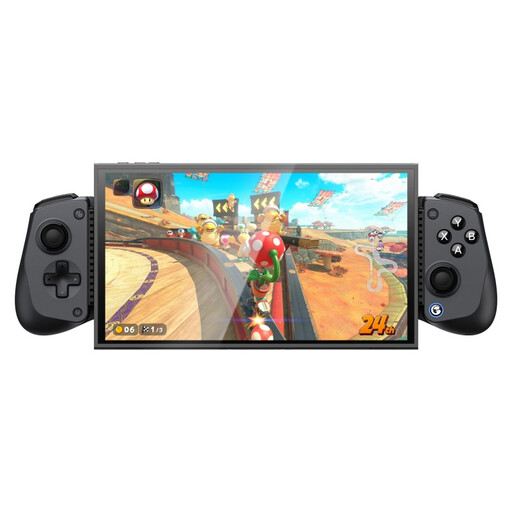
GameSir X5s Bluetooth controller for Switch 2, Android, iOS and PC

GameSir X5s Bluetooth Gaming Controller

The product name lists Switch 2, Android, iOS and PC. If you want to use the listed 2.4 GHz connection, the USB receiver is not included.

Joybuy

Frequently asked questions

Do I need a power connection at all for a wireless controller?

You don’t need a separate mains adapter while playing wirelessly, as long as the battery is charged. The 8BitDo Arcade Controller has a built-in rechargeable battery, according to the manufacturer; on Windows, the USB receiver needs to be plugged into a port.

How do I connect the 8BitDo Arcade Controller to Switch or Windows?

According to the manual, use Bluetooth to pair it with Switch and the 2.4 GHz receiver for Windows. For wired use, the manual describes a USB connection; on Switch, wired communication with the Pro Controller must be enabled.

Will every fightstick for PS4 also work with PS5 games?

No. A PS4 compatibility claim alone doesn’t mean a fightstick will work with PS5 games. For the F500 FLAT, Mayflash lists firmware V1.09 used with a MagicBoots-S5 adapter; also check that the combination works with your game.

What can I do if a controller I bought online isn’t suitable or develops a fault?

For many distance purchases from a business, consumers have a 14-day cooling-off period, according to the Dutch government; terms and exceptions may apply. If a product is faulty, you have statutory rights and should contact the seller. The Netherlands has no fixed statutory guarantee period.

Which product safety rule applies to electronic controllers?

The Dutch government states that electronic devices placed on the market in the EU must carry a CE mark. Check the product information and safety instructions for a specific offer; a CE mark does not indicate whether the controller is compatible with your gaming device.
