
Player short on space
Wants to pack away quickly after a home tournament and needs controls that don’t take up much table space.


First, choose a controller that’s confirmed to work with your console and fighting game. Then consider how much space you have and which controls feel right to you. A gamepad is compact, an arcade stick keeps the joystick, and a leverless controller uses directional buttons. But no layout is automatically right for every player or every tournament.
Wants to pack away quickly after a home tournament and needs controls that don’t take up much table space.
Wants to stick with a familiar gamepad, joystick or directional-button layout, so compares the controls before considering other extras.
Hosts matches at home, but may want to take the same controller to an event with its own controller rules.
Choose this option: if you have limited storage space or want to play without a large device on your lap. The DualSense is a standard gamepad for PS5; the wired HORI Fighting Commander OCTA has a six-button layout and is listed as supporting PS5, PS4 and Windows 11/10.
Bear in mind: the OCTA needs a safe cable route and has a different button layout from the DualSense.
Choose this option: if you’re used to joystick movements and have somewhere stable to place the stick. HORI lists the Fighting Stick Mini as measuring approximately 8 × 6 inches; the Fighting Stick α gives you access to its components for maintenance.
Bear in mind: check that the playing surface sits comfortably on your lap or table; the larger α needs more space.
Choose this option: if you’re set on learning to use directional buttons instead of a joystick. Razer lists the Kitsune for PS5 and PC; the 8BitDo Arcade Controller for Xbox is designed for Xbox and Windows.
Bear in mind: you’ll need to get used to the button layout, and the versions for different platforms aren’t interchangeable. If you’re competing at an event, check its rules on directional inputs and hardware features too.
| Consideration | What should you check? | Who is this important for? |
|---|---|---|
| Platform and game | Check the full model name and the listed console and game support. Don’t assume PS5 support based only on Xbox, Windows or PS4 compatibility. | If I want to play on my own console, I need to know in advance whether that exact version works with my fighting game; around 29% of consumers prioritise compatibility. |
| Space and cable route | Measure the space on your lap or table, and check the dimensions, cable direction and distance from the console. | In a small living room, I want to use the controller securely and put it away easily afterwards; around 29% of consumers prioritise the space available. |
| Control layout | Compare gamepads, joysticks and directional buttons. If you’re considering a fightpad, check whether a six-button front layout suits you. | If I want to keep using familiar controls or learn a new layout, I start with the controls; around 24% of consumers consider them their main priority. |
| Rules for external tournaments | Read the rules for the specific event and check its policies on macros and simultaneous directional input settings. Evo’s rules prohibit hardware macros and other specified input aids. | Anyone who wants to use their controller at an external event should check the rules there; around 18% of consumers prioritise tournament rules. |
HORI distinguishes between the wired Fighting Commander OCTA and the wireless OCTA Pro. These model names refer to different versions.
Before buying, check the full model name and the connection type of the exact version you want to use.
A different connection or control layout from the one you need could mean the controller isn’t right for your set-up.
The listed platforms vary by controller. Support for one console or Windows doesn’t automatically confirm that the same version works with a PS5 fighting game.
Check the platform specifications for the exact model and the version of the game you play.
The ACM ConsuWijzer states that your statutory guarantee rights still apply even if you haven’t bought an extra warranty.
Before paying for any additional cover, compare it with your existing statutory rights.
The DualSense is a standard gamepad option for a PS5 set-up.
Its range includes a wired fightpad, the compact PS5 Fighting Stick Mini and the larger Fighting Stick α.
The Kitsune is a slim leverless option for PS5 and PC.
Its range includes a leverless Arcade Controller for Xbox and an Arcade Stick for Xbox with a joystick.
The PlayStation version of the Daija is a joystick controller for anyone looking for a larger, customisable stick.
The F700 FLAT Elite is a leverless version with wired and wireless connection options.
These product picks are standard gamepads for Xbox or Windows set-ups and PS5. Check that each version is compatible with your console and fighting game.
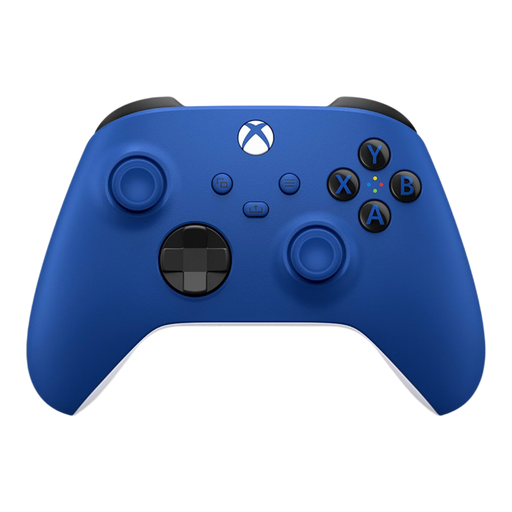 No image available
A gamepad option for an Xbox or Windows set-up; check that the listed support works with your fighting game.
The product description mentions a hybrid D-pad and button mapping via the Xbox Accessories app.
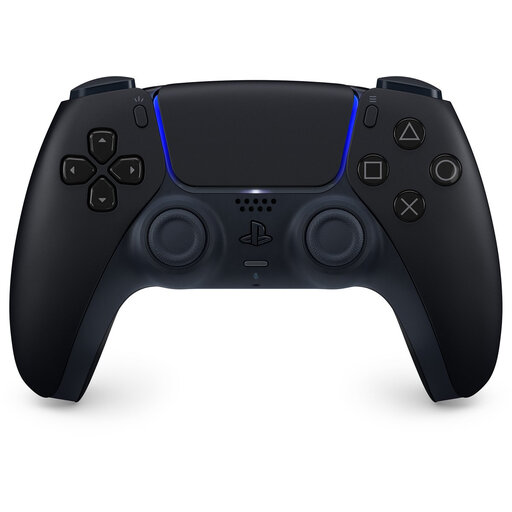 No image available
A standard wireless gamepad for a PS5 set-up; check compatibility with your specific game version.
According to the product description, this version doesn’t work with PlayStation 4 consoles.
Don’t assume they’re universally interchangeable. Check the exact controller version and game; PlayStation treats playing PS4 games on PS5 as a separate compatibility matter. The HORI models reviewed list supported platforms for each version.
Measure the distance to the console and decide whether you’ll play on your lap or at a table. HORI lists an 8 ft cable for the Fighting Stick Mini; Nacon lists a detachable 3 m cable for the PlayStation Daija. Position the cable so players won’t trip over it, and test your set-up beforehand.
It depends on the event and the game. Evo’s rules prohibit hardware macros and other specified input aids, while Razer lists several SOCD modes on the Kitsune. Don’t automatically apply Evo’s rules to a home tournament; if you’re competing elsewhere, read the applicable rules.
According to the ACM ConsuWijzer, online consumer purchases generally come with a statutory cooling-off period of up to 14 days after delivery, subject to legal exceptions. If a product is faulty, you also have statutory guarantee rights, which are separate from any manufacturer’s warranty offered.