Who is this buying guide for?

Players with a wired headset

If you want to plug your headset straight into your controller, check the connection and any audio controls on the exact version you’re considering. HORI, Turtle Beach and 8BitDo list headset connections for the models reviewed.

Players who switch between platforms

If you play on a particular console or PC, compare the full model name, platform version and connection mode. The stated compatibility varies between versions.

Players looking for different controls

If you’re considering a handheld fightpad, a joystick or directional buttons, weigh up the layout against your own preferences. This is separate from checking whether your headset works with the version you choose.

What should you look for?

Fightpad

A good fit if: you want to hold the controller in your hands and prefer a layout with several action buttons.

Trade-off: you won’t get a large body with a physical joystick and separate arcade buttons.

Modular gamepad

A good fit if: you want a conventional gamepad as well as something for fighting games. According to Turtle Beach, the PlayStation version of the Victrix Pro BFG Reloaded has a replaceable six-button fightpad module.

Trade-off: check the platform version and make sure the included module matches the product listing.

Fightstick with joystick

A good fit if: you want a physical joystick with separate action buttons. HORI lists a headset connection on the PlayStation version of the Fighting Stick α.

Trade-off: allow space for the controller and check that the version works with your platform.

Leverless controller

A good fit if: you’d rather enter directional inputs with buttons than a joystick. According to 8BitDo, the 8BitDo Arcade Controller for Xbox supports Xbox and Windows 10/11.

Trade-off: this different way of entering inputs may take some getting used to. Don’t assume Xbox and Windows support means it’s compatible with PS5.

Audio through the platform

A good fit if: you already have a wireless headset that works with your platform and the required adapter. PlayStation explains how to connect supported headsets using a USB adapter.

Trade-off: check your headset’s compatibility separately. This option doesn’t mean every headset works with every controller.

What to consider What should you check? Who is this important for?
Headset and audio Check the 3.5mm jack on the exact version and, where necessary, your console’s audio settings. If I want to plug my wired headset straight into the controller while playing, I check the connection and controls; around 36% of consumers prioritise this audio setup.
Platform and version Compare the full model name, supported console or PC, games, and wired or wireless mode. If I play on a particular console or PC, I want to know in advance that the specific version and connection mode will work; around 29% of consumers give platform compatibility top priority.
Control style Choose between a handheld fightpad, a joystick with separate buttons or directional buttons. If I’m looking for a particular way to enter inputs in fighting games, I compare the layout with my preferences; around 21% of consumers prioritise control style.
Space and setup Check how much room the controller takes up, and check the cable, receiver or battery details for your needs. If I have limited space or need to consider cables and charging, I factor in the setup; around 14% of consumers start with space and practical considerations.

What to watch out for

  • Assuming a similarly named version works with every platform

    Compatibility and connection modes can vary between versions. For example, HORI specifies wired use only for the PS4 version of the OCTA Pro reviewed here; Razer says the Raion reviewed here doesn’t work with new PS5 games.

    Before buying, compare the full model name, gaming platform, supported games and required wired or wireless mode.

  • Assuming every fightstick has a wired headset connection

    A headset connection is listed for the HORI and 8BitDo models reviewed here, but the PlayStation product page for FlexStrike doesn’t confirm a standard 3.5mm jack.

    Check the connection on the exact version, or make sure your headset can connect to the platform separately.

  • Relying on battery life figures without a headset when you’ll be using one

    For the 8BitDo Arcade Stick for Xbox, 8BitDo states 30 hours without a connected headset and 20 hours with one. These are the manufacturer’s figures for this model.

    Compare the battery life figures for the connection method you plan to use, and remember to allow for charging.

Brands to compare

HORI

Its range includes handheld Fighting Commander OCTA versions and the Fighting Stick α for PlayStation.

  • HORI lists a headset connection on the OCTA, OCTA Pro and PlayStation Fighting Stick α versions reviewed here.
  • The OCTA Pro reviewed here only supports wired use on PS4. Check the full version name and intended platform.

Victrix

The Pro BFG Reloaded reviewed here is a modular gamepad; the European product page offers a PlayStation version.

  • For that version, Turtle Beach lists a built-in 3.5mm jack and an included six-button fightpad module.
  • Check the platform version you’ve chosen and make sure the module matches the product listing.

8BitDo

The Xbox range reviewed here includes an Arcade Stick with a joystick and a leverless Arcade Controller.

  • For both Xbox models reviewed here, 8BitDo lists a 3.5mm jack and support for Xbox and Windows.
  • Don’t assume that this stated compatibility means PS5 support. For the Xbox Arcade Stick, 8BitDo quotes 30 hours without a connected headset and 20 hours with one.

Razer

The Raion reviewed here is a wired fightpad with six action buttons for PS4.

  • Razer lists a 3.5mm audio port.
  • Razer says audio doesn’t work in PC mode. On PS5, the controller only works with supported PS4 games, not new PS5 games.

PlayStation

FlexStrike is a fightstick. PlayStation also describes a separate connection option for supported wireless headsets.

  • For FlexStrike, PlayStation describes wired USB-C and wireless PlayStation Link connections, as well as connecting certain wireless headsets via a USB adapter.
  • Check headset compatibility separately: the FlexStrike product description doesn’t confirm a standard 3.5mm headset connection.

Controllers at Joybuy

The Joybuy picks below include a fightpad for PS5 and PC, and a wired Switch controller. For each version, check both the controls and the connection for your headset.
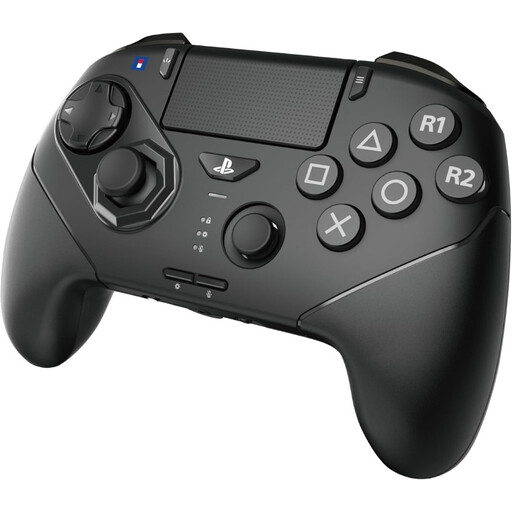
Hori Wireless Controller Fighting Commander Octa Pro for PS5/PC - Black

Hori Fighting Commander OCTA Pro for PS5 and PC, Black

The six front buttons make this a good fit if you’re after a fightpad layout for fighting games.

The product description lists wireless and USB-C wired controls. HORI lists a headset connection for the OCTA Pro; for PS4, HORI specifies wired use only.

Joybuy

Hori Wired Controller Horipad Turbo for Switch and Switch 2 - Pokemon Eevee Cottage Core Edition

Hori HORIPAD Turbo for Switch and Switch 2, Pokémon Eevee Cottage Core Edition

This wired controller is designed for use with Switch and Switch 2. Check that the version you choose works with your gaming platform.

The product description mentions analogue joysticks, programmable buttons and a turbo function. Before buying, check how your headset connects to the Switch version you’ve chosen.

Joybuy

Frequently asked questions

Does a fightstick need a headset connection?

No, not if your headset connects to your gaming platform another confirmed way. PlayStation describes connecting certain wireless headsets via a USB adapter; check that your headset is compatible and, if needed, select the audio output device on PS5. If you want to plug a wired headset straight into the controller, choose a version that lists this connection.

How do I set up headset audio on PS5?

According to PlayStation, go to Settings > Sound > Audio Output and select the output device. The options available depend on the connected devices and settings.

What should I consider when connecting, charging and maintaining my controller?

Use the connection mode specified for your version. HORI specifies wired use for the OCTA Pro on PS4; if you choose a wireless model, also compare the battery life figures for the way you plan to use it. According to HORI, the Fighting Stick α can be opened for maintenance and customisation.

What are my rights in the Netherlands if I buy online or receive a faulty product?

According to the Dutch government, online purchases from a business usually come with a 14-day cooling-off period, although exceptions apply. You’re also entitled to a product that works as it should: Dutch statutory warranty has no fixed time limit, and the retailer is your point of contact if a product is faulty. Check any additional warranty terms separately.
