In a cramped side seat, a handheld controller is often the practical choice because you don’t need to set down a wide casing. An arcade stick may suit you better if you’re used to a lever and have enough room to move. A flat leverless controller has no lever, but still needs space for your hands and some practice to get used to its inputs. Before choosing, check compatibility with the exact console and game, as well as the tournament rules.
Who is this relevant to?
Players with limited seating space
If you’re sitting next to other players, you’ll want room for your hands and cable without having to set down a wide controller casing. Your choice of controller also depends on the support available and where the cable comes out.
Players using a shared tournament console
If you’re bringing your own controller, check the exact version and the system you’ll be playing on. PlayStation warns that not every officially licensed or third-party accessory works with every PS5 game.
Players switching between input layouts
A D-pad, arcade lever and separate direction buttons all require different hand movements. Choose a layout you already know, or practise with it before the event; a new layout is no guarantee of better performance.
What should you consider when choosing?
Gamepad or fightpad
A good fit if: you have little room to set down a controller and are comfortable using one in your hands.
Trade-off: the D-pad and button layout need to suit your playing style; also check the exact console version.
Lever arcade stick
A good fit if: you already play with a lever and have a stable surface for the casing and your hands.
Trade-off: the lever needs room to move, which may be in short supply in a cramped side seat.
Leverless controller with direction buttons
A good fit if: you’ve practised with an all-button layout and can set the controller down securely.
Trade-off: check the required SOCD setting and the event rules. Different versions support different systems; a model name alone doesn’t prove it will work with your tournament console.
| What to consider |
What should you look for? |
Who should pay particular attention? |
| Positioning on a side seat |
Compare the available support, room for both hands and cable route; a slim casing alone doesn’t tell you whether the controller will sit securely. |
If I want to keep my hands and cable clear while sitting next to other players, I focus on where I can put the controller. Around 33% of consumers prioritise positioning. |
| Working with the tournament console |
Ask which system and game version will be used, then check the full model number and any adapter requirements. |
If I’m bringing my own controller to a shared console, I want to know in advance whether that exact version works with the system and game. Around 27% of consumers prioritise compatibility. |
| Familiar inputs |
Try your usual moves and button combinations with the D-pad, lever or separate direction buttons you’ve chosen. |
If I don’t want to spend time learning a new input layout just before a match, I choose controls I can practise with beforehand. Around 20% of consumers prioritise familiar inputs. |
| Permitted settings |
Read the rules for your event and check features such as turbo, macros and the required SOCD output. |
For consumers who want to avoid surprises at the equipment check, permitted settings are crucial. Around 20% of consumers prioritise the event rules. |
Common buying mistakes
-
Assuming a different version’s platform compatibility applies
Controllers with similar names may be designed for different systems. Compatibility with one platform doesn’t prove that another version will work with the tournament console.
Check the full model number against the console and game being used at the event.
-
Assuming every leverless controller is allowed
The presence of an SOCD mode or programmable feature doesn’t automatically mean that your chosen setting complies with your event’s rules.
Check the rules for your game and tournament, then configure the controller accordingly.
-
Looking only at the casing’s thickness
Even a flat controller needs room for your hands and a practical cable route; with a stick, you also need space for the lever to move.
Check the dimensions and cable outlet against the space where you’ll actually be sitting.
Relevant brands to consider
HORI
The PlayStation range we looked at includes both a fightpad and a lever arcade stick.
- According to HORI, the Fighting Commander OCTA SPF-023U has six action buttons and adjustable D-pad sensitivity.
- The Fighting Stick α has a casing that opens for maintenance. These features apply to the versions mentioned and don’t mean that all HORI controllers are faster or more comfortable.
Razer
The Kitsune is a flat, all-button controller for PS5 and PC.
- Razer lists a detachable cable, cable lock, tournament lock and adjustable SOCD modes.
- Check which settings the event allows; a feature being available doesn’t mean it’s approved for every tournament.
Qanba
The Drone 2 is a lever arcade stick, while the Sapphire S1 is a separate leverless model.
- Qanba lists a console switch for choosing the compatibility mode on the Drone 2. According to Qanba, the Sapphire S1 has 18 customisable buttons.
- The Drone 2 manual also describes a turbo function. Turn it off if the event rules prohibit rapid-fire; also check whether a specific button layout is allowed.
8BitDo
Makes separate Arcade Controller versions for Windows and Switch, and for Xbox and Windows.
- For the standard version, 8BitDo lists a wired connection and a tournament lock.
- The listed platforms don’t confirm PS5 support. Software-based macro options aren’t automatically permitted in a tournament.
Hit Box Arcade
Specialises in all-button controllers, including different versions for a range of systems.
- Hit Box Arcade lists PS5 support for the Hit Box ULTRA.
- According to the manufacturer, the ULTRA is no longer available in its own online shop. Compatibility information for older PS4 models depends on the version and doesn’t automatically apply to every Hit Box.
Gamepads at Joybuy
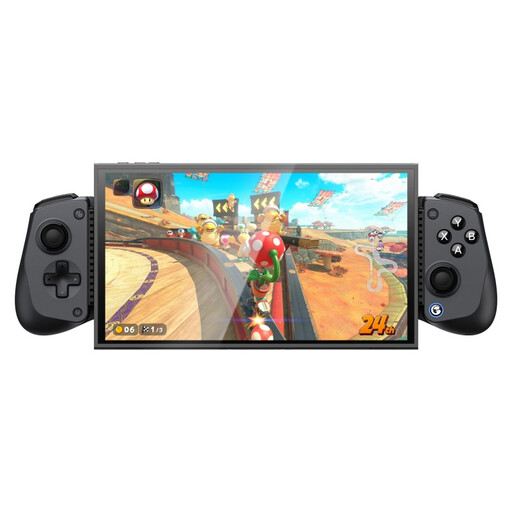
These Joybuy products are gamepads for specific Switch, Xbox, PC and mobile setups. Check each model to make sure the exact version works with your tournament console and game.
 No image available
HORI HORIPAD Turbo wired controller for Switch and Switch 2, Pokémon Eevee Cottage Core Edition
May suit you if you’re looking for a wired handheld controller for Switch or Switch 2; check that this is the system used at your tournament.
The product title lists a turbo function. Use it only if the event rules allow it.
View at Joybuy
 No image available
Game controller with dual vibration and gyro for Switch and PC
May suit you if you’re looking for a handheld controller for Switch or PC; check whether either system is being used at the event.
The product title lists dual vibration and gyro. Check compatibility with the exact console and game.
View at Joybuy
 No image available
GameSir G7 SE wired Xbox controller, Dynamic Blue, for Xbox Series X/S, Xbox One and Win10/Win11
May suit an Xbox or Windows setup if the listed version matches the console being used at the event.
The product title describes a wired controller; check the required connection and game compatibility in advance.
View at Joybuy
 No image available
GameSir X5s Bluetooth game controller for Switch 2, Switch, Android, iOS and PC, with Hall Effect joystick
May suit you if you’re looking for a controller for mobile devices that’s also listed as compatible with the named Switch and PC systems.
The product title mentions Bluetooth and a Hall Effect joystick. Check that the connection and device you choose suit the tournament setup.
View at Joybuy
 No image available
GameSir G7 Pro Tri-Mode Xbox controller, Shadow Ember, for Xbox, PC and mobile devices
May suit you if you’re looking for an Xbox or PC gamepad; the product title also mentions wireless use with mobile devices.
Check which connection is right for your tournament platform, and use turbo or programmable inputs only if the event rules allow them.
View at Joybuy
Frequently asked questions
What should I check before connecting my controller to a shared PS5?
Check that the full controller model is compatible with the console and game. PlayStation warns that not every officially licensed or third-party accessory works with every PS5 game; the Qanba Drone 2 manual also describes a choice between PS5 and PS4 mode.
Is a leverless controller allowed at every Dutch fighting game tournament?
You can only establish this by checking the rules for the specific event and game. Evo’s rules prohibit hardware macros and other hardware assistance; those event rules aren’t a general rule for the Netherlands. Ask the organiser which SOCD settings, extra buttons and adapters are allowed.
How can I avoid connection issues or accidental inputs during a match?
Before the match, test the connection, buttons and cable position, and check any features that could change your inputs. Razer lists a cable lock and a switch to lock non-essential buttons on the Kitsune; Qanba describes a turbo function for the Drone 2. Evo sets out consequences for accidentally pausing, but other events may have different rules.
What are my rights if an online controller purchase isn’t suitable or is faulty?
For many online purchases from a business in the Netherlands, you have 14 days to change your mind; the Dutch government notes that conditions and exceptions can vary by purchase. If a product is faulty, the seller must provide a solution. According to the Dutch government, the Netherlands has no fixed general statutory guarantee period of two years.


