
Players who want to hold a controller on the sofa
A fightpad is worth considering if you don’t want to set up an arcade stick. Check that the model works with your console or PC, and think about how any cable will reach your seat.


Start by choosing the type of controller you want to use from your seat, then check that the exact model works with your console or PC. A handheld controller doesn’t need a separate space for an arcade stick; a stick with a lever or a button-only controller has a different layout and may need more room or some getting used to. Check your TV’s connection and game mode too: the controller’s name alone tells you nothing about input lag in your setup.
A fightpad is worth considering if you don’t want to set up an arcade stick. Check that the model works with your console or PC, and think about how any cable will reach your seat.
Compare a stick with a lever and a controller with separate directional buttons. Each layout calls for different movements, so decide which controls you want to use and how much space you have for them.
Check whether the exact model and version work with the console or PC you have in mind. Look out for any receiver, converter or firmware requirements too; similar model names don’t automatically mean the same systems are supported.
| What to consider | What to check before buying | Who is this important for? |
|---|---|---|
| Compatibility | Compare the full model name with the list of supported platforms, and check whether you need a receiver, converter or firmware. | I want to be sure the controller works with my console or PC before choosing a version. Around 29% of consumers say compatibility is their top consideration. |
| Handheld controls | Compare the directional controls and button layout with what feels comfortable to you. For a wired controller, check the cable route. | If I want to hold a controller on the sofa instead of using an arcade stick, handheld controls matter most. Around 24% of consumers give this priority. |
| Lever or directional buttons | First choose between a physical joystick and separate directional buttons, then check whether your system is supported. | I want to choose how I enter directions: with a lever or separate buttons. Around 18% of consumers put this layout first. |
| Space and cable route | Allow room for your hands and the controller, and consider how far it needs to reach your system if it’s wired. | If I play on the sofa, I want to know whether the controller and cable will suit my seating area. Around 17% of consumers say their setup is the most important factor. |
| Connection | Check which receiver is included, the available connection, how the controller charges and whether the exact version can be used with a cable. | I want a connection that suits the distance to my system, but first I need to check that my platform is supported. Around 12% of consumers prioritise the connection type. |
Different versions with similar names may support different platforms. For example, 8BitDo lists support for Switch and Windows for its standard Arcade Stick, but not for PS5 or Xbox. The separate Xbox version has a different list of supported platforms.
Before buying, compare the full model name and the platform list for the exact version you’re choosing.
Your TV settings can play a part too. Samsung describes a game mode for supported TVs, but notes that support and performance can vary between consoles.
Before replacing your controller because you suspect lag, check whether your TV has a game mode and whether it’s enabled for the input you’re using.
You need to be able to connect a wired fightpad, stick or button-only controller from your usual playing position. An arcade stick also needs a suitable place on your lap or on a surface.
Check the cable route in advance, as well as where the controller and your hands will be while you play.
Manufacturers’ claims about fast or error-free inputs aren’t proof that every player will benefit.
Choose based on the layout you want to use and whether your platform is supported, not on a promise of better performance.
HORI offers handheld controllers and arcade sticks, among other products. The PlayStation versions mentioned here don’t prove that versions with similar names for other platforms offer the same support.
8BitDo offers arcade sticks with different platform support, as well as a button-only controller for Xbox.
Razer describes the Kitsune as a wired button-only controller for PS5 and PC.
The European product page describes the Victrix Pro KO as a customisable button-only controller, with separate PlayStation and Xbox versions.
The F500 FLAT is a button-only controller. According to MAYFLASH, using it with PS5 depends on having a suitable converter and meeting firmware requirements.
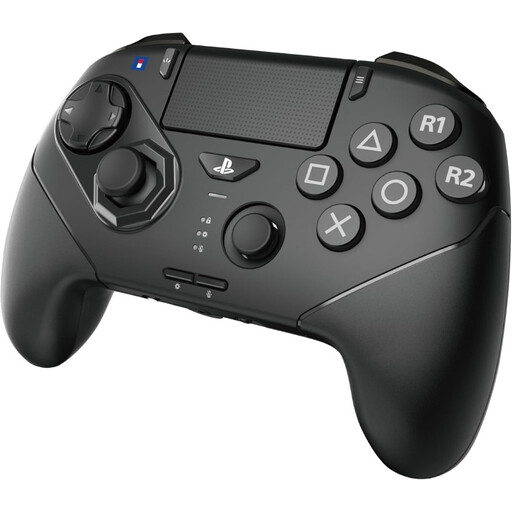
These Joybuy picks are handheld controllers for players who want to play fighting games from the sofa. Check the listed systems, connection and included accessories for each model.
 No image available
A handheld controller for fighting games; the product information lists support for PS5 and PC.
The product information lists six action buttons, an analogue stick with an 8-gate layout, three interchangeable D-pad options and programmable rear buttons. Both wireless and wired use are listed. Install the latest firmware before first use.
 No image available
A wired handheld controller for players using the listed Switch systems.
The product information lists analogue joysticks, programmable rear buttons and a turbo function. The USB cable isn’t included.
The main thing is to check that the controller works with the console or PC you play on; your TV displays the picture from that system. Check the platform list for the exact controller version, as a big screen doesn’t make controllers for different consoles interchangeable.
Check whether your TV has a game mode and whether it’s enabled for the input you’re using. Samsung describes a game mode for supported TVs, but also notes that support and performance can vary between consoles. This doesn’t establish how your TV and controller will perform together.
According to MAYFLASH, the F500 FLAT works with the MagicBoots-S5 converter. Check the firmware on compatible devices too. Allow for this converter and any setup needed for this specific combination; other controllers won’t necessarily need them.
When you buy online from a business, you’ll often have a 14-day cooling-off period, according to the Dutch Government. Check which terms apply to your purchase. If a product develops a fault sooner than you could reasonably expect with normal use, you have statutory warranty rights against the seller, as explained by ACM ConsuWijzer. The cooling-off period and warranty are separate rights.