
Tournament player with a regular gaming set-up
This player wants to take the same controls to matches and checks the game version, platform and event rules first. Evo and Capcom have their own tournament rules.


Choose based on the directional controls you know and the platform you play matches on: a fightpad keeps the controls in your hands, an arcade stick uses a physical lever, and a leverless controller has separate directional buttons. Then check the rules for your game and event; a tournament lock or a particular controller layout does not guarantee that it will be allowed.
This player wants to take the same controls to matches and checks the game version, platform and event rules first. Evo and Capcom have their own tournament rules.
This player compares a familiar D-pad or joystick with separate directional buttons and wants to know how much practice a different layout will take.
This player wants a controller that is easy to connect, carry and store outside of competitions too. Wireless convenience at home does not, by itself, say anything about whether a controller is allowed in a tournament.
Choose this if: you are used to holding a controller and want a layout with several front buttons.
Consider: a different D-pad may not feel familiar straight away; also check which connection mode the event allows.
Choose this if: you are familiar with using a physical lever or want to learn this control style.
Consider: using a lever requires a different hand movement from using a D-pad or separate directional buttons.
Choose this if: you want a separate button for each direction and are ready to practise the layout.
Consider: check the platform version and SOCD setting against your event's rules.
Check the current rules for your event: Evo's rules prohibit hardware macros and rapid-fire, and a tournament lock does not guarantee general approval.
| What to consider | What should you check? | Who is this important for? |
|---|---|---|
| Tournament rules | Check the rules for your game and event, including connection method, macros, SOCD and the pause button. | I don't want to find out on match day that my settings aren't allowed. This is the top priority for around 33% of consumers who prioritise tournament approval. |
| Platform compatibility | Compare the full model name, console, game version and required connection mode. | I want to be sure that my controller, console and game version work together. Platform compatibility is the top priority for around 27% of consumers. |
| Directional and button layout | Decide whether you want a D-pad, lever or separate directional buttons, and check the button positions. | I prefer using the directional controls I already know and want to understand how much adjustment a new layout will take. Around 27% of consumers prioritise this choice of controls. |
| Use outside competitions | Think about where you play, how you connect the controller, and whether it is easy to carry and store. | If I only play occasionally during the day, I want to know whether connecting and storing the controller will be practical. Convenience outside competitions is the top priority for around 13% of consumers. |
Versions within the same product family may be designed for different consoles. HORI lists PS4 support for the SPF-040E in wired mode only.
Before buying, check the full model name, game version and connection mode you need.
If you also want to play on another platform, you may need a different controller or connection solution.
A lock is a product feature; tournament rules may also restrict controller settings and connection methods.
Compare your set-up with the current rules for the specific event and game.
A manufacturer's description does not prove that every player will perform better with a fightpad, stick or leverless controller.
First, choose the layout you want to use and practise with; don't treat a manufacturer's performance claims as a guarantee.
Fightpads for players who want to keep the controls in their hands. The Wireless Fighting Commander OCTA Pro SPF-040E is one example, with a replaceable D-pad and six front buttons.
The Kitsune is a leverless option with separate directional buttons for PS5 and PC.
The Obsidian 2 is an arcade stick with a lever, for players looking for this style of control.
The brand has separate leverless versions for Switch/Windows and Xbox/Windows.
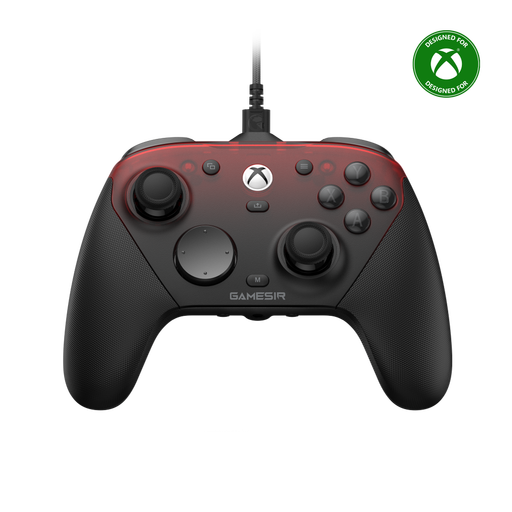
This Joybuy selection includes a GameSir controller listed for Xbox, PC and mobile. Check that the exact version and connection mode suit your tournament platform and the event rules.
 No image available
The product name lists wired Xbox use and wireless use for PC and mobile; check which mode and platform your tournament allows.
The listed platforms are Xbox Series X|S, Xbox One, PC, Android and Steam.
The programmable rear buttons and turbo function listed may conflict with Evo's rules on hardware programming or rapid-fire. Check your event's rules.
No, a tournament lock does not guarantee approval. Evo's rules prohibit hardware macros and rapid-fire, among other things; also check the current rules for the specific event and game.
Some models, including the HORI SPF-040E, offer wired and wireless options. That doesn't mean every connection method is allowed at your tournament, so check the event rules before using the controller.
First, choose the right version and connection for your platform, then set the SOCD mode according to the game and event rules. Razer and 8BitDo list configurable SOCD modes for the models mentioned.
Not just because you play during the day. Consider where you play, how you want to connect the controller and how much storage space you have; the time of day alone does not make a special controller feature necessary.
According to ACM ConsuWijzer, online purchases generally come with a statutory cooling-off period of up to 14 days after delivery, with some exceptions. The legal guarantee is separate: if a product does not perform as you could reasonably expect under normal use, the seller is responsible for providing an appropriate solution.