
Players with limited desk space
If you practise combos at a small desk, you’ll want a controller that doesn’t take up space needed for other equipment. So check not just the width, but also the depth, height and room for the cable.


Choose a compact fight stick if you want to practise joystick movements; choose leverless if you want to train using directional buttons. Measure the space available, check compatibility with your platform and game, and make sure features such as turbo and SOCD comply with your tournament’s rules.
If you practise combos at a small desk, you’ll want a controller that doesn’t take up space needed for other equipment. So check not just the width, but also the depth, height and room for the cable.
A fight stick is a good choice if you want to keep practising joystick movements. A smaller casing can help on a cramped desk, but check that the stick sits comfortably in your workspace too.
If you want to practise at home on the right system and in your chosen game, check compatibility for the exact model. Also find out in advance which controller features the event allows.
First decide which control method you want to practise with and whether it suits your tournament plans. Then check the exact model’s dimensions, platform compatibility and the event rules.
| What to consider | What should you check? | Who should pay particular attention? |
|---|---|---|
| Desk space | Measure the available width and depth, allow room for the cable, and check the joystick’s height if you’re choosing a fight stick. Compare these measurements with the specifications for the exact model. | If I need room for other equipment as well as my controller, I want to know how much space the whole setup will take up. Space is the main reason for buying for around 33% of consumers. |
| Joystick or directional buttons | Choose the control method you want to practise combos with. If possible, try out the layout and spacing between the buttons; don’t treat claims about combo speed as proof of better performance. | If you want to keep practising familiar joystick movements, a different control method may not be as suitable, even if it’s flatter. Joystick controls are the main priority for around 25% of consumers. |
| Platform and game | Check the exact model variant, console or PC, game version and connection method. Also check whether you’ll need an adapter for your setup. | If I want to practise on a particular system and in a specific game, I want to know before buying whether that exact combination is supported. Platform compatibility is the main consideration for around 25% of consumers. |
| Tournament settings | Check the current rules for the specific game and event. Look for rules on hardware macros, turbo, SOCD and any button-lock function. | If you’re taking a controller to a specific tournament, you’ll want to set it up in advance to comply with that event’s rules. Tournament settings are the main consideration for around 17% of consumers. |
Compatibility can vary depending on the controller, game and adapter. A mention of PS4 compatibility alone doesn’t confirm that the controller will work with your PS5 game.
Before you buy, check with the manufacturer that the exact controller works with your game version.
The SPF-038 is a compact fight stick for players who want to keep using a joystick.
The Haute Pad S series is a compact leverless option for players who want to practise using buttons instead of a joystick.
The Kitsune is a leverless controller for players who want to practise on PS5 or PC.
The Arcade Controller for Xbox is a leverless option for players on Xbox or Windows.
The F300 Elite is a fight stick for players looking for joystick controls and customisable parts.
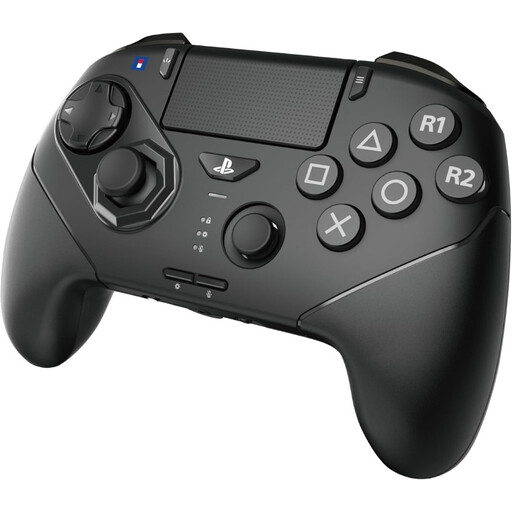
This product selection features a fightpad for practising fighting game combos on the listed platforms. Check that its controls suit what you want to train for your tournament.
 No image available
A fightpad for practising combos with the six front buttons and playing on the listed platform.
The product description lists a replaceable D-pad with three options, an 8-gate stick and six front buttons with microswitches. It also mentions programmable macro assignments for the rear buttons; before using this at a tournament, check whether the feature is allowed under the applicable rules.
No. Check with the manufacturer that your controller works with your PS5 and the specific game. PlayStation also recommends checking support for the exact accessory and title; an adapter listed for one model doesn’t guarantee compatibility in general.
First set the correct platform mode and button layout, then practise the directions and diagonals separately. Before using it at a tournament, also check the SOCD setting and the event rules. For maintenance and any replacement parts, refer to the manual for the exact model.
That depends on the rules for the specific event and game. Evo’s published rules prohibit hardware macros and rapid-fire, among other things, and set conditions for SOCD. Those rules don’t automatically apply to every UK tournament. Check the current event and game rules before configuring your controller.
First check whether you might need an adapter for your platform; for example, Mayflash lists one for certain PS5 setups with the F300 Elite. ACM ConsuWijzer states that online purchases covered by the rules generally come with a 14-day cooling-off period after delivery, with some exceptions. Your statutory rights are separate from the manufacturer’s warranty; according to the Dutch government, the retailer is your point of contact if a product is faulty.