First, choose a controller that works with the console or PC and the tournament game version. Then decide whether you prefer a standard pad, a fight pad, an arcade stick with a lever or a leverless layout. In a shared house, noise, space and cable management matter too. If you’re entering an external tournament, check your chosen set-up against that event’s rules.
Which controller is right for you?
Pad player hosting tournaments
You want a familiar controller that works with your housemates’ console and game version. A fight pad may be worth considering if you’re looking for a different D-pad or six front-facing action buttons. PlayStation distinguishes between PS4 controllers for supported PS4 games on PS5 and controllers for PS5 games.
Player who shares their space with housemates
You practise in a shared space and want to consider button feel, noise and a tidy connection. Descriptions such as ‘muted switches’ are manufacturer specifications for a model, not the result of an independent noise comparison.
Player with a set tournament layout
You want to practise with an arcade lever or leverless directional buttons. Check that your chosen controller settings comply with the rules of your event.
What should you consider when choosing a controller?
Standard gamepad or fight pad
A good fit if: you’re already comfortable with a pad layout, or want to try a fight pad with a different button layout.
Trade-off: check the full model name and game version; a PS4 controller won’t automatically work with a PS5 game.
Arcade stick with lever
A good fit if: you want to practise with a lever-and-button layout or easy access to the components is important to you.
Trade-off: allow for the space needed to play and store it, and check the exact console version.
Leverless controller
A good fit if: you want to learn to use directional buttons without a lever.
Trade-off: check the settings and any hardware features against your organiser’s rules.
| What to consider |
What should you look for? |
Who is it for? |
| Compatibility |
Check the full model name, console or PC, and PS4 or PS5 game version. Also follow the specified connection method. |
If I want to use the controller on my or my housemates’ tournament set-up, I check the system and game version first. Around 33% of consumers put compatibility at the top of their buying priorities. |
| Noise and use at home |
Check the dimensions, cable routing and any cable or button lock. Assess the noise in your own space. |
When practising alongside housemates, I want to consider noise and keep the connection tidy. Around 25% of consumers give shared-space use top priority. |
| Leverless settings |
Check the SOCD setting and any programmable features against the organiser’s rules. |
If I want to learn to use directional buttons without a lever, I want to know which settings I can use at the event. Around 25% of consumers put the leverless layout first. |
| Arcade lever and maintenance |
Check which parts are replaceable, whether the casing can be opened and how much space the stick takes up. |
If I want to practise with a lever-and-button layout, the layout and the ability to maintain its components are important. Around 17% of consumers give the arcade lever top priority. |
Common buying mistakes
-
Seeing ‘PS5 compatible’ and not checking the game version
PlayStation states that a DUALSHOCK 4 works with supported PS4 games on PS5. That doesn’t mean it can also control PS5 games.
Before buying, compare the full controller model, the listed platforms and the game version.
-
Assuming a leverless controller is automatically allowed
Organisers may set rules for controller settings and hardware features. The rules for one event don’t automatically apply to another.
Check the current rules and adjust your controller settings accordingly before you play.
-
Confusing an extended warranty plan with your statutory rights
According to the Government of the Netherlands, there is no fixed statutory warranty period in the Netherlands. If there’s a problem with a product, contact the seller.
Check what additional cover an extended plan offers. If your product is faulty, contact the seller.
Relevant brands and model differences
HORI
The models reviewed include a fight pad, an arcade stick and a leverless controller.
- HORI lists six front-facing buttons and an adjustable D-pad for the Fighting Commander OCTA.
- According to HORI, the casing of the Fighting Stick α can be opened for maintenance and customisation. HORI describes the NOLVA REACTOR as having muted, replaceable switches.
- These features apply to specific models. Check compatibility and connection type for each version; the noise description is not based on an independent measurement.
NACON
The Daija reviewed is an arcade stick in the PlayStation version.
- For this version, NACON lists SANWA components, a system switch and a detachable 3 m cable.
- These details apply to the PlayStation version reviewed; don’t assume that other Daija variants have the same compatibility.
QANBA
The Drone 2 is the arcade stick from this brand that was reviewed.
- QANBA lists a platform switch, touchpad, and its own lever and buttons for the Drone 2.
- These specifications don’t confirm that other QANBA sticks have the same components or compatibility.
Hit Box Arcade
The Hit Box ULTRA reviewed uses an all-button layout.
- Hit Box Arcade lists multiple SOCD modes and compatibility with PS5, PS4, Switch and PC for the ULTRA.
- The manufacturer says the ULTRA is no longer available from its own online shop. Check current availability and your event’s rules.
- The manufacturer describes the buttons as quiet; this isn’t an independent noise comparison.
PlayStation
The DualSense is the standard PS5 pad for anyone who wants to use a familiar gamepad layout.
- PlayStation distinguishes between support for PS4 controllers with supported PS4 games on PS5 and control of PS5 games.
- The standard DualSense layout doesn’t have the six front-facing buttons that HORI lists for the Fighting Commander OCTA. That alone doesn’t prove that either layout is better.
Gamepads on Joybuy for different set-ups
These gamepads are designed for different console and PC set-ups, including a fight pad, Xbox and PC controllers, and a PS5 pad. Check whether each model suits your tournament set-up and game version.
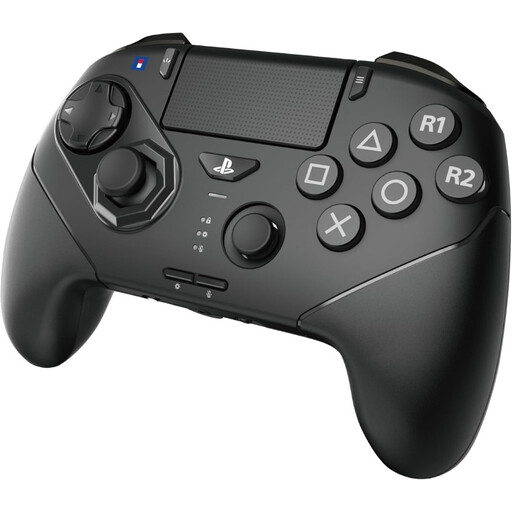 Image unavailable
HORI Fighting Commander OCTA Pro, wireless, PS5/PC, black
A wireless fight pad for playing with this layout on PS5 or PC; check compatibility with the specific game.
The product title lists PS5/PC and a black version. Before entering a tournament, check whether programmable macro assignments are allowed under its rules.
Joybuy
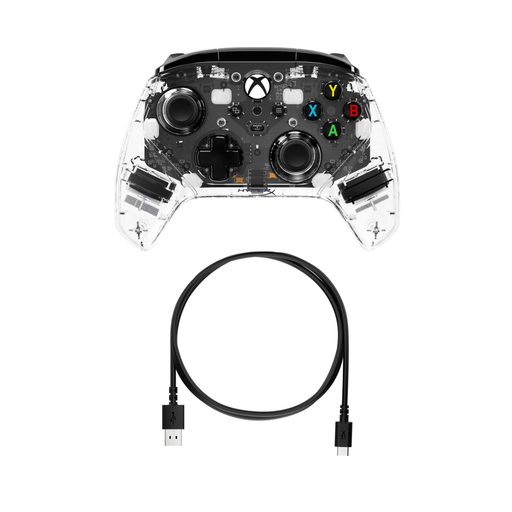 Image unavailable
HyperX Clutch Gladiate RGB, Xbox/PC
A gamepad to consider if your tournament set-up uses Xbox or PC; check compatibility with the game you’ll be playing.
The product title lists an RGB version and Xbox/PC compatibility.
Joybuy
 Image unavailable
BEITONG PanGu modular game controller, wireless/Bluetooth
A modular gamepad to consider if you use one of the listed platforms; check that your specific game and set-up are supported.
The product title lists PC, NS, NS2, iOS and Android, interchangeable modules, and wireless/Bluetooth connectivity.
Joybuy
 Image unavailable
Sony PlayStation 5 DualSense wireless controller, white
A standard wireless pad for a PS5 set-up. PlayStation states that PS5 games require a DualSense; check the requirements for the specific game.
The product title lists the PS5 version in white.
Joybuy
Frequently asked questions
Can I use my PS4 controller for a home tournament on PS5?
That depends on the game version and controller. PlayStation states that a DUALSHOCK 4 and officially licensed PS4 gamepads work with supported PS4 games on PS5; don’t assume that they can also control PS5 games. Check the full model name and the game being played in the tournament.
How do I use a NACON Daija when switching between PC and PlayStation?
For the PlayStation Daija reviewed, NACON instructs you to set the switch to PC, PS4 or PS5 and connect the cable. Before the match, check that the switch is set to the system being used.
Is every leverless controller allowed at a fighting game tournament?
No. The design or model doesn’t mean it’s automatically allowed. Evo rules prohibit hardware macros and similar aids. According to Capcom, the Capcom Pro Tour 2026 rules apply to its sponsored competitions, not outside them. Check your organiser’s current rules and your controller settings.
What are my rights in the Netherlands if I’m unhappy with a controller bought online or it’s faulty?
According to the Government of the Netherlands, when you buy from a business at a distance, you have 14 days to change your mind. If a product is faulty, contact the seller; the Government of the Netherlands states that there is no fixed statutory warranty period in the Netherlands. Check your purchase terms and distinguish between the cooling-off period and a remedy for a faulty product.


