Who is it for?

Groups that print lots of text forms

For groups that regularly print forms for meetings and mainly need black-and-white printing. The Consumers’ Association highlights colour use, scanning and double-sided printing as points to consider when choosing a printer.

Groups that digitise responses

For groups that want to scan or copy completed forms. If you’re handling stacks of paper, also check whether the printer has an automatic document feeder and how much it can hold.

Groups that use colour forms

For groups that use colour for questions, images or easy identification. Consider whether the information will still be clear when the form is printed in greyscale.

What should you look for?

What to consider What to look for Who should prioritise this?
Consumables Estimate how many pages you’ll print each year and check which toner, ink and, where applicable, drum are compatible with the exact model. For regular meetings, I want to know in advance which parts I’ll need to keep printing forms. Around 36% of consumers focus mainly on consumables when printing text repeatedly.
Paper handling Check A4 support, the paper feed and whether automatic double-sided printing is suitable for your form. If we’re preparing a stack of forms for a meeting, I want to know whether the paper feed and duplex function are suitable. Around 29% of consumers say paper handling is their main consideration.
Scanning and copying Check whether the model can scan and whether it has an automatic document feeder if you’ll be handling stacks of forms. If I want to digitise completed forms later, a scanner is more useful than extra printing features. Around 21% of consumers focus mainly on scanning or copying completed forms.
Colour Print the form in greyscale first and check that the questions and images are still easy to read. If colour is needed to make information on our forms easy to identify, the model we choose must be able to print in colour. Around 14% of consumers say colour is their main consideration.

Common buying mistakes

  • Looking only at the printer itself

    For regular printing, you also need to consider the cartridges, toner and any drum required. The stated yield doesn’t guarantee how many forms you’ll be able to print yourself.

    Estimate your annual print volume and check which consumables are compatible with the exact model.

  • Confusing automatic double-sided printing with double-sided scanning

    A duplex printing function doesn’t mean the device can automatically scan both sides of a completed form.

    Check the printing and scanning features separately if responses may be on both sides.

  • Assuming any replacement toner will work

    HP states that the LaserJet MFP M234dw has dynamic cartridge security, which may block certain cartridges with non-HP circuitry.

    Check the cartridge requirements for this specific model before choosing toner.

Brands to consider

Brother

The HL-L2445DW is an example for groups that mainly print A4 text forms in black and white.

  • Brother lists automatic double-sided printing, a network connection, and separately replaceable toner and drum for this model.
  • This model only prints in black and white and, according to Brother, has no scanning function. This doesn’t automatically apply to other models from the brand.

Canon

The PIXMA TR4755i series is an example for groups looking for colour printing, scanning and copying in one device.

  • Canon lists automatic double-sided printing and an automatic document feeder that holds up to 20 sheets.
  • Canon offers standard and XL cartridges. Check which option suits your expected print volume.

Epson

The EcoTank ET-2950 is an example of an ink-tank printer for groups that regularly print colour forms and also need to scan.

  • Epson lists refillable tanks and double-sided printing for this model.
  • Epson’s potential savings figures are manufacturer claims based on its own conditions. They don’t determine what you’ll need for your particular use.

HP

The LaserJet MFP M234dw is an example of a black-and-white laser printer that can also scan and copy.

  • HP lists printing, scanning and copying functions for this model.
  • HP states that this specific model has dynamic cartridge security. Check that your chosen toner meets the model requirements; this restriction doesn’t automatically apply to every HP model.

Printers at Joybuy

This selection includes printers for black-and-white and colour forms, from models for text printing to options where scanning or copying may be useful. Check that each model’s features and paper sizes suit your forms.

Brother MFC-J6760DW multifunction inkjet printer, A3, Wi-Fi

Brother MFC-J6760DW multifunction inkjet printer, A3, 1200 x 4800 DPI, 31 ppm, Wi-Fi

An option to consider if your group wants to print A3 forms and also needs to scan or copy.

Listed in the product name: A3, 1200 x 4800 DPI, 31 ppm and Wi-Fi.

Joybuy
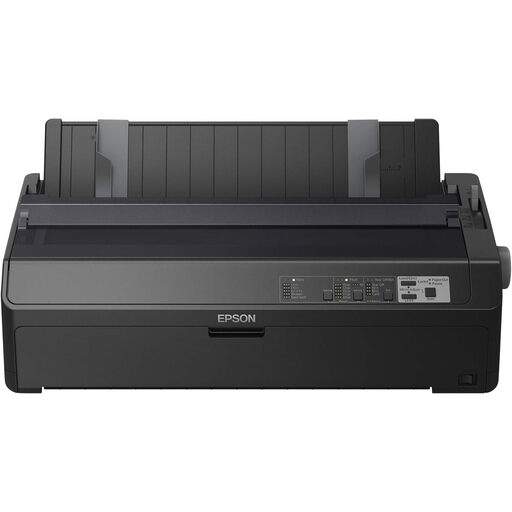
Epson FX-2190IIN dot matrix printer, 240 x 144 DPI, 738 cps

Epson FX-2190IIN dot matrix printer, 240 x 144 DPI, 738 cps

Suitable for groups that want to print large batches of text forms and don’t need colour.

Listed in the product name: 240 x 144 DPI and 738 cps.

Joybuy

Canon PIXMA MG2556S inkjet printer, A4, 4800 x 600 DPI

Canon PIXMA MG2556S inkjet printer, A4, 4800 x 600 DPI

An option for A4 forms if your group also wants to scan or copy completed paperwork.

Listed in the product name: A4 and 4800 x 600 DPI.

Joybuy

Epson WorkForce Pro WF-C5390DW colour inkjet printer, A4, Wi-Fi

Epson WorkForce Pro WF-C5390DW colour inkjet printer, 4800 x 1200 DPI, A4, Wi-Fi

Suitable for groups that want to print colour forms and need automatic double-sided printing.

Listed in the product name: 4800 x 1200 DPI, A4 and Wi-Fi.

Joybuy

Brother HL-L5210DW wireless A4 monochrome laser printer

Brother HL-L5210DW wireless A4 monochrome laser printer

Suitable for black-and-white A4 text forms shared by several group members over a network.

Listed in the product name: wireless, A4 and monochrome laser printing.

Joybuy

Frequently asked questions

Do you need a scanner for feedback forms?

Only if you want to digitise or copy completed forms. If so, compare the scanner and, if you’ll be handling stacks of paper, the capacity of any automatic document feeder.

What should you do if an inkjet printer produces faded text or blank pages?

For affected EcoTank and Expression printers, Epson recommends running a nozzle check first, followed by printhead cleaning via the maintenance menu if necessary. Check the manual for your exact model before using a cleaning function.

Which consumables and warranty terms should you check?

Check which ink, toner and, where applicable, drum are compatible with the exact model. For a purchase as an individual, the Government of the Netherlands explains that statutory guarantee applies alongside any manufacturer’s guarantee. If an association or another organisation is buying the printer, check the applicable sales and warranty terms separately.

Can you keep completed feedback forms that include people’s names?

If responses can be linked to individuals, the GDPR rules on processing personal data apply. The Dutch Data Protection Authority advises collecting no more data than necessary. Keep the forms secure and don’t retain them for longer than needed. The GDPR does not set a general fixed retention period for this.
