
Vandaag of morgen in huis

Kwaliteit gegarandeerd

Welkomstaanbiedingen ontgrendelen: GRATIS bezorging | Tot 80% korting | Gratis 30 dagen JoyPlus-proefperiode
Download de app
A dead battery is always a nuisance, especially when you're in a hurry. A good fast charger seems like the simple solution, but the market is flooded with options that over-promise and under-deliver. Many people end up buying a charger that's slow, incompatible with their device, or breaks after just a few months.
As a Joybuy Product Recommendation Officer, I see where things go wrong every day. Before you spend your money, it's wise to understand the most common pitfalls.
A good charger is an investment in the convenience and longevity of your devices. Let's look at the specifications that truly matter.
To avoid a bad buy, you don't need to read a technical manual. Pay attention to the following three points, and you'll make an informed choice.
The power output, expressed in watts (W), determines how fast a charger can charge. But a high number isn't everything. Your device must also be able to accept this power. The most important standard today is Power Delivery (PD).
A Power Delivery charger communicates with your device to determine the optimal charging speed. This has become the universal standard for most modern devices, from an iPhone fast charger and Samsung fast charger to even a laptop charger. A charger with PD and a USB-C port is therefore a future-proof choice. For a smartphone, 20-30W is often sufficient, while a laptop requires at least 45-65W.
You may have come across the term GaN charger. GaN stands for Gallium Nitride, a material that replaces silicon in modern chargers. The advantages are practical:
A GaN charger is especially useful if you're looking for a powerful charger for multiple devices or for travel.
How many devices do you want to charge at once? A single-port phone charger is fine for your nightstand, but for your desk or living room, a model with multiple ports is more practical. Pay attention to the combination of ports. Most new devices use USB-C, but many accessories and older devices still have a USB-A connection. A charger with both types of ports offers the most flexibility.
Not everyone needs the same charger. Here are some recommendations tailored to specific situations.
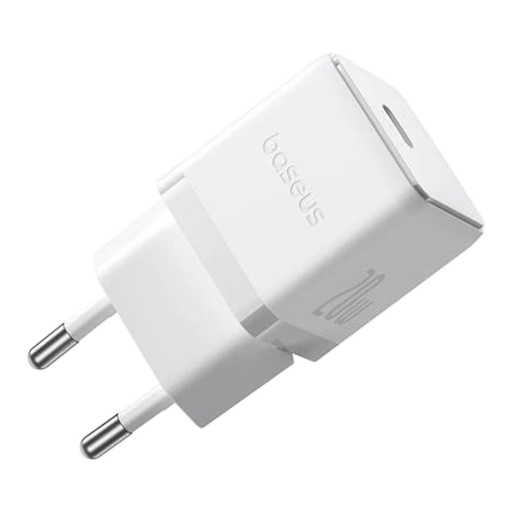
Why This Fits Their Persona: Ideal for those who just want to fast-charge a smartphone without any fuss. Its compact size makes it perfect for a bag or for travel. No unnecessary ports or features, just a reliable and fast charge.
This charger delivers exactly what it promises: 20W via Power Delivery. Perfect for a modern iPhone or Android phone that supports PD, without paying for excessive power you won't use.
Supports PD 3.0 fast charging; Very compact and lightweight; Baseus Cooling Technology for temperature control.
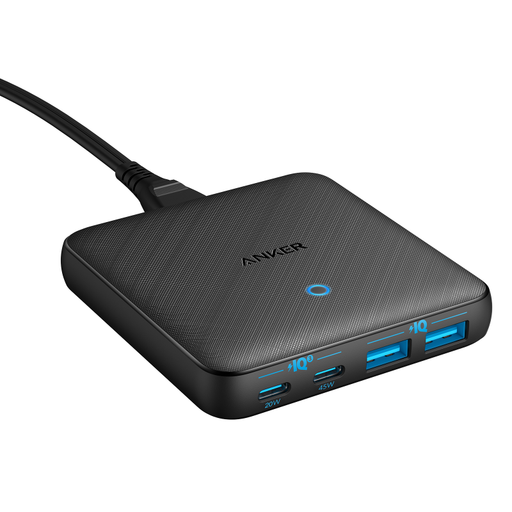
Why This Fits Their Persona: For the remote worker or tech enthusiast who needs to charge a laptop, tablet, phone, and earbuds simultaneously. This charger replaces a power strip cluttered with individual adapters with a single, slim charging station.
This GaN charger bypasses the wattage trap by clearly specifying what each port delivers (45W for a laptop, 20W for a tablet/phone). The GaN technology ensures proper heat dissipation, even when fully loaded.
Charges 4 devices at once; Powerful 45W USB-C port for laptops; Ultra-slim design thanks to GaN technology.
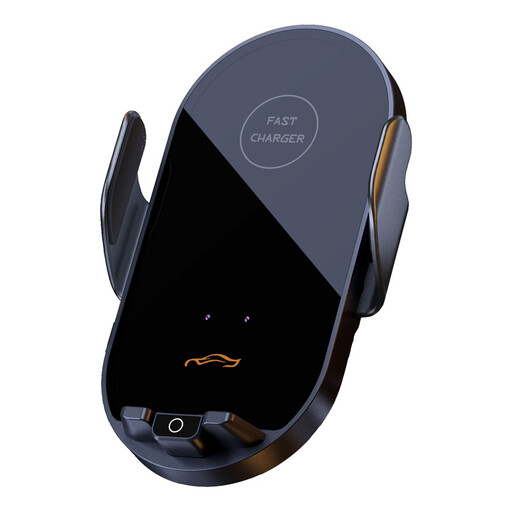
Why This Fits Their Persona: For those who are always on the go and need a safe, hands-free solution. This car charger doubles as a phone mount that automatically clamps your phone and charges it wirelessly. Ideal for navigation and eliminating cable clutter.
This model solves the incompatibility issue by offering both wireless charging (15W) and a direct PD connection (66W). The built-in temperature control prevents overheating in a warm car.
Combines a mount with a wireless charger; Automatic clamping sensor; 360° rotation for the ideal viewing angle.
We have compiled a complete, up-to-date list of products that meet these selection criteria and comply with all relevant safety regulations.
No, not when used correctly. Modern smartphones have a built-in battery management system. This system communicates with a certified fast charger to regulate the charging speed. The phone charges quickly up to about 80%, then switches to a slower speed to protect the battery. Using a charger from a reputable brand with the proper certifications is crucial.
The easiest way is to check your device's specifications on the manufacturer's website. Look for terms like "maximum charging power" (in watts) and the supported fast-charging protocol (usually Power Delivery or PD). Choose a charger that provides at least that much power and supports the same protocol.
USB-A is the familiar, rectangular port that has been the standard for years. USB-C is the newer, smaller, and oval-shaped port. The main advantages of a USB-C charger are that the plug is reversible (it always fits) and it can deliver much higher power levels, making it suitable for charging laptops and other large devices. USB-C is the future and is being mandated as the standard by the EU.
