If you play next to someone who’s asleep, look for the exact mouse version that the manufacturer describes as having silent switches. Check the scroll wheel and other buttons too. Keychron distinguishes between the M6’s silent main buttons and a version where all buttons are silent. Logitech compares the quiet main clicks of the MX Master 3S with those of the MX Master 3, while a gaming mouse with extra buttons isn’t automatically quiet.
Who is this choice relevant to?
Night-time player with a roommate
You play while someone else is sleeping and mainly want to reduce the noise of clicks and scrolling. The switch version matters more than the gaming label: Keychron describes different silent M6 versions, while Logitech makes a specific claim about the MX Master 3S.
Player who wants to use shortcuts
You want to set up frequently used actions so they’re within easy reach. Check that the game, mouse settings and button placement suit the commands you want to use. Razer describes the Pro Click Mini as having programmable buttons.
Player who spends a long time at the computer
You’re thinking about fit, room to move and a connection that suits your setup. Product descriptions can tell you about a mouse’s features, but they can’t tell you how it will feel in your hand. Keychron lists several connection options for the M6.
What should you look for when choosing?
| What to consider |
What to check before buying |
Who is this important to? |
| Click and scroll noise |
Check which switches are silent on each version, and pay attention to the scroll wheel too. |
If I’m playing while someone is asleep, I want to know how much noise the mouse makes when I use the controls most often. Around 42% of consumers say quiet operation is their biggest concern when buying. |
| Easy-to-reach gaming buttons |
Check whether you can assign commands to the buttons and reach them comfortably. |
I want to use frequently played actions without having to keep reaching for the keyboard. Around 25% of consumers give easy-to-reach, customisable controls top priority. |
| Fit |
Compare the shape and dimensions with your current mouse, and try the grip if possible. |
For longer gaming sessions, I want a shape that feels comfortable in my hand, even when I’m also considering noise. Around 17% of consumers put fit first. |
| Connection to your setup |
Check the connection options for the exact version and which components are included. |
I want a mouse that works with my computer and the space available on my desk. Around 16% of consumers say the connection and setup are their biggest concerns when buying. |
Common buying mistakes
-
Assuming a gaming mouse is quiet
Logitech describes the G203 as a gaming mouse with mechanical clicks, but doesn’t say that they’re quiet.
Look for information on the main buttons, other buttons and scroll wheel for the exact version.
-
Assuming every Keychron M6 has the same silent switches
Keychron’s buying guide distinguishes between a version with silent main buttons and one where all mouse buttons are silent.
Before buying, check which switch version comes with the model on offer.
-
Choosing extra buttons without checking your commands
The number of buttons doesn’t tell you whether you can assign the gaming actions you want to them or reach them easily.
First, make a note of the commands you use most often, then check the game settings, mouse software and button layout.
Brands to compare
Keychron
Keychron describes the M6 as offering different connection and scrolling options, as well as separate switch versions. This may be useful if you want to weigh up control and noise together.
- Keychron’s buying guide distinguishes between silent main buttons and a version where all buttons are silent.
- The M6 model name alone doesn’t tell you which switch version is on offer; check the exact variant.
Logitech
Logitech positions the MX Master 3S as a productivity mouse, while the G203 is a wired gaming mouse with six buttons. These are different options for people who prioritise quiet operation or gaming controls.
- Logitech compares the sound of left and right clicks on the MX Master 3S with those of the MX Master 3, measured at 1 metre.
- That noise claim applies to the specified main clicks and models, not all Logitech mice. The G203 isn’t described as quiet.
Razer
Razer describes the Pro Click Mini as a compact productivity mouse with silent switches and programmable buttons.
- The manufacturer’s information lists silent mechanical switches and seven programmable buttons.
- Check how it fits your hand, which software you’ll need and the exact version. The product information doesn’t confirm independent noise measurements or availability in the Netherlands.
Gaming mice at Joybuy
This selection includes gaming mice with customisable controls; one product description mentions silent microswitches. Check which features apply to the version you choose.
 Image unavailable
Turtle Beach Kone II Wired, 26000 DPI, 23 Buttons, Black
This wired gaming mouse could suit you if you want to control lots of in-game actions using the mouse buttons.
The product information lists 23 buttons and a 4D scroll wheel with vertical scrolling and tilt.
View at Joybuy
 Image unavailable
NAXSIR 3-in-1 Gaming Mouse, 12800 DPI, 7 Programmable Macro Keys, Black
This mouse could suit you if you want to assign gaming commands and choose from several connection options.
The product description lists seven programmable macro buttons, a wired connection, 2.4 GHz and Bluetooth. The product listing also describes the microswitches as silent; check that this applies to the version on offer.
View at Joybuy
 Image unavailable
AULA SC620 Wireless Gaming Mouse, 67 g, 7 Programmable Buttons, White
The listed buttons may be useful if you want to set up gaming commands on your mouse.
The product title lists seven programmable buttons, a weight of 67 g, and Bluetooth, 2.4 GHz and USB-C connection options.
View at Joybuy
 Image unavailable
Razer Basilisk V3 Pro 35K Ergonomic Wireless Gaming Mouse, Black
This gaming mouse could suit you if you want to assign several commands and use different scroll wheel modes.
The product description lists 11 programmable buttons and a scroll wheel with both a notched and a free-spin mode.
View at Joybuy
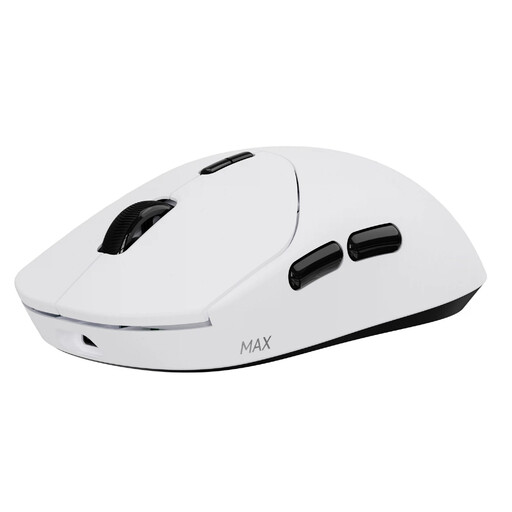 Image unavailable
RAPOO VT2 MAX Wireless Gaming Mouse, 53 g, 10 Programmable Buttons, White
This wireless mouse could suit you if you’re looking for programmable buttons without a cable across your desk.
The product information lists 10 programmable buttons, macro support and a weight of 53 g. The title states a battery life of up to 750 hours.
View at Joybuy
Frequently asked questions
Do I need a mouse with extra buttons for Farming Simulator 25?
Not just because of an optional mod. The official ModHub listing for Mouse Steering describes mouse control and shortcuts. Check which features you want to use and whether you want to set them up in the game or with your mouse.
What should I look for if I want to play quietly?
First, check which buttons on the exact version are described as silent, and listen to the wheel and other buttons too. Then set only the sensitivity and features you need. Logitech lists G HUB for advanced G203 settings and Logi Options+ for the MX Master 3S on Windows and macOS.
What are my rights if I’m unhappy with the mouse or it develops a fault?
For online purchases in the Netherlands, you generally have 14 days from delivery to change your mind, subject to applicable exceptions. ACM ConsuWijzer also states that the seller is responsible for the legal guarantee if a product develops a fault too soon under normal use; there is no general fixed two-year period. Check the terms and any return costs before ordering.
Are there Dutch rules for wireless mice?
Yes. Dutch government information says that equipment with Bluetooth or another radio module is covered by the rules for radio equipment. This general framework doesn’t confirm that a specific model meets all applicable requirements.


