If you play from the sofa or want a single handheld controller, a gamepad is an obvious choice. If you need to control lots of machine functions, specialised farming controls may suit your play style better. Choose based on support for your game and platform, and check the button layout, power supply and any extra equipment you might need. Support for Farming Simulator 25 does not automatically mean support for other farming games.
Who are these controllers for?
Players who enjoy long sessions from the sofa
If you play for a long time, look for an easy-to-reach button layout, a comfortable fit and a practical way to charge the controller or replace its batteries. Microsoft describes the Xbox Wireless Controller as having a textured grip, but comfort is a matter of personal preference.
Players who operate lots of farming machinery
A joystick or dedicated wheel and control set-up may suit players who use lots of vehicle and implement functions. Check that the exact model, game and platform work together; Thrustmaster and Logitech G describe different types of specialised controls.
Players who use a wired controller on a Windows PC
A wired controller may be a good choice if you want to play without relying on a controller battery and a cable is practical where you play. 8BitDo lists Windows compatibility for the Ultimate 2C Wired; also check support for your specific game.
What should you look for when choosing?
Handheld controller
A good fit if: you want a compact controller for Xbox, PlayStation or a supported PC game.
Bear in mind: you may still need button combinations or menus to access many machine functions.
Specialised farming controls
A good fit if: you often use machine functions in a supported simulation and have room for a dedicated set-up.
Bear in mind: a joystick or wheel set takes up more space. For the SimTask FarmStick X with Farming Simulator 25 on Xbox Series X|S, Thrustmaster also specifies a steering wheel as a requirement.
| What to consider |
What should you check? |
Who should pay particular attention? |
| Game and platform |
Check the exact controller model, system and support for your game. |
I want to know before buying whether my controller will work with both my platform and farming game. Around 29% of consumers put compatibility first. |
| Ease of use |
Consider how easy it is to reach the sticks, triggers and buttons, as well as your playing position. |
If I play for a long time, I want the controls to suit my hands and where I play. Around 29% of consumers give ease of use top priority. |
| Machine functions |
Check which functions you use often, how the game assigns them and whether you need any extra equipment. |
I want to control vehicle and implement functions directly, and I have room for a more elaborate set-up. Around 24% of consumers prioritise machine controls. |
| Power and cables |
Check whether a cable or batteries are included, and whether you can charge while playing. |
If I want to minimise interruptions, I need to know in advance what power supply and accessories my model requires. Around 18% of consumers start by considering power and essentials. |
Common buying mistakes
-
Assuming a farming joystick works as a standalone Xbox gamepad
For the SimTask FarmStick X with Farming Simulator 25 on Xbox Series X|S, Thrustmaster specifies a steering wheel as a requirement. So the set-up may involve more than just the joystick.
Before buying, check the exact model, console, game and complete set-up required.
-
Assuming PC compatibility means all DualSense features are supported
Sony says that haptic feedback and adaptive triggers only work when supported by the game and connection.
Only count on these features if they’re supported by your game and chosen connection.
-
Forgetting about a wireless controller’s power supply
A controller with replaceable batteries needs different preparation from one with a built-in battery. You may also need a suitable cable to charge while playing.
Check what’s included with the exact model and decide in advance how you’ll charge it or replace the batteries.
Depending on the model you choose, suitable batteries, a rechargeable battery pack or a USB-C cable may need to be bought separately.
Brands to consider
Xbox
Xbox Wireless Controllers are designed for the specified Xbox consoles and Windows PCs.
- Microsoft lists a textured grip, Bluetooth and USB-C connectivity.
- Comfort is personal; check whether batteries and a cable are included with the model you choose.
PlayStation
Sony describes DualSense as designed for PS5 and supported PC games.
- The controller reviewed has a built-in battery and, according to Sony, can be charged via USB-C while you play.
- Haptic feedback and adaptive triggers only work when supported by the game and connection.
Thrustmaster
The SimTask FarmStick range is designed for specialised farming machinery controls.
- According to Thrustmaster, the FarmStick X has 33 action buttons and automatic mapping in Farming Simulator 25.
- Check the platform-specific model; for this game on Xbox Series X|S, Thrustmaster also specifies a steering wheel as a requirement.
Logitech G
The Farm Simulator Heavy Equipment Bundle is designed for a dedicated set-up with a steering wheel, pedals and side panel.
- Logitech lists a steering wheel with a 900° turning range and a side panel.
- The set takes up more room than a handheld controller. GIANTS Software lists Windows and Mac OS for this bundle.
8BitDo
The Ultimate 2C Wired is a compact wired controller for Windows PC.
- 8BitDo lists USB connectivity, Hall-effect sticks and button mapping without software.
- For the standard Ultimate 2C Wired model reviewed, the manufacturer does not list compatibility with Xbox or PS5.
Controllers on Joybuy
This selection includes handheld controllers for PC, Switch or Xbox. Before buying, check that the exact model works with your farming game and platform.
 Image unavailable
Gaming Controller with Dual Vibration & Gyro for Switch & PC
A wireless handheld controller for playing on PC or Switch.
The product description lists dual vibration motors and a gyroscope.
Joybuy
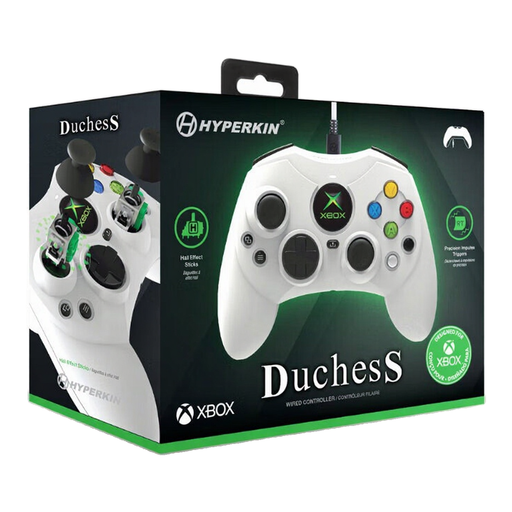 Image unavailable
Hyperkin Duchess wired Xbox controller, white
A wired option for the specified Xbox consoles or a supported Windows PC.
The product information lists a detachable 3-metre USB-C cable, programmable buttons, Hall-effect sticks and dynamic impulse triggers.
Joybuy
 Image unavailable
Xbox Wireless Controller Robot White
A handheld controller for the specified Xbox consoles or Windows PC.
The product description lists Bluetooth, USB-C connectivity, a hybrid D-pad and a textured grip. Check the power supply and what’s included with the model.
Joybuy
 Image unavailable
GameSir G7 SE wired Xbox controller, Dynamic Blue
A wired handheld controller for the specified Xbox consoles or Windows.
The product information lists Hall-effect sticks and triggers, two programmable rear buttons and USB connectivity.
Joybuy
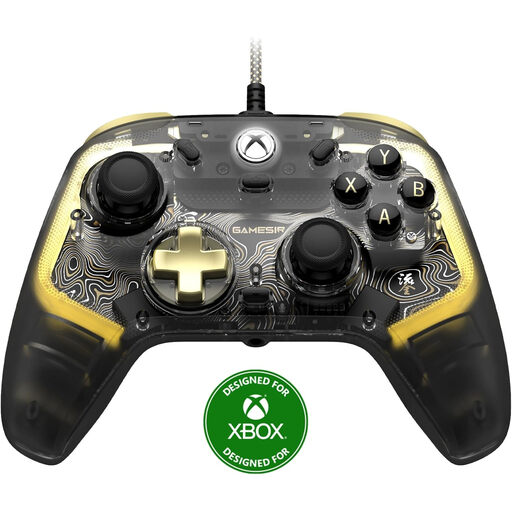 Image unavailable
GameSir Kaleid Flux Smoke Transparent RGB wired Xbox controller
A wired handheld controller for the specified Xbox consoles or Windows.
The product information lists ALPS sticks, mechanical face buttons and customisable button mapping through an app.
Joybuy
Frequently asked questions
Can I use any controller with any farming game?
No. Support depends on the platform, as well as the specific game and controller model. Check that they work together; Sony, for example, says certain DualSense features only work when supported by the game.
Does the SimTask FarmStick X need to be used with a steering wheel on Xbox?
Yes. For Farming Simulator 25 on Xbox Series X|S, Thrustmaster specifies that combination as a requirement. Don’t assume the same applies to the PC or PlayStation version.
How do I connect a controller for a long session?
Follow the instructions for the exact model and system. For DualSense on PC, Sony lists USB-C or Bluetooth; Microsoft lists Bluetooth for supported Windows PCs and USB-C for the Xbox controller reviewed. If you’re playing with a wired connection, check in advance that the cable will reach your playing area.
What if a controller I bought online breaks too soon during normal use?
According to ACM ConsuWijzer, you have a legal guarantee in addition to any commercial warranty. If the product breaks sooner than you could reasonably expect with normal use, the seller must offer an appropriate free solution, such as a repair, replacement or refund. There is no single fixed legal guarantee period in the Netherlands for every controller.
Can I return a controller I bought online after trying it out?
ACM ConsuWijzer states that online purchases generally come with a statutory cooling-off period that ends 14 days after delivery. Before ordering, check the terms for unboxing and trying out the product, as well as any return costs.


