A standard gamepad is a good choice if you play a variety of games and want to clear your desk away afterwards. Specialist controls are better suited to playing Farming Simulator regularly, where you steer vehicles and operate machinery, and have room for extra equipment. ConcernedApe confirms that Xbox controllers work with Stardew Valley on PC, while the Farming Simulator 25 Steam page lists full controller support. Before choosing, check the exact game, model, connection and what’s included in the box.
Which controls are right for you?
Players of several farming games
You want to use one handheld controller, so first check that it’s supported by your game and platform. ConcernedApe confirms that Xbox One and Xbox 360 controllers work with Stardew Valley on PC; the Farming Simulator 25 Steam page lists full controller support.
Players who share a desk
You use the same workspace for gaming and work, and are choosing between a gamepad you can put away and equipment with a separate panel, steering wheel or pedals.
Fans of operating machinery in Farming Simulator
You mainly want to control vehicles and machinery. Check that a specialist joystick or complete set is compatible with your game version and platform, and fits in the space you have available.
What should you look for when choosing?
Standard gamepad
Best if: you play different games or want to clear your desk after gaming. ConcernedApe confirms Xbox controller support for Stardew Valley on PC.
Bear in mind: a gamepad doesn’t have a separate steering wheel, pedals or machine-specific controls.
Standalone farming joystick
Best if: you mainly operate machinery in Farming Simulator 25 or 22 on a Windows PC. Thrustmaster lists three axes, 33 action buttons and automatic control mapping in these games for the FarmStick PC.
Bear in mind: a steering wheel for a more comprehensive setup is sold separately. Be sure to check which FarmStick model you’re choosing, too.
Steering wheel, pedals and side panel
Best if: you want a dedicated simulation setup with separate controls for driving and operating farm machinery. Logitech G describes the Heavy Equipment bundle as a set with a steering wheel, pedals and side panel.
Bear in mind: this equipment needs more space to use and store than a gamepad. Check that it’s supported by your game.
The key trade-offs will depend on your game, workspace and the type of controls you want.
| What to consider |
What to check before buying |
Who should pay extra attention? |
| Game and platform |
Check the exact game title, platform and controller model. If necessary, check the connection type as well. |
If I switch between farming games, I want to know whether the controller works with my game and platform. Around 36% of consumers put compatibility first. |
| Desk and connection |
Consider where you’ll store it and check that your PC has the required USB port, receiver or Bluetooth connection. |
I share my desk with work and want to be able to put my gaming controls away easily afterwards. Around 29% of consumers prioritise desk space and connectivity. |
| Machine controls |
Compare the in-game controls with the axes, buttons and components included with the exact model. |
If I regularly drive vehicles and operate machinery, I’m looking for controls that suit those tasks. Around 21% of consumers prioritise machine controls. |
| Power and extras |
Check what’s included in the box, and whether batteries, a receiver, cable or the extras you want are included. |
I want to know in advance which accessories I’ll need and what to do if a product develops a fault. Around 14% of consumers focus mainly on running costs and customer service. |
Things to consider before buying
-
Wireless doesn’t always mean Bluetooth on Windows
For the 8BitDo Ultimate 2C Wireless, the manufacturer lists 2.4 GHz or USB for Windows and Bluetooth for Android.
Check the connection options for the exact model and make sure your PC has a suitable USB port for the receiver.
-
Don’t mistake a FarmStick model for a complete set
Thrustmaster describes several FarmStick models; a steering wheel for a more comprehensive setup is sold separately.
Check the full model name, platform and which components are included in the box.
-
A stated warranty period isn’t the same as your full statutory rights
The Dutch government says there is no fixed statutory warranty period in the Netherlands. What you can expect from a product depends on the product and the circumstances.
Keep your proof of purchase and contact the seller if a product is faulty.
Brands to compare
Xbox / Microsoft
A standard wireless handheld controller for a range of games, including PC gaming.
- Microsoft lists Windows support, Bluetooth, button mapping and textured grips.
- The controller uses AA batteries or a compatible rechargeable solution sold separately. Xbox Support says rechargeable AA batteries can’t be charged in the controller.
8BitDo
According to 8BitDo, the Ultimate 2C Wireless connects to Windows via 2.4 GHz or USB, and to Android via Bluetooth.
- 8BitDo lists remappable extra bumpers and Hall Effect joysticks.
- For this model, the manufacturer doesn’t list Bluetooth as a connection option for Windows, so check which connection you want to use.
Thrustmaster
The SimTask FarmStick PC is designed for operating machinery in Farming Simulator 25 and 22 on Windows.
- Thrustmaster lists three axes, 33 action buttons and automatic control mapping in these games.
- A steering wheel for a more comprehensive setup is sold separately. Check whether you’re choosing the PC model or a version for another platform.
Logitech G
The Heavy Equipment bundle is designed for a dedicated farming simulation setup with a steering wheel, pedals and side panel.
- Logitech lists a steering wheel with a 900° rotation and Windows support.
- The separate components need more space than a gamepad. Check support for the game you want to play; manufacturer claims about setup and compatibility aren’t independent test results.
Gamepads for farming games
Below are handheld gamepads for PC. Check that each model’s connection and support are suitable for your game and platform.
 No image available
Wireless game controller with dual vibration and gyroscope for Switch and PC
A handheld controller for anyone looking for a gamepad for PC or Switch; check that it’s supported by your game.
The product information lists dual vibration, a 6-axis gyroscope and a USB-C charging cable.
Joybuy
 No image available
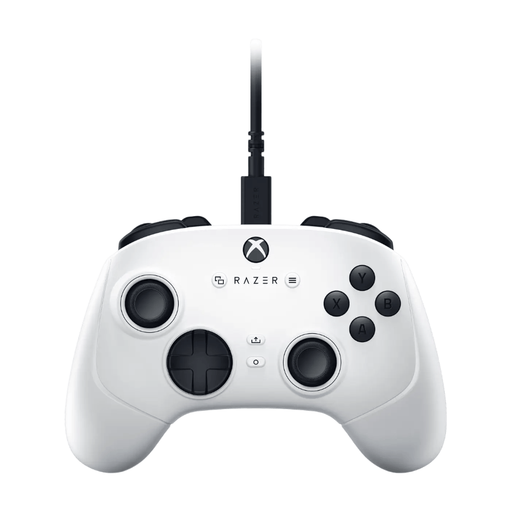
Razer Wolverine V3 Tournament Edition White
A wired gamepad for anyone looking for handheld controls on PC or Xbox; check that your chosen game supports the controller.
The product information lists four rear paddles, six assignable buttons and a detachable 3 m USB-C cable.
Joybuy
 No image available
BEITONG PanGu Modular Wireless Gaming Controller
A handheld controller for anyone who wants to adjust the layout for different games; check the required connection and game support in advance.
The product information lists interchangeable joysticks, buttons and D-pads. It can connect via cable, 2.4 GHz or Bluetooth. The platforms listed are PC, Nintendo Switch, Switch 2, Steam and Android.
Joybuy
 No image available
BEITONG KP70 Elite Wireless Gaming Controller
A gamepad for anyone who wants to customise buttons and joysticks on PC; check the connection and support for each game.
The product information lists haptic triggers, adjustable joysticks and six programmable buttons. The platforms listed are PC, Nintendo Switch, Switch 2, Steam and Android.
Joybuy
 No image available
VIELLAN Wireless Gaming Controller with Hall Effect Joysticks
A wireless handheld controller for anyone looking for a PC gamepad; check that the listed layout and connection suit your needs.
The product name lists Hall Effect joysticks, 255-level Hall triggers, programmable rear buttons, RGB lighting, a 1000 mAh battery and USB-C. The name mentions PC and a PS5 layout.
Joybuy
Frequently asked questions
Will every PC controller work with Stardew Valley or Farming Simulator 25?
No. Check support for the exact controller and model. ConcernedApe confirms that Xbox One and Xbox 360 controllers work with Stardew Valley on PC; the Farming Simulator 25 Steam page lists full controller support and mentions USB use for DualShock and DualSense.
How do you connect the 8BitDo Ultimate 2C Wireless to a Windows PC?
According to 8BitDo, you can connect it via the 2.4 GHz receiver or a USB cable. For this model, the manufacturer lists Bluetooth for Android, but not Windows; the manual explains how to connect the receiver to a USB port on your PC.
Do you need to charge rechargeable AA batteries in an Xbox controller?
No. Xbox Support says rechargeable AA batteries need to be charged outside the controller. Check which batteries or charging accessories are included before buying.
Are you always limited to a two-year statutory warranty on a controller in the Netherlands?
No. The Dutch government says there is no fixed statutory warranty period in the Netherlands; what you can expect from a product depends on the product and the circumstances. If a product is faulty, contact the seller.
What rules apply to online purchases and product safety in the Netherlands?
For online purchases from a business as a consumer, the Dutch government says you usually have 14 days to change your mind; exceptions and the circumstances of the purchase may apply. Business.gov.nl states that electrical equipment with Bluetooth or a radio frequency module is also covered by European radio equipment rules. A product listing alone doesn’t show that a specific item meets all applicable requirements.


