What should you look for in a controller for farming games?
First, check that your device, chosen game and connection method work together. Then decide whether a wired or wireless setup suits your playing space.
| What to consider |
What should you check? |
Who is this important for? |
| Device and game |
Check support for your device, game and connection method. GIANTS Software lists USB as the only way to use DualSense with Farming Simulator 25 on PC. |
If I switch between PC games or play on a console, I want to know in advance whether my particular setup will work. Around 36% of consumers put device and game compatibility first. |
| Wired or wireless |
Check whether you have room to run a cable. PowerA says the controller mentioned here has a detachable 3 m USB cable; the 8BitDo Ultimate 2C connects to Windows using a USB receiver. |
In a small room, I want to play without a cable getting in the way of where I sit, or avoid having to manage a receiver or wireless power. Around 29% of consumers prioritise their gaming setup. |
| Controls |
Check whether the game supports any extra buttons in the way you want to use them. PowerA lists two mappable extra buttons on the Enhanced Wired Controller for Xbox Series X|S. |
If I want to customise the controls for a farming game, I want to know whether the game and controller work together to allow it. Around 21% of consumers focus mainly on the controls. |
| Power and maintenance |
Check whether the controller is wired, which batteries or charging cable it needs, and what’s included. Nintendo says a USB-C cable is included with the Switch Pro Controller. |
If I want to keep charging and battery management to a minimum, it matters how the controller is powered and whether I need any accessories. Around 14% of consumers make this their main priority when choosing. |
Joybuy controllers for different ways to play
This selection includes wired and wireless controllers for Nintendo Switch systems, plus a wireless Xbox controller for Xbox and Windows. Check support for your particular farming game and connection method.
 No image available
Turtle Beach Afterglow Wave Wireless Controller (Bluetooth), transparent
A good fit if you want to play wirelessly on one of the Nintendo Switch systems listed.
The product information lists Switch 2, Switch, Switch Lite and Switch OLED as compatible. It also mentions TMR sticks, four RGB modes, two programmable buttons and up to 40 hours of battery life.
The product information says the USB-C charging cable isn’t included.
View at Joybuy
 No image available
Xbox Wireless Controller, Ice Breaker Special Edition
A good fit if you play on Windows or one of the Xbox consoles listed and want to game wirelessly.
The product information lists Xbox Series X|S, Xbox One and Windows 10/11, with Xbox Wireless and Bluetooth. It also mentions USB-C, a 3.5mm jack, two AA batteries included and a stated battery life of up to 40 hours.
View at Joybuy
 No image available
Hori Horipad Turbo for Switch and Switch 2, Pokémon Eevee Cottage Core Edition
A good fit if you want to play using a wired connection on one of the Switch systems listed.
The product information lists Switch, Switch 2 and Switch OLED as compatible, with programmable rear buttons and a Turbo function.
The product information says a standard USB cable is required but not included.
View at Joybuy
 No image available
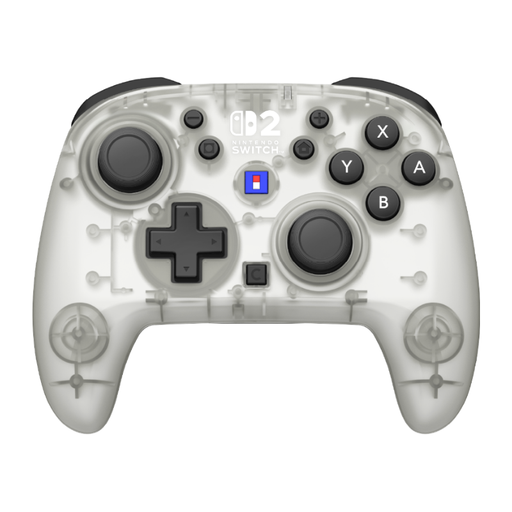
Hori Horipad Turbo Frost Wireless Controller, white and transparent
A good fit if you want to play wirelessly on Switch or Switch 2 and customise the controls.
The product information lists Switch 2, Switch, Switch OLED and Switch Lite as compatible. It also mentions TMR sticks, a gyroscope, Turbo, mappable rear buttons, two button profiles and up to 10 hours of battery life.
The product information says HD Rumble 2 and vibration aren’t supported.
View at Joybuy
 No image available
Turtle Beach Rematch Super Mario Jump Wireless Controller
A good fit if you want to play wirelessly on the Nintendo Switch systems listed and assign extra buttons.
The product information lists Switch 2, Switch and Switch OLED as compatible, with TMR sticks, a C button for GameChat, two programmable buttons and 40 hours of battery life.
View at Joybuy
Frequently asked questions
Will every PC controller work with Stardew Valley and Farming Simulator 25?
No. The game information doesn’t confirm that every controller has the same level of support. ConcernedApe and GIANTS Software list controller support for their games; for DualSense with Farming Simulator 25 on PC, GIANTS Software lists USB as the only connection option. Check support for your controller type and connection method.
How do I connect the 8BitDo Ultimate 2C wirelessly to a Windows PC?
According to 8BitDo’s guide, plug the 2.4GHz receiver into a USB port and set the controller to the mode shown. For this setup, the guide lists Windows 10 version 1903 or later.
Do I need to buy a separate charging cable for the Switch Pro Controller?
Nintendo says a USB-C cable is included with the Pro Controller for the original Switch. Before you buy, make sure you choose the right controller for your Switch generation.
Does a two-year manufacturer’s warranty cover the full statutory guarantee in the Netherlands?
No. According to the Dutch government, the Netherlands has no fixed statutory guarantee period. You’re entitled to a product that meets what you can reasonably expect from it; a manufacturer’s warranty is separate from these statutory rights. If a product is faulty, contact the seller.
Can I always return a controller bought online within 14 days?
No. According to the Dutch government, when you buy online from a business, you’ll often have 14 days to change your mind, but there are exceptions. A purchase from a private seller isn’t covered by the same distance-selling rules, so check who the seller is and which terms apply.


