What should you look for when choosing?
First, decide which game and headset you need to work. Then choose between playing on a built-in screen or a connected TV or monitor, and check whether you want to use discs.
Nintendo Switch 2
A good fit if: you want to play The Legend of Zelda: Tears of the Kingdom – Nintendo Switch 2 Edition and use a built-in screen.
Bear in mind: Bluetooth audio may cause delays and does not support Bluetooth microphones, according to Nintendo.
PlayStation 5
A good fit if: a PS5 game such as Final Fantasy VII Rebirth is your priority and you play on a TV or monitor.
Bear in mind: according to PlayStation Support, standard Bluetooth audio headphones do not connect directly to PS5; check which connections are supported.
Xbox Series X or Series S
A good fit if: your chosen fantasy game is available for Xbox Series X|S and you play on a connected screen.
Bear in mind: the Series X compared by Xbox has a disc drive and 1 TB of storage; the 512 GB Series S is all-digital.
Steam Deck OLED
A good fit if: you want to play compatible games from your Steam library on a built-in screen.
Bear in mind: Valve quotes battery life of 3–12 hours for the OLED model, depending on use; check that your specific game works.
| What to consider |
What should you look for when buying? |
Who should give this more thought? |
| Headphones |
Check the connection on your exact headset and whether you need game audio, chat or both. |
If you want to keep using your existing headset, supported connections are crucial. Around 36% of consumers with this buying question put headset compatibility first. |
| Game you want to play |
Check the full title, edition, required platform and any conditions for an upgrade pack. |
If you have one fantasy game in mind, you’ll want to know first whether that specific title works on the console. Around 29% of consumers with this buying question give the specific game top priority. |
| Where you play |
Choose between a built-in screen and a TV or monitor. If you’re choosing a handheld, also check that your preferred game works. |
If you want to play without a dedicated TV setup, a built-in screen is important. Around 21% of consumers with this buying question prioritise being able to play on a standalone screen. |
| Discs and downloads |
Check whether the model has a disc drive, what’s included in a bundle, and any storage or game requirements. |
If you own game discs or want to know in advance which purchase format suits you, check the exact model. Around 14% of consumers with this buying question give purchase format and additional costs top priority. |
Joybuy products
The products below include portable handhelds and PS5 consoles. For each game, check that the title and edition work on your chosen console, and that the model suits your preference for discs or downloads.
 No image available
Nintendo Switch Lite 32 GB bundle, turquoise, with Tomodachi Life download and Nintendo Switch Online trial
This handheld is designed for playing without a TV; the product information states that TV output is not supported.
The product name lists 32 GB of storage, a turquoise finish, a Tomodachi Life download and a 30-day Nintendo Switch Online trial.
View at Joybuy
 No image available
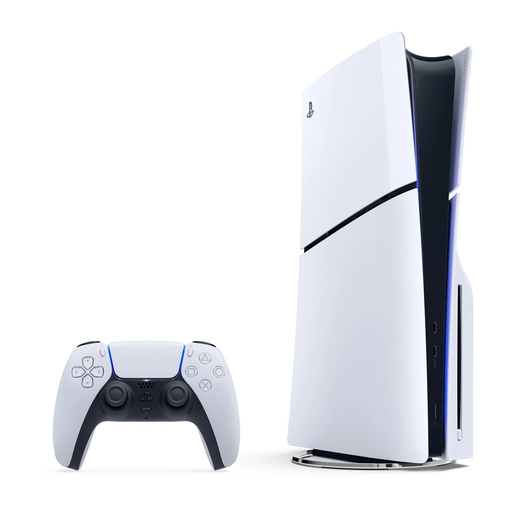
Sony PlayStation 5 Slim 825 GB Digital Edition
A digital PS5 model may suit you if your chosen game is available for PS5 and you want to play digital games.
The product name lists 825 GB and a digital model. This console has no disc drive, so disc-based games cannot be used with it. For PS5 3D audio, Sony lists analogue and USB stereo headphones, once set up and running the latest system software update.
View at Joybuy
 No image available
Nintendo Switch 2 console, EU
This console has a built-in screen and TV mode, so you can choose between handheld play and connecting it to a TV.
Nintendo lists a 3.5mm jack for Switch 2. Bluetooth audio is also available, but may be delayed and does not work with a Bluetooth microphone.
View at Joybuy
 No image available
MSI Claw A8 BZ2EM-047NL, 8-inch touchscreen, 1 TB
This portable handheld gaming PC may suit you if you want to play on a built-in screen; check that your chosen game works on it.
The product name lists a 20.3 cm (8-inch) touchscreen and 1 TB of storage. According to the product information, the charger must be bought separately.
View at Joybuy
 No image available
Sony PlayStation 5 Slim 1 TB Disc Edition
This PS5 model may suit you if you want to play a compatible PS5 game on a connected screen and use discs.
The product name lists 1 TB and a disc drive. For PS5 3D audio, Sony lists analogue and USB stereo headphones, once set up and running the latest system software update.
View at Joybuy
Frequently asked questions
Can I connect my Bluetooth headphones directly to any console?
No, support varies by console. Nintendo describes Bluetooth audio on Switch 2, which may be delayed and does not support Bluetooth microphones; Valve lists Bluetooth audio for Steam Deck OLED. PlayStation Support says that Bluetooth audio devices are not directly compatible with PS5. For Xbox Series X|S, Microsoft describes a separate wireless connection for the Xbox Wireless Headset. So check the connection for your exact headset and whether it also meets your chat needs.
How do I set up Bluetooth audio on Switch 2?
According to Nintendo, first check your system version, then go to System Settings, Bluetooth Audio and Add Device in the HOME Menu. Select your headphones. While using Bluetooth audio, you can connect up to two wireless controllers; Nintendo also warns that audio may be delayed and Bluetooth microphones are not supported.
Does a one- or two-year manufacturer’s warranty cover everything on a console in the Netherlands?
No. The Dutch government distinguishes between a manufacturer’s warranty and statutory guarantee rights, and states that the Netherlands has no fixed statutory guarantee period. If a product is faulty, contact the retailer. What you can expect depends, among other things, on the product, its price and the information provided.
Is a PEGI rating a buying recommendation or a general legal age limit for fantasy games?
The Dutch government describes PEGI ratings on game packaging as age guidance about potentially harmful content. Check the rating for the exact game and don’t assume that its genre means it’s suitable for a particular age. The information cited does not set a general legal minimum age for owning or using a game console.


