
Family with seats beside the TV
This family wants to watch their videos comfortably, even from an angled position. The Consumers’ Association points out that the viewing angle depends on the TV; a media player won’t change it.


First, assess the viewing angle of your TV from where you sit: a media player won’t change the screen. Then choose a way to play your videos that suits where they’re stored, such as AirPlay for compatible Apple devices, Cast for compatible apps or a set-up for local files.
This family wants to watch their videos comfortably, even from an angled position. The Consumers’ Association points out that the viewing angle depends on the TV; a media player won’t change it.
This user keeps most of their videos on an iPhone or iPad, or in a compatible app, and wants a practical way to watch them on the TV. Apple Support explains how to stream from Photos using AirPlay; Google Help explains how to Cast from compatible apps.
This user stores videos on a computer, drive or NAS and wants to know how to play those files on the TV. The Consumers’ Association explains that locally stored videos don’t necessarily work with every streaming option; NVIDIA documents a Plex option for the SHIELD TV Pro.
| What to consider | What should you check? | Who is this important for? |
|---|---|---|
| Visibility from the side seats | Watch a familiar video from your usual seats and assess the TV’s viewing angle, not just the player’s output resolution. | If I’m watching from the side, I want to know whether the picture will still look good on my current screen. Around 36% of consumers prioritise visibility from the side seats. |
| Sharing from your phone | Check whether your TV or player supports AirPlay or Cast, and whether the app containing your video offers that option. For Google Cast, your phone and receiver need to be on the same Wi-Fi network. | If my family videos are on a phone, I want to send them to the TV from the app they’re in. Around 29% of consumers prioritise easy sharing from a phone. |
| Your own video files | Make a note of where your files are stored and test a representative file using the app, USB or network option you plan to use. A USB port alone doesn’t guarantee support. | If I store videos on a drive, computer or NAS, I want to know in advance how those specific files will be opened. Around 21% of consumers prioritise playing their own files. |
| What you’ll need when you buy | First, check what your TV can already do, then check the cables and connections required for each version. Apple states that the HDMI cable for Apple TV 4K (4th generation) is sold separately. | If I don’t want to buy a device that duplicates features my TV already has, I’ll check the existing features first, along with what I’ll need for the version I choose. Around 14% of consumers prioritise avoiding extra purchases and accessories. |
The viewing angle depends on the screen. A different media player won’t change the characteristics of your TV.
First, watch a familiar video from a side seat and assess your existing TV before choosing a separate player.
That could mean buying an extra device you don’t need.
A casting feature or streaming app doesn’t automatically mean locally stored files can be played directly.
Check where your videos are stored, which app opens them and whether that app supports the playback option you want to use. If possible, test a representative file.
Setting up a local option may take extra time and sometimes requires another app or a storage solution.
According to iiyama, the iiyama WP D002C is designed to be used with a compatible receiver; its product name alone doesn’t make it a general-purpose replacement for a living-room player.
Check the full model name and the required receiving equipment, then compare them with your TV and the way you plan to play your videos.
Apple’s Dutch specifications page describes Apple TV 4K (4th generation); versions may differ.
Before buying, check the generation, connections and box contents. Apple states that the HDMI cable for the 4th generation is sold separately.
So you may need to buy a separate HDMI cable for the 4th generation.
Apple TV 4K is worth considering if your family videos are on an iPhone or iPad and you want to watch them using AirPlay.
Google TV Streamer (4K) combines Google TV apps with Cast from compatible apps and a remote control.
The Xiaomi TV Box S (3rd Gen) is a Google TV option with a remote control and a USB 2.0 port.
The SHIELD TV Pro could be a good option for a family archive managed through USB, a network or Plex.
The LEAP-S3PRO offers Google TV, built-in Cast and a remote control.
This selection features a satellite receiver with a stated USB multimedia function and an HDMI connection for use with a TV. Check whether the receiver supports your specific video files.
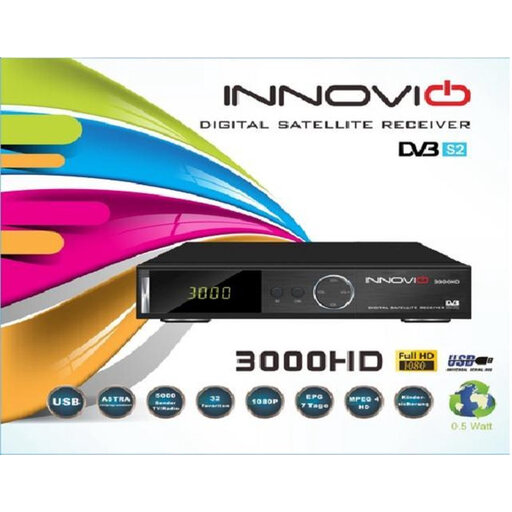 No image available
The product description mentions USB multimedia playback for a local video collection and an HDMI connection for your TV. Check whether your files are supported.
The description lists 1080p, USB, HDMI and a remote control.
Not if the screen’s viewing angle is the problem. The Consumers’ Association says OLED TVs generally have a wider viewing angle than LCD TVs, but check how the specific TV looks from your own seats. To see extra 4K detail, your video and TV must also support it.
With a compatible Apple TV or AirPlay-enabled TV, you can use the AirPlay option described by Apple: open the video in Photos and select AirPlay using the share button. First, check whether your current TV already supports it.
Check that the app supports Cast and that your phone and player are connected to the same Wi-Fi network, as Google requires. Also check whether you can play the video you want through that app.
Don’t assume that you can. Google describes an option using a compatible USB-C hub and power supply for removable storage, but says it isn’t guaranteed to work in every set-up. Test the files and option you intend to use.
According to the Dutch government, the seller must provide a product that works properly and help find an appropriate solution if it doesn’t. For many online consumer purchases, you also have a 14-day cooling-off period; check whether these rules apply to your purchase.