Choose a media player based on where you store your family videos: casting from a supported phone app, viewing iCloud Photos on Apple TV 4K, or playing files from USB or a shared network drive each calls for a different playback option. Also check the app or video file you plan to use, the availability of a spare HDMI port, and any cable or profile requirements.
Who are these options for?
Videos on your phone
You usually open family videos in a phone app and want to watch them on your bedroom TV without copying files. Check whether that particular app supports casting. Google Photos Help explains how to show photos and videos from a device on a TV.
Your own video library
You store videos on USB or a shared network drive and want to select those files on your TV. Check the connection, whether there’s a suitable player app, and whether it supports your files. Xiaomi Netherlands lists USB connectivity on the TV Box S (3rd Gen); VideoLAN explains how to browse NAS and shared drives in VLC for Android TV.
A family with iCloud Photos
Your family videos are already in iCloud Photos, and you want to watch them in the Photos app on Apple TV 4K. Apple Support Netherlands says that access to synced content in the Photos app is linked to the default profile.
What should you look for when choosing?
Cast from a phone app
A good fit if: you usually open videos on your phone and want to show them on your TV straight away. Google Photos Help explains how to cast to Chromecast.
Bear in mind: Google says both devices should be on the same Wi-Fi network for this option. Also check whether your own app supports casting.
iCloud Photos on Apple TV 4K
A good fit if: your family videos are already in iCloud Photos and you want to watch them in the Photos app.
Bear in mind: Apple links access to synced content to the default profile. Apple announced that the fourth generation would be available from 13 November 2026, following its announcement on 13 October 2026.
Files on USB or a shared drive
A good fit if: you store videos outside a phone or cloud service. Xiaomi lists a USB port on the TV Box S (3rd Gen); VideoLAN explains how to access NAS and shared drives in VLC for Android TV.
Bear in mind: having a port or app doesn’t guarantee that every file will play. Test your own video file and, for network files, the shared folder you plan to use.
The table groups consumers by their main reason for choosing a media player for family videos in the bedroom.
| What to consider |
What should you check? |
Who is this most important to? |
| Videos from a phone |
Check that your app supports casting and that your phone and player are on the same Wi-Fi network. |
If I want to show videos from my phone app, I don’t want to have to copy files. Around 36% of consumers give casting from a phone top priority. |
| USB or network files |
Check the USB port or access to the shared folder, the suitable player app and the format of your video file. |
When my library is on USB or a shared drive, I want to be able to select the files directly. Around 29% of consumers give access to their own files top priority. |
| Existing iCloud library |
Check your Apple account, the default profile, and which library or albums you want to view on your TV. |
If my family videos are already in iCloud Photos, I want to use my existing library. Around 21% of consumers prioritise access to iCloud Photos. |
| Setting up in the bedroom |
Check for a spare HDMI port, space for the device and its power supply, the cable included in the box, and network coverage. |
For a straightforward setup, I want to know in advance which connections and cables I’ll need. Around 14% of consumers give placement and connections top priority. |
Common buying mistakes
-
Assuming ‘4K’ guarantees support for your own videos
The output resolution doesn’t tell you whether your chosen app, storage source and video file will work together.
Test a representative family video using the exact USB, network, iCloud or phone option you plan to use.
-
Assuming every streamer has USB
Xiaomi says the Xiaomi TV Box S (3rd Gen) has USB 2.0. The Google TV Streamer has a different set of listed connections.
Compare the connections on the exact model with where your videos are stored.
-
Not checking a boxed Xiaomi model
Totaal TV reported a case where a player bought for a test, in packaging for the TV Box S (3rd Gen), turned out to be a counterfeit. That report concerns the item described, not all sellers.
Check the seller, exact model identity and supplied specifications before relying on USB or app features.
-
Overlooking the cable or Apple TV generation
Google says an HDMI cable for the Google TV Streamer is sold separately. Apple announced that the fourth generation would be available from 13 November 2026.
Check what’s included in the box, the generation and the delivery date for the model you’re considering.
Remember that an HDMI cable for the Google TV Streamer is sold separately.
Brands to consider for your video setup
Google
The Google TV Streamer (4K) is worth considering if you want to cast from supported apps and also want a TV interface with a remote control.
- Google lists 32 GB of storage and casting from compatible apps.
- The required HDMI cable is sold separately. Check whether the app with your family videos supports casting.
Xiaomi
The TV Box S (3rd Gen) may suit you if you’re looking for a Google TV box with a physical USB port for your own video library.
- Xiaomi lists USB 2.0, 32 GB of storage and an HDMI cable included with this model.
- A USB port doesn’t guarantee that every file format will play. Totaal TV also reported a counterfeit in a case involving a player packaged as a TV Box S (3rd Gen), so check the model identity.
Apple
Apple TV 4K is worth considering if you already keep your family videos in iCloud Photos and want to watch them on your TV in the Photos app.
- Apple explains how to access iCloud videos through the Photos app on Apple TV 4K.
- Apple links access to synced content to the default profile. Apple says the fourth generation will be available from 13 November 2026, so check which generation you’re looking at.
Joybuy products for watching videos on a screen
This Joybuy selection includes devices with listed streaming or USB playback features, including different types of device. Check each model to make sure your app or video file works with the connection you need and the screen you plan to use.
 No image available
2026 Video Projector with built-in apps and Play Store
May be worth considering if you want to watch videos from a USB stick or stream through a built-in app. The product description mentions USB stick compatibility, built-in apps and access to the Play Store. Check that it works with your own files and screen setup.
View at Joybuy
 No image available
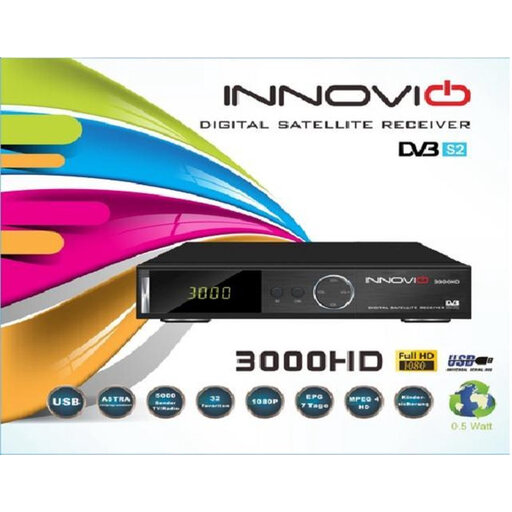
INNOVIO 3000 HD FTA satellite receiver and set-top box
May suit you if you want to watch videos from USB on a screen with HDMI. The product description mentions USB multimedia playback and an HDMI output. Check that your own video file is supported.
View at Joybuy
 No image available
Rokid Station Google-certified Android TV device
The product information describes a video-streaming device with an Android TV interface and remote control. The product title presents it as an accessory for Rokid Max and Air series AR glasses; check that it suits your screen setup.
View at Joybuy
Frequently asked questions
Can I show family videos from my Android phone on the TV?
Yes. Google explains how to cast photos and videos from Google Photos on Android to Chromecast when both devices are on the same Wi-Fi network. Also check whether the app your video is in supports this feature.
Can I watch videos from a NAS without putting them in the cloud?
You can use a suitable app: VideoLAN says that VLC for Android TV can browse NAS and shared drives. Check whether the app is available on your player, then test your own shared folder and video file.
What should I have ready, apart from the media player, when setting it up?
Check that you have a spare HDMI port, a power supply and a network connection. Xiaomi says an HDMI cable is included with the TV Box S (3rd Gen); Google says the HDMI cable required for the Google TV Streamer is sold separately.
Do I need a subscription to watch my own family videos?
That depends on the app or storage service you choose. Check its account and any storage requirements; Apple says access to iCloud Photos on Apple TV is linked to the account in use and the default profile.
Is the Apple TV 4K announced in October 2026 already available?
No. Apple announced on 13 October 2026 that the fourth generation would be available from 13 November 2026. Check which generation is on offer when choosing.


