Choose a games console based on the quiz, the seating and the controls your group needs. Check that everyone can read the questions on the TV and find out how many players can join in at once. Switch models with TV output, a PlayStation quiz controlled by smartphones and the all-digital Xbox Series S are different options; 4K output alone does not guarantee larger or more readable quiz text.
Who is this choice relevant to?
Families sitting some distance from the TV
This group wants everyone to be able to follow the questions from their own seat, so they look at how the chosen quiz is displayed, not just its output resolution. Nintendo lists requirements for 4K TV display; the Dutch PlayStation Store describes a specific quiz as having menu and HUD text that is easier to read.
Quiz groups with multiple players
This group wants to know in advance how many people can play at once and whether the quiz uses controllers or phones. The PlayStation Store states that the PS4 version of It’s Quiz Time supports smartphone controls for up to eight players.
Families who want to play in Dutch
This group checks the language options for the specific quiz: a Dutch-language console or product page does not tell you which languages the game itself supports. The editions of It’s Quiz Time and The Jackbox Party Pack 9 mentioned here do not list Dutch.
What should you look for when choosing?
For a family quiz from the sofa, readability, controls that work for the whole group, game content and how you buy the game are the main things to compare.
Nintendo Switch 2
A good fit for: anyone who wants to combine TV gaming with detachable controllers and may want to play existing Switch games.
Bear in mind: Nintendo says 4K output requires a compatible TV and game; also check whether your existing games are compatible.
Nintendo Switch or Switch OLED
A good fit for: anyone who mainly plays on the TV and does not need a specific Switch 2 feature for their quiz.
Bear in mind: the OLED screen is on the console and does not improve the picture on your TV; Switch Lite does not support TV mode.
PlayStation 5
A good fit for: anyone who wants to play a quiz available for PS5 or use a compatible PS4 quiz.
Bear in mind: for a PS4 quiz, check which features, languages and phone controls are available on your chosen console; a disc model gives you a different way to buy games than a digital edition.
Xbox Series S
A good fit for: anyone who can play their chosen quiz on Xbox and wants to buy games digitally only.
Bear in mind: Series S is all-digital; check the language, player limit and controls for each game.
| What to consider |
What should you check? |
Who is this important for? |
| Readable questions |
Check the quiz text on the TV you plan to use, from the furthest seat; look for any accessibility information. |
I want to be able to read the questions on the TV from the furthest seat; around 36% of consumers prioritise readability. |
| Controls for the group |
Check the maximum number of players and whether the quiz requires controllers or phones. |
If everyone wants to join in, I want to know how many people can play at once and what devices we need; around 29% of consumers prioritise group participation. |
| Language and age suitability |
Check the screen and voice languages for the exact game, and look at its PEGI rating for content guidance. |
If there are children or players who need Dutch, I want suitable content and questions they can understand; around 21% of consumers prioritise language and age suitability. |
| How you buy it and what you need |
Check whether the game is available on disc or digitally, and which controllers or other devices are required for the way you want to play. |
I want to know in advance how I can buy the game and which controls we already have at home; around 14% of consumers prioritise how to buy it and what they need. |
Common pitfalls when choosing
-
Assuming 4K output means quiz questions will be easy to read
Nintendo Switch 2’s 4K TV output works only with a compatible TV and game. Resolution alone does not tell you how large the quiz text will appear on your screen.
Check your chosen quiz on the TV you plan to use, from the furthest seat, before choosing a console.
-
Assuming a Dutch-language product page means the game is in Dutch
The editions of Quiz Challenge Multiplayer and It’s Quiz Time mentioned here do not list Dutch as a game language.
Check the languages for the exact game and edition before you buy.
-
Assuming everyone can join in without any extra equipment
The maximum number of players and the controls vary from quiz to quiz. You may need extra controllers or compatible phones.
Count the players and available devices, then check the requirements for your chosen game.
Some ways of playing may require extra controllers or compatible phones; what you need depends on the game and the devices your family already has.
-
Choosing a console that does not suit your TV connection or preferred way to buy games
Switch Lite does not support TV mode, and Xbox Series S is all-digital. The PS5 is also available in both digital and disc editions.
Before you buy, check that the console can be used with your TV and that your preferred way of buying games is available.
Brands to consider
Nintendo
Nintendo Switch 2, Switch and Switch OLED offer ways to play local multiplayer games on a TV; check that each quiz is suitable and compatible.
- Nintendo says Switch 2 can output up to 4K through the dock, provided the TV and game support it.
- The OLED screen does not improve the picture on your TV. Switch Lite does not support TV mode.
Sony PlayStation
PS5 is an option for quizzes available on PS5 and supported PS4 games, including the PS4 version of It’s Quiz Time mentioned here.
- The PlayStation Store lists smartphone controls for up to eight players for that PS4 game.
- On PS5, check which PS4 features are available and which languages the game supports. The digital and disc editions offer different ways to buy games.
Microsoft Xbox
Xbox Series S is an all-digital option for TV gaming if your chosen quiz is available on Xbox.
- Microsoft describes Xbox Series S as all-digital.
- Physical games are not an option; the player limit, language and phone controls depend on the game you choose.
Joybuy products
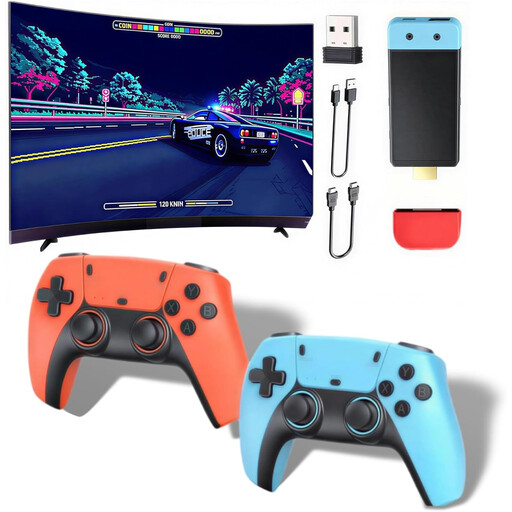
These Joybuy products are retro games consoles with HDMI output and wireless controllers. Before you buy, check whether the built-in games include the quiz you want and whether the text is readable on your TV.
 No image available
Retro games console, 20,000+ games, 4K HDMI and 2.4G controllers
Could suit a TV set-up if the built-in game library includes the quiz you want; check which titles are included first.
Listed features: 4K HDMI output, 20,000+ classic games, 23 emulators and two wireless 2.4G controllers. The product name also mentions use with a TV, PC and projector.
Joybuy
 No image available
Retro games console, 20,000+ games, 1080P/720P HDMI output
Could suit a TV set-up if the built-in games include the quiz you want; check the titles and required controls first.
Listed features: 1080P/720P HDMI output, 20,000+ games and two wireless controllers. The product description states that it supports up to four players; extra controllers may be needed for this.
The product description states that batteries for the controllers are not included.
Joybuy
Frequently asked questions
Is 4K enough to read quiz questions clearly from the sofa?
No. 4K does not guarantee that you can read quiz questions from your seat. For 4K output on Switch 2, Nintendo requires both a compatible TV and a compatible game; you should also check how the quiz text looks on the TV you plan to use.
Can everyone use their own phone as a controller?
That depends on the game. The PlayStation Store lists up to eight players using smartphones for the PS4 version of It’s Quiz Time; check which devices and features are supported for each quiz.
How do you connect a Switch to your TV for a quiz?
Use a Switch model that supports TV mode and place the console in the dock to play on your TV. Nintendo states that Switch Lite does not support TV mode.
How can you check whether a quiz is available in Dutch?
Check the languages for the exact game and edition; a Dutch-language product page is not proof. The editions of It’s Quiz Time and The Jackbox Party Pack 9 mentioned here do not list Dutch.
Which age rating should you check for a children’s quiz?
Use the PEGI rating for the specific game as a guide to whether its content is suitable. PEGI states that the rating does not indicate how difficult the game is.


