Who is this choice relevant to?

Family with phones

If you want to play quizzes on a shared screen without lots of extra equipment, first check whether players can answer on their phones. Jackbox Games describes joining with a room code; with Everybody 1-2-Switch!, the right input method depends on the play style you choose and the players’ phones.

Family with multiple Switch players

If you already have a Nintendo Switch, check whether your chosen play style uses Joy-Con controllers and whether the controllers you already own are enough. Nintendo describes separate phone and Joy-Con play styles for Everybody 1-2-Switch!.

PC-to-TV player

If you use a compact Windows PC with your TV, only choose a gamepad after checking that the quiz game supports gamepad input and the number of local players you need. Microsoft lists Windows PC support for the Xbox Wireless Controller; 8BitDo describes a different connection method for Windows for the Ultimate 2C Wireless.

What concerns should guide your purchase?

Phone or tablet as a player controller

Choose this when: the quiz you’ve chosen lets players join on their phones, as Jackbox does with a room code.

Trade-off: you won’t need a separate gamepad for each player, but the game’s requirements and compatible phones still matter.

Separate Joy-Con controllers for Nintendo Switch

Choose this when: your Switch play style supports Joy-Con controllers and you don’t have enough already.

Trade-off: a shared pair of Joy-Con controllers won’t make every quiz suitable for extra players; the phone style in Everybody 1-2-Switch! is a different play style.

Gamepad for a Windows PC

Choose this when: the specific quiz game supports gamepad input on PC.

Trade-off: the controller needs to connect to the PC, but that connection won’t add gamepad support to a game that doesn’t have it.

Wired controller for a docked Switch

Choose this when: your Switch is docked and the game doesn’t require Joy-Con motion controls.

Trade-off: the PowerA controller reviewed has a 3 m cable and no motion controls, so your TV’s position and the play style both matter.

What to consider What should you check? Who is this important for?
Avoiding an unnecessary controller Check the input method and requirements of your chosen quiz before buying extra hardware. If I want to play using phones we already own and avoid adding a gamepad the quiz won’t use, this is my first concern; around 36% of consumers put this need first.
Controls for Switch players Count the Joy-Con controllers you have and check how many players the play style you want supports. If I want to play a Switch game with my family, I want to know whether we have enough suitable controls; around 29% of consumers prioritise this need.
Compatibility with a compact PC First check that the game supports gamepad input, then check how the controller connects to the PC. If I’m playing a quiz on a Windows PC connected to my TV, I want the game and controller to work together; around 21% of consumers put this compatibility first.
Cable clearance and motion controls Check that the cable can safely reach your seat and whether the game requires motion controls. If I’m considering a wired controller, I want to know whether the cable will work with my TV setup and whether the play style is supported; around 14% of consumers focus mainly on these practical considerations.

Common buying mistakes

  • Buying a controller for a game that uses phones as its input

    With Jackbox, players join using their phones; Nintendo also says that the Jackbox bundle for Switch reviewed here doesn’t require a special controller.

    Choose your quiz game first and check how players answer before buying extra hardware.

  • Assuming all Switch play styles use the same controllers

    Everybody 1-2-Switch! has separate phone and Joy-Con play styles. The wired PowerA controller reviewed has no motion controls, so it isn’t suitable for a play style that requires them.

    Check the number of players and the required controller features for each play style.

  • Assuming Bluetooth on the box means it connects to every device

    For the Ultimate 2C Wireless, 8BitDo lists Bluetooth for Android and a 2.4GHz adapter or cable for Windows.

    Check the connection method for the exact model and operating system. On a mini PC, the USB port needed for the adapter may also be in use.

  • Confusing the manufacturer’s warranty with all your legal rights

    The Dutch government distinguishes between your statutory protection if a product is faulty and any additional manufacturer’s warranty.

    Check what any additional cover includes, and contact the retailer about a faulty product.

Relevant brands to compare

Nintendo

Relevant for families playing quizzes on a Nintendo Switch who want to choose between phone and Joy-Con input.

  • For Everybody 1-2-Switch!, Nintendo describes a Joy-Con style for 2–8 players and a separate phone style.
  • The player numbers listed apply to those specific play styles, not as a general limit for Switch quizzes.

Xbox / Microsoft

An Xbox Wireless Controller is an option for a Windows PC when the quiz game supports gamepad input.

  • Microsoft lists Windows PC and Bluetooth support for the Xbox Wireless Controller.
  • This platform support doesn’t confirm that every quiz game works with the controller.

8BitDo

The Ultimate 2C Wireless could be an option for quiz games on a Windows PC connected to your TV.

  • For Windows, 8BitDo lists a 2.4GHz adapter or cable.
  • For this model, 8BitDo lists Bluetooth for Android, not as a connection method for Windows.

PowerA

A wired Switch controller may suit a supported game on a docked Switch.

  • For the Wired Controller reviewed, PowerA lists a detachable 3 m cable.
  • According to PowerA, this version is only intended for use with a docked Switch and has no motion controls.

Gamepads for PC and Nintendo Switch

These Joybuy products are gamepads for PC or Nintendo Switch; check whether gamepad input is supported for each quiz game. A gamepad may not be necessary for titles where players use their phones.
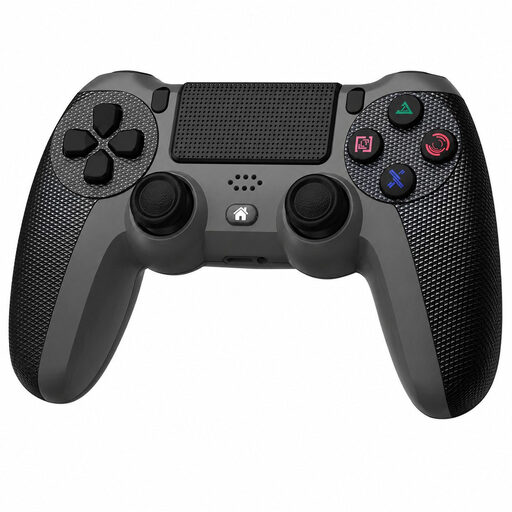
Black Wireless Dualshock Game Controller for PS4 and PC

Black Wireless Dualshock Game Controller for PS4 and PC

Could suit a quiz game on PC that supports gamepad input.

The product description mentions wireless controls and PC compatibility; the included USB cable is needed for the first pairing.

Joybuy
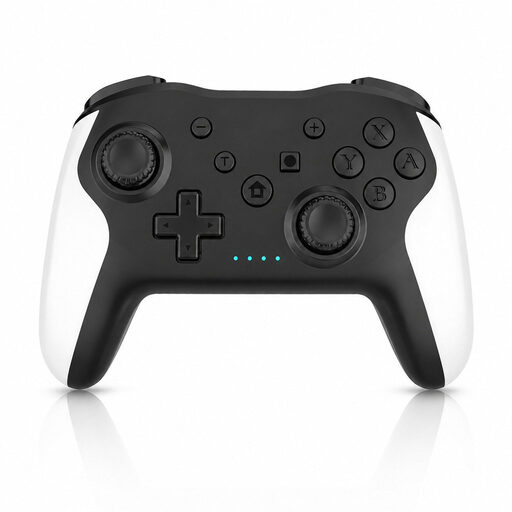
Gaming Controller with Dual Vibration and Gyro for Switch and PC

Gaming Controller with Dual Vibration and Gyro for Switch and PC

A possible option for a quiz game on Switch or PC that supports gamepad input.

The product description mentions wireless controls, dual vibration and a gyroscope.

Joybuy

Xbox Wireless Controller Robot White

Xbox Wireless Controller Robot White

Could suit a quiz game on Windows that supports gamepad input.

The product description mentions Xbox Wireless and Bluetooth for wireless use, and USB-C as a wired option.

Joybuy

GameSir Cyclone 2 Black-Bundle Edition

GameSir Cyclone 2 Black-Bundle Edition

Could suit a quiz game on PC or Switch that supports gamepad input.

The product description lists 2.4GHz, Bluetooth and USB-C connections, and mentions a charging dock.

Joybuy

Nintendo Switch Pro Controller Black

Nintendo Switch Pro Controller Black

An option for a quiz game on Nintendo Switch that supports gamepad input.

The product description mentions wireless controls, motion controls, HD Rumble and amiibo functionality.

Joybuy

Frequently asked questions

Does every player in a Jackbox quiz need a separate gamepad?

No. According to Jackbox Games, players can join on their phones via jackbox.tv using a room code. One person starts the game on the host device; check the player limit and requirements for the title you choose.

Can Everybody 1-2-Switch! be played without an internet connection?

Yes. Nintendo says the Joy-Con style can be played without an internet connection. The phone style requires an active internet connection; some games also require specific camera and motion sensors on the smart device.

Does the 8BitDo Ultimate 2C Wireless connect via Bluetooth to a Windows mini PC?

According to 8BitDo, this model uses Bluetooth for Android and the included 2.4GHz USB adapter or a cable for Windows. Also check that the quiz game accepts gamepad input and that your PC has the required port.

Are Jackbox quizzes in Dutch and suitable for young children?

Don’t assume they’re in Dutch or suitable for a particular age: check the language and age rating of the specific title. For the titles listed on the relevant language help page, Jackbox Games Support mentions French, Italian, German, Spanish and Brazilian Portuguese, among others, but not Dutch; Nintendo gives The Jackbox Naughty and Nice Bundle a PEGI 16 rating.

Who should I contact about a faulty controller bought in the Netherlands?

If a product is faulty, contact the retailer. The Dutch government states that there is no fixed statutory warranty period for all products in the Netherlands, and that any additional manufacturer’s warranty comes on top of your statutory warranty.
