What should you look for when choosing?
Start with the quiz’s input method and the device that will send the picture to your TV. Then work out how many players need an extra device.
| What to consider |
What should you look for? |
Who is this important for? |
| Input method that suits the quiz |
Check whether players enter answers using a browser, phone app or Joy-Con, and separately identify which device hosts the game. |
When choosing a quiz, I want to know how players will answer first; around 36% of consumers prioritise matching the game to its input method. |
| Enough devices for the group |
Nintendo lists 2–8 players for the Joy-Con style of Everybody 1-2-Switch! and 2–100 for the phone style. Count the devices available for the style you’ve chosen. |
For a group, I want everyone to be able to join in without buying extra controllers unnecessarily; around 29% of consumers prioritise having enough input devices for everyone. |
| TV and network connection |
Check the host device, TV connection and internet requirements. Nintendo says the phone style of Everybody 1-2-Switch! requires internet, while the Joy-Con style works without it; Jackbox requires the host to have an internet connection. |
If the quiz needs to work on the big screen, I want to know in advance whether the host, TV and players’ devices can connect; around 21% of consumers prioritise getting this set-up right. |
| Language and phone controls |
Check the language of the specific game and make sure the phones and any required features, such as motion sensors, are suitable. |
For a quiz with a mix of players, I want questions everyone can understand and controls that work on their devices; around 14% of consumers start by checking the language and whether the phone controls will work. |
Joybuy products for these set-ups
This selection includes individual Joy-Cons for compatible Joy-Con play styles, as well as full-size controllers for quiz games that support them.
 No image available
GameSir Cyclone 2 Multiplatform Controller (Black-Bundle Edition)
A full-size controller for quiz games that support this type of controller. Check how the game you’ve chosen is played.
The product name lists PC, Switch, iOS and Android, as well as a charging dock. Check compatibility with the specific game and the device you’ll be playing on.
Joybuy
 No image available
Nintendo Switch Pro Controller, black
A full-size Switch controller for quiz games that support this type of controller. It won’t automatically replace a phone or individual Joy-Con.
The product description lists motion controls, HD Rumble, amiibo functionality and a rechargeable battery.
Joybuy
 No image available
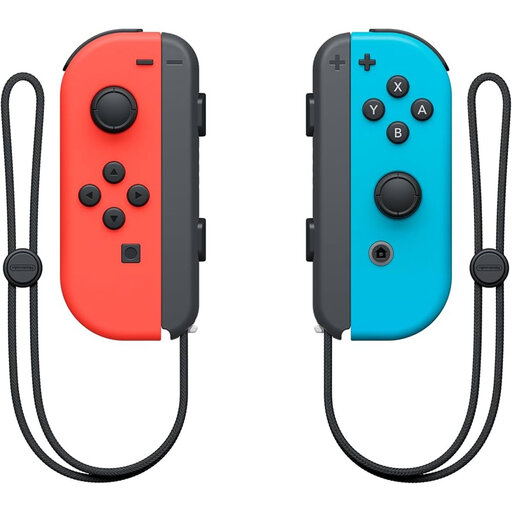
Nintendo Switch Joy-Con controller pair, neon red/neon blue
For Everybody 1-2-Switch! in Joy-Con style, Nintendo lists 2–8 players; each Joy-Con can be used as a controller on its own.
This is a pair of Joy-Cons. Check that the Joy-Con play style is right for your quiz and console.
Joybuy
 No image available
Nintendo Switch 2 Pro Controller, black
A full-size controller for quiz games on Switch 2 that support this type of controller.
The product description lists a wireless Bluetooth connection, a rechargeable battery, motion controls, HD Rumble and amiibo functionality. This model is designed for Nintendo Switch 2.
Joybuy
 No image available
Nintendo Switch 2 Joy-Con 2 pair, light blue/light red
A pair of Joy-Con 2 controllers for a Nintendo Switch 2 quiz set-up that requires individual Joy-Cons.
Nintendo says Joy-Con 2 can only be used with Nintendo Switch 2. The product description lists motion controls and the included wrist straps.
Joybuy
Frequently asked questions
Does every Jackbox player need their own controller?
No. Jackbox Games lets players enter answers at jackbox.tv using the room code on screen. The host needs the game you’ve chosen and a device to run it on; Jackbox Games also says the host needs an internet connection.
Can you play a Switch quiz without internet?
Nintendo says the Joy-Con style of Everybody 1-2-Switch! works without internet, while the phone style requires an active internet connection. Check the requirements for other games separately.
What do you need to connect to show a quiz on the TV?
For an original Switch or Switch OLED, Nintendo describes using a dock with a power supply and an HDMI connection to the TV; Switch Lite doesn’t support TV mode. With Jackbox, the screen of the device running the host game needs to be visible to the group.
Can you use and charge original Joy-Cons with Switch 2?
Nintendo says original Joy-Cons can pair wirelessly with Switch 2, but can’t be attached to the console. To charge them, Nintendo recommends using an original Switch or a compatible licensed charging accessory.
What statutory guarantee applies to a controller in the Netherlands?
According to the Dutch government, there is no fixed statutory guarantee period in the Netherlands; you’re entitled to a product that is fit for purpose. If there’s a fault, the retailer is your point of contact. A manufacturer’s guarantee or additional cover comes on top of your statutory rights.


