
Families who already own a quiz game
First, check which controls and game modes your chosen game supports, so you don’t buy a controller you don’t need.


Start with the quiz and its game mode. Jackbox lets players join in through a browser on their phone or another compatible device, while Everybody 1-2-Switch! offers phone and Joy-Con play styles. Only buy extra Joy-Con if you’re playing that specific style and your existing controllers aren’t enough. In bright daylight, also check separately that everyone can read the questions on the TV and use the controls on their own device.
First, check which controls and game modes your chosen game supports, so you don’t buy a controller you don’t need.
Check how easy it is to read questions on the TV and answers on phones when light from tall windows falls on the screens.
Count the Joy-Con you already own and check whether they’re enough for the game mode you want to play.
For a family quiz, the controls you need depend on the game, the number of players and the room everyone will be using the screens in. So first compare the input method, then check how easy the screens are to read where you’ll be playing.
| What to consider | What should you check? | Who is this important for? |
|---|---|---|
| Game compatibility | Check the exact game, game mode, host system and permitted input devices. | If I want to buy a gamepad, I first want to be sure my quiz accepts answers through that controller. Around 33% of consumers prioritise controls that work with their chosen game. |
| Readability in daylight | Test the TV and phones from the seats at the time you’ll be playing; adjust the brightness of an iPhone or iPad if needed. | If light from the windows makes questions or answer options hard to see, a different controller won’t help. Around 27% of consumers put readability in daylight first. |
| Controls for everyone | Count the players and the suitable phones or Joy-Con available; check whether anyone without a phone can join in. | I want to make sure no family member is left out because there aren’t enough suitable devices. Around 20% of consumers make sure there are enough controls for everyone their top priority. |
| Language and content | Check the language options and age rating for the exact edition of the game. | If not everyone understands the questions in the available language, a different controller won’t solve the problem. Around 20% of consumers focus on quiz content that’s easy to understand and appropriate. |
In Jackbox, players control the game via jackbox.tv in a browser. The host also needs the game on a compatible device.
Before buying, check the input method and host system for the exact game.
A controller that works with a Switch isn’t automatically suitable for every activity. 8BitDo says the Micro has no motion sensor; Nintendo describes motion controls for Joy-Con in specific activities.
Check whether the exact game and activity accept the input method you want to use; don’t rely on Bluetooth compatibility alone.
Reflections on the shared screen and the brightness of phones are unrelated to your choice of input hardware.
First check the screen position and how easy the screens are to read from your usual seats in the daylight you’ll be playing in.
The language can vary by game or edition. For example, Jackbox states that The Jackbox Party Pack 7 is only available in English.
Check the language options for the exact game and make sure they suit the players.
Official Joy-Con are relevant if you’re playing Everybody 1-2-Switch! in Joy-Con mode on Nintendo Switch.
Jackbox games can use phones, tablets or computers as browser-based controllers.
PlayStation 4 PlayLink is one option for supported games that use phones as controllers.
The compact Micro is only an alternative if the specific game accepts the input method it needs.
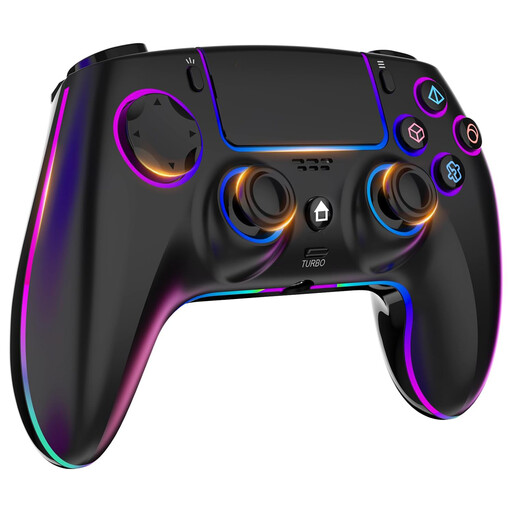
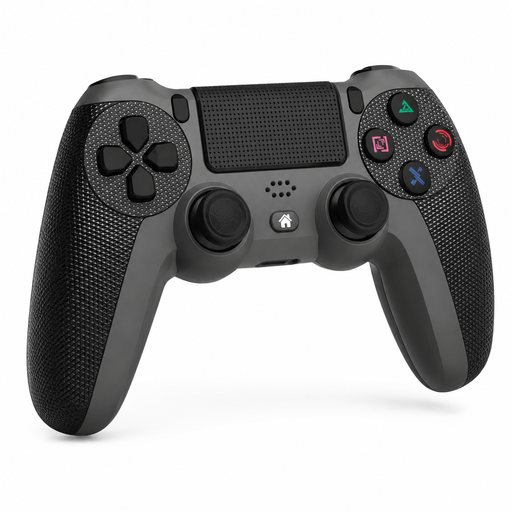
This selection includes wireless controllers for PS4 and PC, as well as a pair of Joy-Con for Nintendo Switch. Before buying, check that your chosen quiz and game mode support the controller.
 No image available
An option to consider if you’re looking for a gamepad for PS4 or PC; check that your chosen quiz supports this input method.
The product name lists 7-colour RGB lighting, dual vibration, turbo, a touchpad, a headphone socket and a 1000 mAh battery.
 No image available
Consider this controller if you’re looking for a gamepad for PS4 Slim or Pro; check that your quiz game supports it as an input device.
The product name lists a touchpad, dual vibration and a turbo function.
 No image available
This pair is a good option if you’re playing Everybody 1-2-Switch! in Joy-Con mode and need more individual controllers than you already own.
The product name lists two Joy-Con for Nintendo Switch in neon green and neon pink. Nintendo says Joy-Con can be used individually; check how many players and controllers your chosen game mode requires.
No, it depends on the game and game mode. With Jackbox, players use an internet-connected device and enter a room code in their browser. Everybody 1-2-Switch! offers both phone and Joy-Con modes, so first count what you already have.
Check your internet connection and the requirements for the device you’re using. Nintendo recommends iOS 14.8 or later and an up-to-date version of Safari for iOS; for Android, Nintendo recommends an up-to-date version of Chrome. Some games require both an accelerometer and a gyroscope, and Nintendo can’t guarantee that every device will work.
Test the screens from your seats when daylight is coming in. You can adjust the brightness on an iPhone or iPad. An anti-reflective screen finish is a feature of certain screen models, not a controller, so changing the controller alone won’t fix reflections.
According to the Dutch government, you’re entitled to a product that works properly, and the seller is your point of contact if there’s a problem. For online purchases from a business, you’ll often also have a 14-day cooling-off period; check the terms and exceptions that apply to your specific purchase.
No, an age rating relates to the game’s content. Nintendo lists PEGI 3 for Everybody 1-2-Switch!; check the rating and content of the game you want to play.