
Family with a Switch quiz
Wants to check before buying whether the quiz supports individual Joy-Con, phones or both as player input.


You don’t automatically need to buy an extra gamepad for every player at a family quiz: with Jackbox, players answer in a browser on a phone or another device, while Nintendo says Everybody 1-2-Switch! offers both a phone-style and a Joy-Con-style mode. Only buy an extra controller if the quiz you choose supports it for answering and it’s compatible with your console or PC; in The Jackbox Party Pack 5 on Switch, Joy-Con only control the menus. Also check the player limit, language options and whether everyone can see the shared screen clearly.
Wants to check before buying whether the quiz supports individual Joy-Con, phones or both as player input.
Wants family members to answer using devices they already own, and checks the game’s browser, connection and player limit.
Looking for an input method that suits the specific quiz and the device they already own, and perhaps other games too.
Start by checking how players answer. Then decide whether phones, individual Joy-Con or a traditional gamepad are right for the game and your group.
Choose this when: the quiz supports answers by phone, as with Jackbox or the phone-style mode in Everybody 1-2-Switch!.
Bear in mind: you’ll need suitable devices and a connection. With Jackbox, the group must be able to see the shared game screen. For The Jackbox Party Pack 5 on Switch, you’ll still need a Joy-Con or Switch Pro Controller to navigate the menus.
Choose this when: the Switch quiz you’ve picked supports a play style using individual Joy-Con.
Bear in mind: the number of controllers you’ll need varies by game and play style; Joy-Con don’t automatically let players enter quiz answers.
Choose this when: the quiz supports gamepad input on your console or PC, and you may also want to use the controller for other games.
Bear in mind: platform compatibility doesn’t prove that a quiz accepts answers via gamepad. A wired PC gamepad also needs a cable that can reach your playing area.
| What to consider | What to look for when buying | Who is this important for? |
|---|---|---|
| Game and device compatibility | Check whether players answer using a phone or gamepad, and whether that input method works with your console or PC. Nintendo says Joy-Con only control the menus in The Jackbox Party Pack 5. | If I’m considering an extra controller, I want to know first whether the quiz accepts answers through it; around 36% of consumers put game and device compatibility first. |
| Multiple players | Count the participants and check the limit for the specific play style. Nintendo lists 2–8 players with Joy-Con and 2–100 with phones for Everybody 1-2-Switch!. | When I want everyone to join in at once, I want to know which input method suits the group; around 29% of consumers give group participation top priority. |
| Language and accessibility | Check which languages are available in the quiz you’ve chosen. Nintendo lists English, French, German, Spanish and Russian for Trivial Pursuit Live! 2. | If I’m playing with people of different ages or language abilities, I want everyone to be able to follow the questions and controls; around 21% of consumers put language and accessibility first. |
| Easy set-up for occasional play | Get the required devices ready in advance and check that everyone can see the shared screen. Jackbox Games highlights the importance of a visible host screen when playing together in the same room. | For a quiz we only set up occasionally, I want to keep preparation to a minimum; around 14% of consumers say easy set-up matters most. |
Nintendo says that in The Jackbox Party Pack 5 on Switch, Joy-Con control the menus but not the quiz answers.
Before buying, check separately how to navigate the menus and how players submit their answers.
The available input method and player limit can vary by play style. Everybody 1-2-Switch! lists different player numbers for Joy-Con and phone modes.
Count the participants and check the limit for the specific game mode before buying extra controllers.
Sony says that downloads of some PlayLink companion apps are restricted on devices running Android versions newer than the limit for that app.
Before buying the game, check that the required app is available for the phone and Android version you plan to use.
According to 8BitDo, the Ultimate 2C Bluetooth version works with Switch, while the Ultimate 2C Wireless is designed for Windows and Android.
Compare the full model name and platform details with the device and game you want to use the controller with.
Worth considering for supported Switch games that use individual Joy-Con; some quizzes also offer a phone-style mode.
An option for games that support the Xbox Wireless Controller, which Xbox says can also be used with Windows, iOS and Android.
The F310 is a wired PC gamepad for games that support gamepad controls on PC.
According to 8BitDo, the Ultimate 2C Bluetooth is a gamepad version designed for Switch.
DualSense is relevant for supported PS5 games; for older PS4 PlayLink quizzes, players use phones or tablets.
These gamepads are intended for quizzes that support controller input on the relevant device. Check compatibility with both the game and your console or PC.
 Image unavailable
A gamepad option for quizzes that support controller input on a listed platform; the description includes Android, PC and Nintendo Switch.
The product name lists Bluetooth 5.2, 2.4G wireless, dual vibration, a turbo function and a detachable phone holder. iOS, Smart TV and PS3 are also listed as compatible platforms.
 Image unavailable
Suitable for a quiz on Switch or PC when the title supports gamepad input.
The product name lists dual vibration, a gyroscope and wireless use; the description also mentions an ergonomic grip.
 Image unavailable
A wired option for quizzes that support gamepad input on Xbox or Windows; the description also mentions Steam.
The description lists Hall Effect sticks and triggers, programmable back buttons, vibration and a detachable USB cable.
 Image unavailable
Designed for quizzes that support gamepad input on Xbox Series X|S, Xbox One, or Windows 10 and 11.
The description lists Hall Effect sticks, vibration, 18 buttons and a detachable 3-metre USB-C cable.
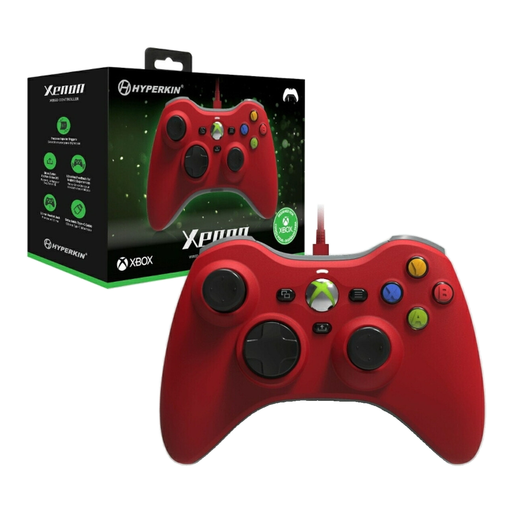 Image unavailable
A wired option for quizzes that support gamepad input on Xbox Series X|S, Xbox One, or Windows 10 and 11.
The description lists vibration feedback, impulse triggers, a Share button, a detachable Type-C cable and a headset socket.
No. According to Jackbox Games, players answer in a browser on a phone or another internet-connected device. For The Jackbox Party Pack 5 on Switch, you do need a Joy-Con or Switch Pro Controller to navigate the menus, but you don’t use it to play the quiz itself.
According to Nintendo, you can play in Joy-Con style without an internet connection. The phone-style mode requires an active internet connection for communication between the Switch and players’ devices.
Position the shared screen so everyone can see the questions, and try out the set-up in advance where you plan to play. Jackbox Games highlights the importance of a visible host screen when playing together in the same room.
Pair them in advance, check the battery charge and make sure the game supports the play style you need. Nintendo says a full charge takes around 3.5 hours and provides up to 20 hours of continuous use, depending on the software and how you use them.