Who is this guide for?

Family with limited space

Wants to enjoy a quiz around the sofa without everyone having to move about or a cable crossing the walkway. Nintendo and Jackbox describe game modes that use phones as well as controller options; check how much movement each game requires.

Switch family who enjoy quizzes together

Wants to know whether the Joy-Con they already have will do the job and whether the chosen game mode requires them. Nintendo describes a Joy-Con style for 2–8 players in Everybody 1-2-Switch!; another gamepad won’t automatically work with this style.

Family with children and phones

Wants to let several players answer and is considering the devices, question language and game content. Nintendo warns that not every smart device is guaranteed to work; Jackbox Games notes that not every game has a content filter.

What should you consider when choosing?

Smartphone as a quiz controller

Choose this if: the quiz supports phone controls and players have a suitable device.

Bear in mind: you’ll need a host screen that everyone can see, and there may be internet or device requirements.

Original Nintendo Switch Joy-Con

Choose this if: your Switch game has a Joy-Con game mode or requires individual Joy-Con controllers.

Bear in mind: some minigames involve movement; use the wrist straps when playing wirelessly.

Standard button gamepad

Choose this if: the quiz supports standard gamepad controls and you want to play while seated.

Bear in mind: check compatibility with the exact game mode; a wired model also needs a safe cable route.

Consideration What should you check? Who should consider this?
Playing while seated in a narrow room Check the controls for the exact game mode and how much movement the minigames involve. If you’re considering a wired controller, check the cable route too. I want to keep the walkway clear and would rather play seated; around 25% of consumers cite limited room to move as their main buying concern.
Compatibility with the quiz and console Check your console model and the controls required for the quiz mode you’ve chosen. Joy-Con 2 doesn’t work with the original Switch. I want to know in advance whether my controller will work with both my console and the quiz; around 25% of consumers put compatibility first.
Getting everyone involved Check the player limit for the game mode and count the controllers or suitable phones you already have. Make sure everyone can see the host screen. I want everyone in the family to be able to join in at the same time; around 20% of consumers start by checking how many players the quiz needs to support.
Question language and content for children Check the language and age rating for the exact game, and whether a content filter is available. Not every Jackbox game has one. I want questions and content that suit my family; around 15% of consumers make language and suitability for children their top priorities.
A complete gaming set-up Check which console, game and controllers you already have. With Jackbox, the host needs a separate device to enter their own answers. I want to make use of the devices and controllers I already own before buying anything else; around 15% of consumers focus on what the complete set-up requires.

Common buying mistakes

  • Buying a controller before deciding on the quiz and game mode

    Everybody 1-2-Switch! has a Joy-Con style and a phone style. So a standard gamepad won’t necessarily work for every activity.

    First decide which quiz activities you want to play, then check which controls they support.

  • Assuming a wired controller will save space

    According to PowerA, the PowerA Enhanced Wired Controller we looked at only works with a docked Switch and has a 3 m cable. In a narrow room, that cable could cross the walkway.

    Check that your Switch is docked and that you can route the cable safely around the seating; otherwise, consider a supported wireless or phone option.

  • Treating Joy-Con and Joy-Con 2 as interchangeable

    Nintendo says Joy-Con 2 doesn’t work with the original Switch. Original Joy-Con can connect wirelessly to Switch 2, but they won’t charge when attached to that console.

    Check your exact console model and think about how you’ll charge original Joy-Con if you use them with Switch 2.

    You may need a separate charging solution to charge them with Switch 2.

  • Assuming a content filter makes every quiz suitable for children

    Jackbox Games says that not all of its games have a family-friendly filter. A PEGI age rating indicates whether the game’s content is suitable, not how difficult the questions are.

    Before children join in, check the exact game, question language, age rating and available settings.

Relevant brands and games

Nintendo

Relevant for Switch games with Joy-Con controls, including Everybody 1-2-Switch!

  • Nintendo describes Joy-Con controllers that can be used separately; Everybody 1-2-Switch! also has a phone style.
  • The Joy-Con style includes active minigames too. Original Joy-Con won’t charge when attached to a Switch 2 console.

8BitDo

The Lite 2 is a compact gamepad option for games that support standard controller controls.

  • According to 8BitDo, the Lite 2 works in S mode with Switch, Switch Lite and Switch OLED, and has motion controls.
  • According to 8BitDo, features including HD rumble and NFC aren’t available on Switch. Check compatibility with the specific quiz.

PowerA

Its range includes the wireless Nano Enhanced and a wired Enhanced Wired Controller for different Switch set-ups.

  • According to PowerA, the Nano has motion controls.
  • The Nano we looked at doesn’t have HD rumble, IR or amiibo NFC. The wired version we looked at only works with a docked Switch, has no motion controls and isn’t designed for games that only use Joy-Con.

Jackbox Games

An option for quizzes where players use their own devices to join with a room code.

  • According to Jackbox Games, only one person in the group needs to own the game; everyone playing needs to be able to see the host screen.
  • Check the language and content filter for the specific game; not every game has one.

Joybuy products for wireless gaming

This selection features wireless gamepads for Switch set-ups. Before buying, check whether your quiz and game mode support standard gamepad controls; a wireless gamepad won’t automatically replace a required Joy-Con.

Turtle Beach Afterglow Wave wireless controller for Nintendo Switch

Turtle Beach Afterglow Wave Wireless Controller

A wireless controller option if you want to use a physical gamepad without a cable between the controller and console; check your quiz’s control requirements.

The product information lists Bluetooth, motion detection and battery life of up to 40 hours. The product name mentions Nintendo Switch 2, Switch, Switch Lite and Switch OLED.

Joybuy
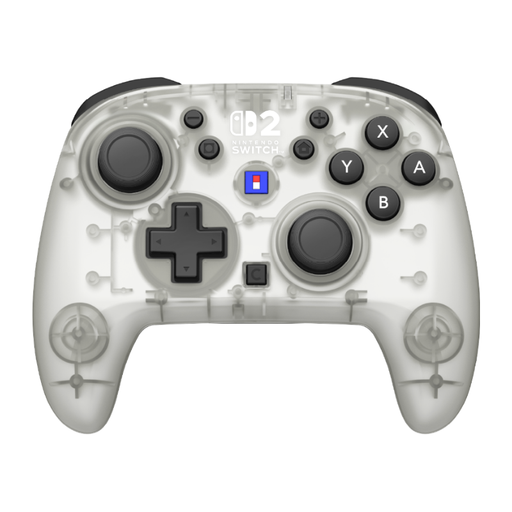
Hori Horipad Turbo Frost wireless controller

Hori Horipad Turbo Frost Wireless Controller

A wireless gamepad to consider if the quiz supports standard controller controls; check your console and game mode before choosing.

The product name mentions Nintendo Switch and Switch 2, and battery life of 10 hours. The product information lists motion sensors and programmable buttons.

Joybuy

Turtle Beach Rematch Super Mario Jump wireless controller

Turtle Beach Rematch Super Mario Jump Wireless Controller

A wireless controller to consider if your quiz supports a standard gamepad; don’t assume it will replace a controller in a Joy-Con-only game mode.

The product name mentions Nintendo Switch 2 and Switch OLED, and battery life of 40 hours. The product information lists a C button for GameChat and two programmable buttons.

Joybuy
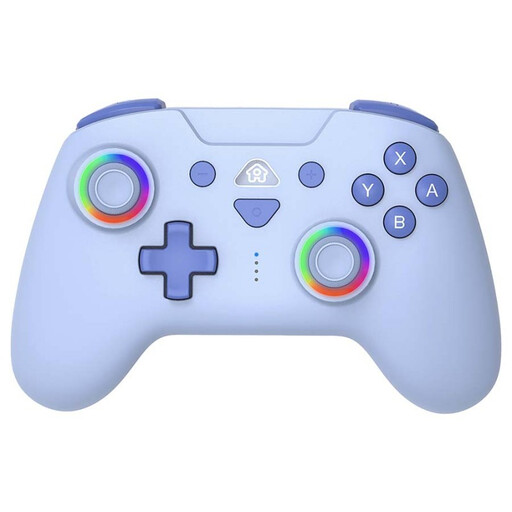
SUBSONIC wireless controller for Switch and Switch Lite, blue

SUBSONIC Wireless Controller for Switch & Switch Lite with LED, Blue

A wireless option if you want to play with a physical controller; check that your chosen quiz and game mode support these controller controls.

The product name mentions Switch and Switch Lite. The product information lists Bluetooth, motion sensors, adjustable vibration levels and programmable buttons.

Joybuy
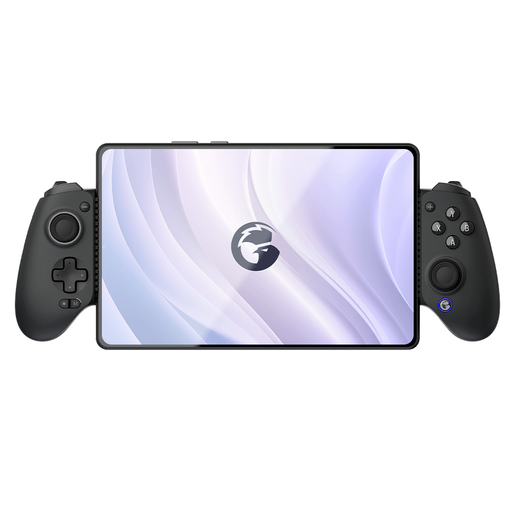
GameSir G8 Galileo Plus Bluetooth game controller

GameSir G8 Galileo Plus

A controller to compare if you’re looking for a physical gamepad; check the exact quiz, game mode and device you want to play on.

The product name and product information list Bluetooth and support for Switch, iOS, Android, tablets and PC, among other devices. The product information also lists a telescopic phone holder and Hall Effect sticks.

Joybuy

Frequently asked questions

Can everyone join in on a phone without extra controllers?

It depends on the game. In Jackbox, players enter a room code and look at the host screen. Everybody 1-2-Switch! has a phone style that requires an active internet connection; check the requirements for the devices being used in advance too.

Will a standard gamepad work with every Everybody 1-2-Switch! game?

No, don’t assume it will. Nintendo distinguishes between a Joy-Con style and a phone style; before buying another gamepad, check which controls are needed for the activities you want to play.

How can I play wirelessly with Joy-Con in a small room?

Nintendo recommends attaching the wrist straps when using Joy-Con wirelessly. Choose activities that give you enough room to move too, as the Joy-Con style in Everybody 1-2-Switch! includes energetic minigames.

Can I use Joy-Con 2 with the original Nintendo Switch?

No. Nintendo says Joy-Con 2 can’t connect to an original Nintendo Switch. Original Switch Joy-Con can connect wirelessly to Switch 2, but they won’t charge when attached to that console.

What should I consider if children are joining in?

Check the language, age rating and settings for the specific game. Jackbox Games says that not every game has a family-friendly filter; a PEGI rating indicates whether the content is suitable, not how difficult the quiz questions are.
