What should you consider?
First, check which input method the quiz uses. Then make sure your console and the number of players taking part at the same time are compatible with those controls.
| What to consider |
What should you check? |
Who is this important for? |
| Game and console compatibility |
Check your console version and which controllers or input methods the specific quiz supports. |
If I want to use the console I already own, I want to avoid finding that its controls aren’t compatible with the game; around 31% of consumers prioritise compatibility between the quiz and console. |
| Input for all players |
Count the players and check the quiz’s player limit and controller instructions. |
If everyone wants to answer at the same time, I check how many separate input devices are needed; around 25% of consumers prioritise having enough input devices for all players. |
| Living room setup |
Check that everyone can see the host screen from their seats and whether the quiz requires any features of the chosen controller. |
In a small living room, I want a clear view of the screen without having to set out lots of separate devices; around 19% of consumers focus on keeping their setup compact. |
| Avoiding extra hardware |
Check whether players can use a phone and whether the host needs a separate device to enter answers. |
If I already have suitable phones, I don’t want to buy gamepads the quiz doesn’t need; around 25% of consumers are mainly looking to avoid an unnecessary purchase. |
Joybuy controllers for Switch quizzes
This selection focuses on physical controllers for quizzes on Nintendo Switch systems. Check which console versions and input methods are supported for each product and quiz.
 No image available
KONIX Nintendo Switch and Switch OLED JoyPad Controller Pair – Blue and Red
A pair of physical controllers may suit a quiz where two players need separate input, provided the game and console are compatible.
The product name lists compatibility with Nintendo Switch 2, an 8-hour battery life and a vibration function.
Joybuy
 No image available
Nintendo Switch Joy-Con Pair – Neon Green/Neon Pink
A pair of Joy-Cons can provide two separate input devices for quiz games that support these controls; check the instructions for the title you’ve chosen.
The product name lists a pair of Joy-Cons for Nintendo Switch.
Joybuy
 No image available
Nintendo Switch 2 Joy-Con 2 Pair – Light Blue/Light Red
This pair is designed for a quiz that supports Joy-Con 2 on Switch 2; Nintendo says Joy-Con 2 does not work with the original Switch.
The product name lists a pair of Joy-Con 2 controllers for Nintendo Switch 2.
Joybuy
 No image available
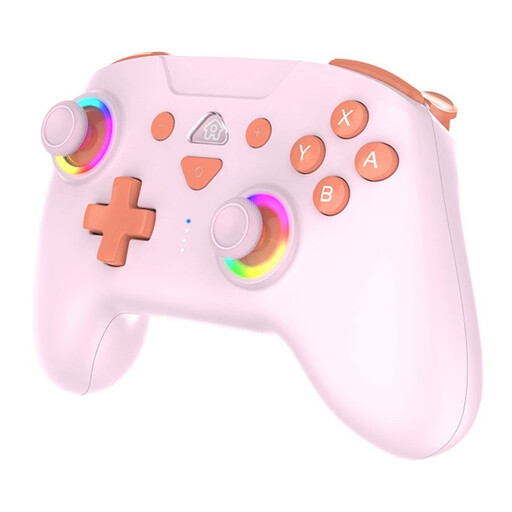
SUBSONIC Wireless Controller SW2 & SW with LED – Pink
An option for one player who prefers a physical controller. For everyone to answer at the same time, there must be enough separate input devices, and the quiz must support this controller.
The product name mentions SW2, SW and LED.
Joybuy
 No image available
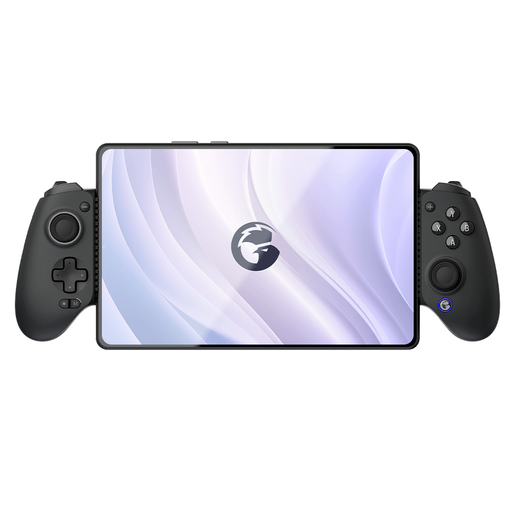
GameSir G8 Galileo Plus Bluetooth Wireless Mobile Game Controller
A mobile controller to consider when the quiz and device you’re using support this combination; check compatibility with the specific title.
The product name mentions Switch, iOS, Android, tablet and PC.
Joybuy
Frequently asked questions
Can everyone answer a Jackbox quiz on a phone?
Yes. In Jackbox games that support this input method, players can join in at jackbox.tv using the room code. Make sure the host screen is visible and check the player limit for the title you’ve chosen. If the host is playing on a laptop, they’ll need a separate device to enter their answers.
How do you charge extra Joy-Con 2 controllers?
Nintendo says you can charge Joy-Con 2 controllers while they’re attached to a powered Switch 2, or by using a separately sold Joy-Con 2 charging grip. The standard grip doesn’t charge them, so check which accessories are included in the bundle you’ve chosen.
Is a family-friendly filter enough for every Jackbox quiz?
No. Jackbox Games says most, but not all, games have a family-friendly filter. Check the content of the specific title and use its PEGI rating as an indication of age suitability; it doesn’t tell you how difficult the game is.
What are your rights in the Netherlands if a controller bought online is faulty?
According to the Dutch government, the seller must provide an appropriate solution for a faulty product under the statutory guarantee. For online purchases from a business, you’ll often also have a 14-day cooling-off period; check the applicable terms and exceptions.


