
Family with seats spread around the room
Wants to answer from their own seat without aiming at a sensor bar. Choose the controls once you’ve settled on a quiz. For example, Jackbox Games describes using a phone browser as the controller.


Start by choosing the quiz and gaming system: some games use phones to enter answers, while Big Brain Academy: Brain vs. Brain specifies one Joy-Con per player for local play. If you’re sitting at an angle to the TV, using a phone or buttons is usually more practical than pointing at the screen. Also check how many players the game supports and whether it requires an app or a specific connection.
Wants to answer from their own seat without aiming at a sensor bar. Choose the controls once you’ve settled on a quiz. For example, Jackbox Games describes using a phone browser as the controller.
Wants to check whether their existing Joy-Cons will do the job and how many controllers the local quiz requires. Nintendo Netherlands says Big Brain Academy: Brain vs. Brain supports up to four players, with one Joy-Con each.
For example, they have a PS4 or Wii and want to check in advance whether the required app works or whether pointer controls suit the seating arrangement. PlayStation and Nintendo each outline their own requirements for these older gaming options.
Choose this when: the quiz supports phone input and everyone has a suitable device with internet access. According to Jackbox Games, players use a browser-based controller for Jackbox games.
Bear in mind: everyone needs to be able to see the shared screen. Also check the language of the specific game.
Choose this when: the game supports Joy-Cons. Nintendo specifies one per player for Big Brain Academy: Brain vs. Brain.
Bear in mind: the number of players and the connection setup determine how many controllers you need.
Choose this when: both the quiz and the console or PC support standard gamepad input.
Bear in mind: compatibility with one platform doesn’t automatically mean a gamepad will work with every quiz.
Choose this when: the game and the required companion app work on all the phones or tablets you plan to use.
Bear in mind: since 14 December 2023, PlayStation has warned of restrictions on downloading certain companion apps on newer versions of Android.
Choose this when: you already play a Wii quiz and the seating arrangement works well with pointer controls.
Bear in mind: Big Brain Academy for Wii asks players to point at their answers, which may be less practical from an angled seat.
| What to consider | What to check before buying | Who is this important for? |
|---|---|---|
| Quiz and platform compatibility | Check the specific game, console and supported input method. | If I’m not sure whether my quiz accepts phones, Joy-Cons or standard gamepads, I want to find out before buying. Around 31% of consumers prioritise compatibility with their game and console. |
| Controls from the side | Check whether you enter answers using buttons or a phone, or need to point at the screen. | If I’m sitting beside the TV, I want to answer without having to aim precisely at the screen. Around 25% of consumers prioritise controls that work from an angled seat. |
| Devices for every player | Count the players and check how many input devices the game requires. | If everyone in the family wants to play at the same time, I want to know how many controllers the quiz actually needs. Around 25% of consumers prioritise being able to include all players. |
| Setup and power | Check whether you need an app, a network connection, batteries or charging. | If I want to start the quiz without any unexpected setup, I’ll check the apps and power requirements in advance. Around 19% of consumers prioritise an easy setup. |
Some quizzes use phones as controllers, so an extra gamepad won’t replace that input method.
Check the game information first to see whether players use a browser, an app or a gamepad.
Big Brain Academy for Wii asks players to point at their answers. That’s different from using buttons while sitting beside the TV.
If you have a Wii, try it from the actual seats and check that the sensor bar is positioned correctly. For cursor problems, Nintendo recommends playing directly in front of the TV and checking the sensor bar.
The app is required for the relevant quiz. PlayStation warns of restrictions on downloading certain companion apps on newer versions of Android.
Check the app on all the phones or tablets players want to use before relying on this gaming option.
A game you’ve bought may be unusable for players who can’t use the required app.
The number of controllers a Switch can connect isn’t the same as the number of players a quiz supports. Nintendo says Big Brain Academy: Brain vs. Brain supports up to four players.
Check the game’s player limit and the connection setup before choosing extra controllers.
Joy-Cons for supported local Switch games and Wii Remotes for existing Wii quizzes that use pointer controls.
Wireless gamepads for supported Xbox, Windows PC and mobile games.
Switch gamepads, including a compact Nano Enhanced Wireless Controller and a separate Wireless Controller.
Alternative Switch gamepads, including the Ultimate 2C Bluetooth Controller.
PlayLink uses phones or tablets as input devices for compatible PS4 games, including Knowledge is Power.
These gamepads are intended for quizzes that support input from a standard controller. For each model, check that it works with your console or PC and with the input method used by your chosen game.
 No image available
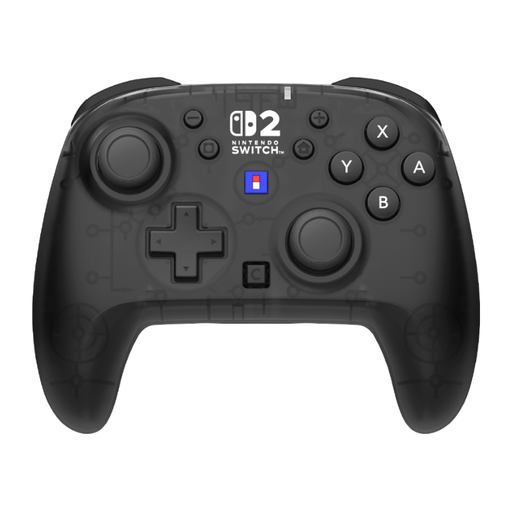
A wireless gamepad for quizzes that support gamepad input on Switch or Switch 2.
The product description lists programmable rear buttons and a rechargeable battery. The title specifies a C button and a 10-hour battery life.
 No image available
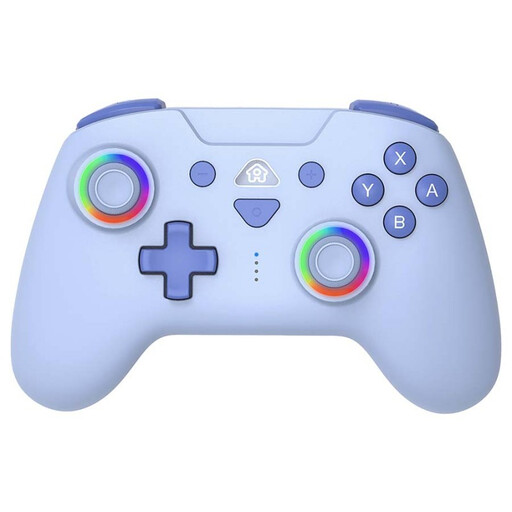
Could suit a quiz that supports gamepad input on Switch or Switch Lite; check compatibility with the game separately.
The description lists Bluetooth, a rechargeable battery and a turbo function. The title specifies a blue version with LED lighting.
 No image available
An option for quizzes that support gamepad input on PS4 or PC; check support for the specific game.
The product description lists a touchpad and a 6-axis gyroscope.
 No image available
Could suit a quiz that supports gamepad input on Switch or PC; the title alone doesn’t confirm compatibility with a particular game.
The product description lists Bluetooth, a 6-axis gyroscope and a rechargeable battery. The title specifies dual vibration.
 No image available
A gamepad for quizzes that accept controller input on a supported platform; check game compatibility and the connection you plan to use.
The description lists wired, wireless and Bluetooth connections. The title specifies six programmable buttons and support for PC, Nintendo Switch, Switch 2, Steam and Android.
Not for a quiz where answers are entered on a phone or using buttons, although everyone still needs to be able to see the shared screen. Sitting at an angle can be more difficult for a Wii quiz that requires you to point at the screen. For cursor problems, Nintendo recommends playing directly in front of the TV and checking the sensor bar.
For Big Brain Academy: Brain vs. Brain, Nintendo specifies one Joy-Con per player for games with up to four players. Check that the controllers are paired and charged. Nintendo also says that when Bluetooth audio is connected, a maximum of two wireless controllers can be connected.
No. An extra gamepad won’t replace the players’ input devices: they use the companion app on a phone or tablet. PlayStation says a DUALSHOCK 4 is needed for PS4 setup and system functions. Check in advance that the app works on all the devices players want to use.
According to the Dutch government, when you buy from a professional seller at a distance, you usually have a 14-day cooling-off period; an online purchase from a private seller isn’t necessarily covered by the same rules. If a product is faulty, the seller must offer a solution under the statutory guarantee. Check the terms that apply to the specific purchase.
For discarded devices that need mains power or batteries, the Dutch government lists collection points and municipal recycling centres among the options. You can take used loose batteries to a designated collection point.