
Researcher sharing a room
You’re looking up family records while someone else works or rests in the same room. Quiet buttons may matter more than extra features; Logitech and CHERRY describe specific mouse models with quiet buttons.


If you share a room, start with the click noise. For longer sessions, finding a comfortable fit and varying your working position matter more than extra features. Then check whether Bluetooth, a USB receiver or a cable will work with your computer. A trackball needs less room to move, while a compact mouse is easier to carry around. Manufacturer specifications tell you what a mouse can do, not how comfortable it will feel in your hand.
You’re looking up family records while someone else works or rests in the same room. Quiet buttons may matter more than extra features; Logitech and CHERRY describe specific mouse models with quiet buttons.
You spend a lot of time searching, clicking and reading, and want a shape that suits your hand. Arboportaal describes repetitive actions and static strain when working at a screen; a particular mouse shape is no guarantee against discomfort.
You work in a small space and are weighing up a compact mouse you can take with you against a stationary trackball that you don’t need to move across the desk. Trust and Kensington describe these different designs.
Start with the thing you notice most day to day: noise, fit, connection, scrolling or power.
| What to consider | What to look for | Who should pay extra attention? |
|---|---|---|
| Click noise | Check that the specific version you’re considering has quiet buttons; don’t assume it does just because it’s described as ‘wireless’. | If I’m working next to someone I share a room with, I want to click a lot without making a distracting noise; around 28% of consumers put quiet operation first. |
| Fit | Compare the shape and button reach, and check whether there’s a version suited to left- or right-handed use. | For long research sessions, I want a mouse that suits my hand; around 22% of consumers prioritise hand comfort. |
| Connection and space | Check how the exact version connects and which ports your computer has. | At a small desk, I don’t want to run short of ports or room to move; around 22% of consumers therefore look at the connection and workspace first. |
| Document navigation | Think about whether you mainly scroll vertically or also move across wide documents; check which features work without additional software. | When I’m working through long archive pages, I want to navigate smoothly; around 17% of consumers give scrolling the highest priority. |
| Power | Check whether the mouse uses a replaceable battery, a built-in rechargeable battery or a USB cable. | I want to know in advance whether I’ll need to replace batteries or charge a device; for around 11% of consumers, this is their first buying priority. |
A Bluetooth mouse can connect directly to a computer that supports Bluetooth; other wireless versions use a USB receiver.
Check how the specific mouse connects and whether your computer is compatible.
According to Logitech, the Logitech Lift is designed for small to medium-sized hands and is also available in a left-handed version. A vertical shape may take some getting used to.
Compare the version with your hand size and preferred hand, and take breaks from prolonged screen work.
A mouse with a replaceable battery will need a battery change eventually; a wired mouse, on the other hand, has a cable.
Weigh up replacing batteries against using a cable or charging the mouse, and check which ports your computer has.
Logitech offers a range of models, from a compact Bluetooth mouse to a vertical mouse and a model with more advanced scrolling.
According to Trust, the Ozaa Compact is a compact mouse with quiet buttons, available with a choice of Bluetooth or a 2.4 GHz receiver.
Orbit trackballs offer a stationary way to control the cursor if you have little room to move a regular mouse.
The GENTIX SILENT is a wired option if you want quiet buttons without having to set up a wireless connection.
These mice are suited to quiet operation, scrolling through long documents and working in a compact space; there’s also a vertical option.
 No image available
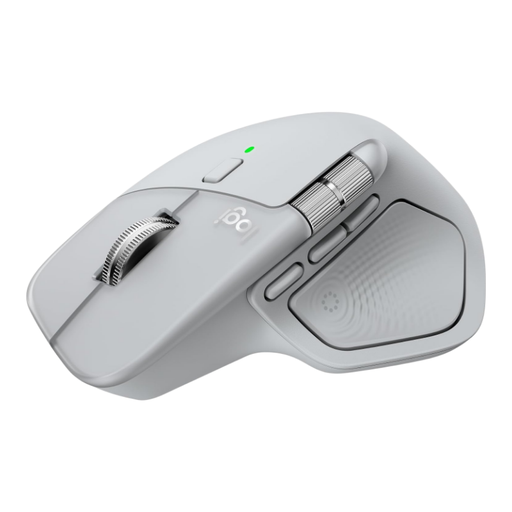
An option to consider if you work through long archive pages and will make good use of the extra scrolling features.
Logitech lists MagSpeed scrolling; some customisation options require Logi Options+ on Windows or macOS. The design described is for right-handed use.
 No image available
A compact option to consider if quiet clicks matter in a small workspace.
The product name lists quiet operation, 2.4G+BT, adjustable DPI and one AA battery. Check which connection type works with your computer.
 No image available
A compact mouse to consider if you’re looking for quiet operation in a shared or small workspace.
The product information lists Dell Peripheral Manager for changing settings. Check in advance that the ports and software will work with your computer.
 No image available
A compact option if you want quiet clicks and use or carry your mouse in a small space.
The product name lists quiet buttons and multi-device use. Using the USB receiver requires a USB-A port; the product information lists one AA battery.
 No image available
A vertical design to consider if you find this way of using a mouse comfortable during longer research sessions.
This version is for right-handed use and is described as suitable for small to medium-sized hands. The vertical design may take some getting used to; an ergonomic shape is no substitute for varying your position during prolonged screen work.
No. According to Logitech, the Logitech M240 pairs directly via Bluetooth, without a dongle. Check that your computer supports Bluetooth, though; other wireless versions may use a USB receiver.
No, not for regular scrolling with a scroll ring or wheel. According to Logitech, some MX Master 4 customisation options require Logi Options+; check that the software supports your operating system.
According to ACM ConsuWijzer, if a product doesn’t perform as you could reasonably expect during normal use, the seller must put things right free of charge. This could mean a repair, replacement or refund. In the Netherlands, there isn’t one fixed statutory warranty period that automatically applies to every mouse.
For online consumer purchases, there is usually a statutory 14-day cooling-off period from delivery. ACM ConsuWijzer also explains the conditions and exceptions around trying out a product; check these before doing more than is necessary to assess the mouse.
According to the Dutch government, when you buy a new, similar device, you can return your old mouse to the seller free of charge, including when you buy online. Loose used batteries must not go in the rubbish bin; you can take them to shops that sell batteries, among other places.