For a growing archive of source footage and multiple project versions, a high-capacity HDD is a sensible choice. If you regularly edit directly from the drive, an SSD may suit you better. Add up the space needed for source files, project folders and exports, check the connection and formatting, and keep a separate, up-to-date backup too. SSD speeds quoted by manufacturers are based on their own tests and also depend on your computer and how you use the drive.
Who is this choice for?
Family film collector
You keep original footage, finished films and different project versions, and want to stay organised while leaving room for your archive to grow. SeniorWeb and Seagate highlight storage choice and capacity as important considerations.
Regular video editor
You often open or move large project files and weigh up drive speed against available storage space. Kingston and Samsung provide model specifications for their portable SSD ranges.
Guardian of irreplaceable footage
You want to be able to recover files if a device is lost or damaged, so you don’t treat your working drive as your only copy. VeiligInternetten and the Consumentenbond describe backups as copies used for recovery.
Which buying considerations matter?
Portable external HDD
A good fit if: you mainly want to store lots of source material and finished project versions, and rarely edit directly from the external drive.
The trade-off: an HDD is more vulnerable to knocks and slower than an SSD. Check the connection on the specific model and whether it needs formatting for a Mac.
Portable external SSD
A good fit if: you regularly transfer large files, open project versions from the drive or often take it with you.
The trade-off: SSD storage usually costs more per unit of capacity. Actual speed depends on factors including the USB port, computer and workload, and an SSD is no substitute for a separate backup.
| Consideration |
What to look for when buying |
Who is this important for? |
| Space for source footage and versions |
Compare the capacity with the source files, project folders and exports you want to keep. |
If I need to fit source footage, project folders and exports alongside one another, I count more than just the finished films. Around 36% of consumers give archive space top priority. |
| A recoverable copy |
Plan a separate, up-to-date copy and check that you can restore a file or project version. |
When footage can’t be recreated, I don’t want to depend on a single device. Around 29% of consumers put recoverability first. |
| Speed when copying and editing |
Check that both the drive and your computer’s USB port are suitable for the way you plan to use them. |
If I regularly work from the external drive, I pay attention to speed and the connection. Around 21% of consumers give a fast working drive top priority. |
| Connection and system compatibility |
Check the supplied cable, the ports on your devices and the file system before copying files or formatting a drive. |
If I want to use files on different computers, I check the connections and formatting first. Around 14% of consumers put system compatibility first. |
Common mistakes when buying an external drive
-
Only counting finished films when working out capacity
Source footage, project folders and saved versions also take up space. List the folders you want to keep before choosing a capacity.
-
Using your working drive as your only backup
Extra space on a single drive won’t prevent data loss if it fails or goes missing. Keep an up-to-date copy somewhere separate and try restoring a file. VeiligInternetten describes a backup as a copy for recovery, for example if a device is lost.
-
Assuming a quoted peak SSD speed is the speed you’ll get in practice
Kingston says that speed depends on factors including the host, software and how the drive is used. Compare your computer and cable’s USB specifications with those of the drive, and choose based on your workload rather than the highest number alone.
-
Assuming every portable HDD works with a Mac straight away
Toshiba says the Canvio Basics is formatted with NTFS for Windows and needs reformatting for macOS. Check the formatting of the exact model and make another copy of your files before reformatting.
Allow time for reformatting and check in advance where you can safely store your files.
Brands to consider as a guide
Seagate
Expansion Portable is a compact, USB-powered HDD range. Seagate lists the STKM5000400 model with 5 TB.
- Seagate says this range doesn’t need a separate power supply.
- The data sheet says that using it with Time Machine requires reformatting. Any recovery service is no substitute for your own backup.
Toshiba
Canvio Basics is a portable HDD range. The EMEA product page includes the HDTB540EK3CA with 4 TB.
- Toshiba describes it as connecting with a single USB cable.
- Toshiba says the drives are pre-formatted with NTFS for Windows; reformatting is needed for macOS.
Kingston
XS1000 is a compact external SSD range. The data sheet lists the black SXS1000/2000G with 2 TB.
- Kingston quotes maximum read and write speeds of 1.050 MB/s and 1.000 MB/s respectively for this model, and lists a USB-A cable with a USB-C adapter.
- These are manufacturer figures. The data sheet says speeds vary depending on the host and usage; USB 3.2 Gen 2 is needed for optimum speed.
Samsung
T7 Shield is a portable SSD range. Samsung identifies the black MU-PE2T0S/EU as a 2 TB model.
- Samsung quotes maximum read and write speeds of 1.050 MB/s and 1.000 MB/s respectively for this model, and lists IP65 protection.
- These are manufacturer figures for this model. They don’t prove that the drive will reach those speeds in all conditions or that a separate backup is unnecessary.
Joybuy products for archiving and editing
This selection includes external HDDs for archive storage and external SSDs for those who regularly move or edit project files.
 Image unavailable
WD Elements Portable 5 TB USB-C
For a portable archive of source footage, project folders and exports; the stated capacity is 5 TB.
View at Joybuy
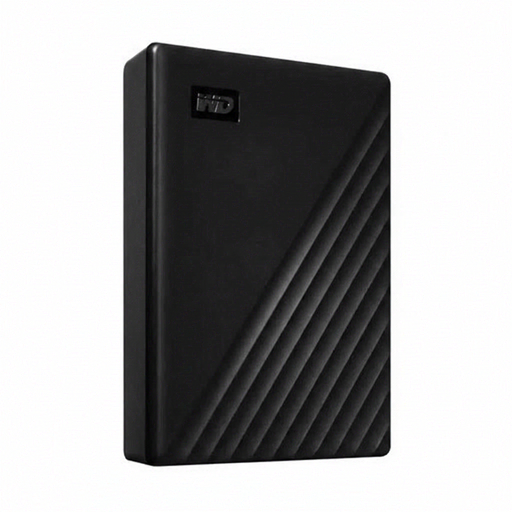 Image unavailable
Western Digital WD Elements Desktop 24 TB, USB 3.2 Gen 1, 3,5 inch
For a large archive kept in one place; this model offers 24 TB of storage and an external power adapter.
The product name lists USB 3.2 Gen 1 and a 3,5-inch enclosure.
View at Joybuy
 Image unavailable
Toshiba Canvio Basics 4 TB, USB Type-A
For storing source material and project versions on a portable HDD; the stated capacity is 4 TB.
The product name lists USB Type-A and Micro-USB B, with USB 2.0 and USB 3.2 Gen 1 specifications.
View at Joybuy
 Image unavailable
Samsung MU-PG2T0B 2 TB USB Type-C, black
For regularly working with project files from an external SSD; the stated capacity is 2 TB.
The product name lists USB 3.2 Gen 2x2.
View at Joybuy
 Image unavailable
Samsung MU-PE2T0R 2 TB USB Type-C, blue
For regularly working with project files from an external SSD; the stated capacity is 2 TB.
The product name lists USB 3.2 Gen 2.
View at Joybuy
Frequently asked questions
Is one external drive enough for your family films?
Not if it’s your only copy. Keep a separate, up-to-date backup and check that you can recover your files; VeiligInternetten describes a backup as a copy for recovery, for example if a device is lost.
Can you use a new external drive with Mac and Windows straight away?
Check the exact model and its formatting before transferring files. Toshiba says Canvio Basics comes pre-formatted with NTFS for Windows and needs reformatting for macOS; make sure your files are stored elsewhere before reformatting.
Will you always get the quoted SSD speed?
No. The quoted speed doesn’t guarantee the performance you’ll get on your computer. Kingston says that speed depends on factors including the host and how the drive is used; also check that your USB connection is suitable.
How do you safely disconnect an external drive in Windows?
First use the Safely Remove Hardware feature, then disconnect the cable. Microsoft recommends this step to prevent data loss.
What warranty applies in the Netherlands if your external drive breaks?
In the Netherlands, products must be fit for purpose; the Government of the Netherlands states that there is no fixed statutory warranty period. The appropriate solution depends on the circumstances and the product.


