
Calling alone at the table
You’re calling family on your own and want to make sure your voice comes through clearly. Check the connection type and look for a microphone that’s easy to control.


If you’re the only person on the call, choose a headset that connects to your calling device and has an easy-to-use mute control. If several family members want to join in around the table, a speakerphone designed for table use may suit your setup better than a personal headset. A wired connection means you don’t need to charge your headset, but it limits how far you can move; wireless calls require pairing and charging.
You’re calling family on your own and want to make sure your voice comes through clearly. Check the connection type and look for a microphone that’s easy to control.
Several people will be speaking around one device. Consider whether a table speakerphone is better suited to your shared setup than a personal headset.
You want to be able to move around during the call, and are happy to manage Bluetooth pairing and charging.
A good fit if: you’re sitting at the table on your own and want to call without charging your headset.
Things to consider: the cable limits how far you can move, and the microphone is designed for the wearer.
A good fit if: you want to get up during a call and your calling device supports Bluetooth.
Things to consider: you’ll need to manage the connection and battery charge.
A good fit if: several people are joining the call from the same table.
Things to consider: the conversation will be audible in the room. For the Jabra Speak2 40, Jabra recommends placing it in the centre of the table, 0.5 to 2.3 m from each participant.
| What to consider | What to look for when buying | Who should prioritise this? |
|---|---|---|
| Voice clarity | Check the microphone position and mute control, and make sure the correct microphone is selected in your calling app. | If I’m calling on my own, I want my voice to come through clearly, even with kitchen noises in the background; around 30% of consumers prioritise voice clarity. |
| Several voices | Decide how many people will be speaking, then check the microphone range and placement instructions for your chosen model. | If more family members want to join in from the same table, I’m looking for a setup that works for several speakers; around 30% of consumers prioritise this. |
| Connection | Check the exact model variant, the ports on your phone or computer, and the audio settings in your calling app. | I want to know in advance whether my calling device can use the headset; around 20% of consumers prioritise the right connection. |
| Freedom to move | Check the cable length or wireless connection, and for wireless models, check the stated talk time. | If I want to get up during a call, a cable may be inconvenient; around 10% of consumers prioritise freedom to move. |
| Controls and comfort | Check where the mute control is and whether the headset feels comfortable to wear for the length of your calls. | If I want to mute the microphone quickly and wear the headset for longer periods, I look for easy controls and a comfortable fit; around 10% of consumers put these features first. |
The microphone boom on a personal headset is designed for the wearer. It’s not the same as a device intended for several people speaking around a table.
Before choosing, decide whether one person or several people will be speaking through the same setup.
The Logitech H390 variant described here has USB-A, but product pages may also show other connection options.
Check the connection on the exact version and make sure it matches the port on your calling device.
Manufacturers’ product descriptions don’t prove how a microphone will perform in your kitchen.
Check the microphone position and audio settings and, if possible, make a test call.
The H390 reviewed here is a wired USB headset for one speaker; the Zone 300 is a wireless Bluetooth option for one speaker.
The Ayda USB-ENC reviewed here is a wired on-ear headset for PC use, with a microphone boom and mute function.
The Speak2 40 is a speakerphone for sharing, while the Evolve2 30 SE is a personal headset.
The Blackwire 3320 version reviewed here, 8X220AA, is a wired stereo headset with a USB-C cable and USB-A adapter.
These Joybuy picks are personal headsets for one speaker, with both wired and wireless options.
 No image available
Suitable for computer calls where one person speaks and an adjustable microphone boom is important.
Wired; designed to connect to a USB port on your computer.
 No image available
A wired stereo headset for anyone who wants to make calls using USB.
The connection listed is USB; check that it’s compatible with your calling device.
 No image available
Suitable for individual computer calls with a wired headset and adjustable microphone.
Wired and designed to connect to a USB port on your computer.
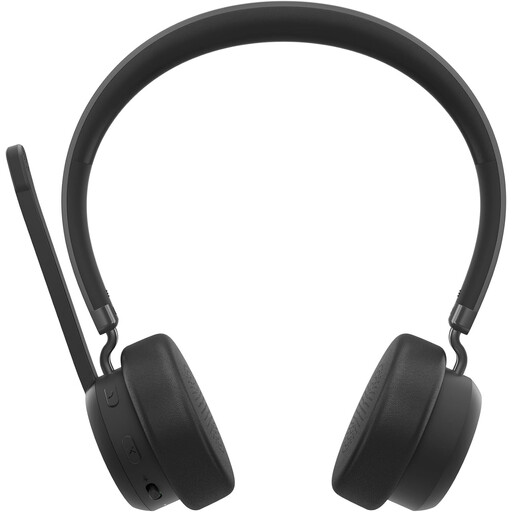 No image available
Suitable for anyone who wants to get up during a call and is looking for a wireless headset.
Check that your calling device supports the required Bluetooth connection; wireless use means you’ll need to charge the headset.
 No image available
Suitable for individual calls on a PC or laptop if you want to be able to flip the microphone boom up to mute it.
Wired; check that USB Type-A is compatible with your device and whether you need the stated adapter for the connection you’re using.
A personal headset’s microphone boom is designed for the wearer. If several people will be speaking through one device, compare it with a table speakerphone and check the model’s placement instructions. Jabra recommends placing the Speak2 40 in the centre of the table, 0.5 to 2.3 m from each participant.
Connect or pair the headset, then select your preferred microphone and speaker in your calling app. Microsoft Support explains how to choose these audio devices in Teams; for other apps, check their audio settings.
Before the call, check that the right microphone is active and isn’t muted. If you’re using a wireless headset, check the battery charge too; the talk time Logitech quotes for the Zone 300 is a model specification.
According to ACM ConsuWijzer, the seller must put right a fault that occurs during normal use, in line with the applicable terms. For online purchases, consumers can usually change their mind and cancel up to 14 days after delivery, subject to legal exceptions; check what applies to your purchase.