What should you look for when buying?
First, work out what your current set-up is missing. Then compare cameras and lenses. Consistent colour, detail, repeatability and the complete kit can all be deciding factors.
| Factor to consider |
What should you look for? |
Who is this important for? |
| Consistent colour |
Check whether you can adjust the exposure and white balance. Compare test shots of the actual fabrics using the same set-up. |
If you sell bags in several fabric colours, you’ll want photos taken under similar conditions. Around 31% of consumers say colour accuracy is their top priority. |
| Small details |
Check the maximum magnification of the exact lens and take a test shot of the smallest detail you want to show. |
If seams, fastenings or the weave need to be clearly visible, you’ll want to know whether the lens can capture them large enough. Around 25% of consumers prioritise detail. |
| Repeatable set-up |
Check whether you can keep the camera, tripod, background and lighting in fixed positions. Make sure the controls suit your shooting angle. |
When you regularly photograph new bags, you’ll want to achieve a similar crop and background each time. Around 25% of consumers say a repeatable process is their main need. |
| Complete kit |
Compare what’s included in the exact offer: camera body, lens and any other essentials. If you have your current smartphone to hand, start by taking test shots with it. |
If you want to keep your photography kit compact, you’ll need to know which items you already have and which you still need. Around 19% of consumers say a complete kit is their top priority. |
Your current smartphone
Choose this option if: your current phone can capture the whole bag and the details you need.
Bear in mind: you’ll need to keep the lighting, background and positioning consistent yourself, and check your test shots.
Mirrorless camera with standard zoom
Choose this option if: you take overall shots from different distances and want manual control or an interchangeable lens.
Bear in mind: a standard zoom won’t necessarily fill the frame with small stitches.
Mirrorless camera with close-up lens
Choose this option if: small seams, zips or woven textures need to appear large in the frame and your current lens isn’t up to the job.
Bear in mind: you’ll need a suitable lens and enough space to position lighting near it.
Cameras on Joybuy
This selection includes cameras and kits described in their product names as cameras for photography or video. Take test shots of your own bags to check whether the model you choose captures the colours, overall shots and details you need.
 No image available
DJI Osmo Pocket 4 Standard Combo
The product name mentions photography and video; use test shots to check whether this model shows the details of your bags that you need.
The product name lists a 1″ CMOS sensor, 4K/240 fps, 3-axis stabilisation, 2× zoom and 107 GB of built-in storage.
View at Joybuy
 No image available
Komery W6 digital camera
The product name mentions photography; take a test shot to see whether this camera shows the fabric texture and small details you want to feature.
The product name lists 12× optical zoom, 4K, 64 MP and Wi-Fi.
View at Joybuy
 No image available
DJI Osmo Pocket 3
The product name mentions photography and video; take a test shot to assess whether this model is suitable for the bag photos you want to take.
The product name lists a 1″ CMOS sensor, 4K/120 fps, 3-axis stabilisation and a 2″ rotating touchscreen.
View at Joybuy
 No image available
Sony ZV-E10 + 16-50mm Zoom, black
The product name describes a camera for photography with a zoom lens included; take test shots to check whether the lens captures the overall shots and details you want.
The product name lists a 16-50mm zoom lens.
View at Joybuy
 No image available
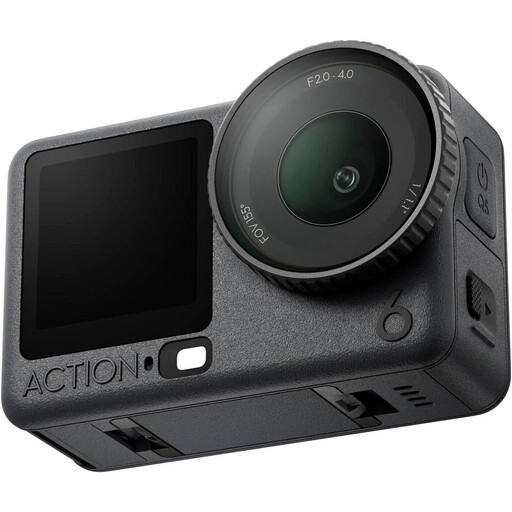
DJI Osmo Action 6 Adventure Combo
The product name identifies this model as an action camera; take a test shot first to see whether the footage is suitable for your product photos.
View at Joybuy
Frequently asked questions
Do you need to buy a mirrorless camera straight away for online shop photos of fabric bags?
No, not if your smartphone can already take the overall and detail shots you need. First try using a consistent background, good lighting and a stable position, then assess photos of your own fabrics. Shopify lists a smartphone as a possible option for product photography.
How do you create a repeatable photo set-up?
Position the bag, background, lighting and camera in similar places each time. A tripod helps reduce camera movement. Take test shots before photographing a whole batch.
What costs and warranty terms should you check in advance?
Check which lens and other essentials are included in the kit you choose, and ask about the warranty and service terms for your purchase. According to the Dutch government, consumers in the Netherlands have a legal guarantee with no fixed statutory warranty period. Don’t assume that the same consumer protections automatically apply to a business purchase for your online shop.
Can you feature a recognisable model carrying the bag in a photo for your online shop?
The GDPR applies to photos taken or published on behalf of a business for commercial purposes if someone is recognisable in them. The Dutch Data Protection Authority gives consent as an example of a valid legal basis for processing. Also check the rights to any images you haven’t taken yourself, as Ondernemersplein advises.


