
Vandaag of morgen in huis

Kwaliteit gegarandeerd

Welkomstaanbiedingen ontgrendelen: GRATIS bezorging | Tot 80% korting | Gratis 30 dagen JoyPlus-proefperiode
Download de app
Many adults spend hours each day in front of a screen. An eye massager can become a regular part of your downtime at home, on the go or before bed. However, eye massagers vary considerably in their features, fit and ease of use.
Marketing copy often focuses on heat, air pressure or Bluetooth, but not every feature matters to every user. Read on to find out which specifications are worth checking, which common pitfalls can lead to a disappointing purchase, and which type of eye massager best suits your needs.
An eye massager with heat, vibrations, air pressure, music and several programmes may sound versatile. In practice, complicated controls can make it awkward to use. Check:
A device that’s quick to set up is more likely to be used regularly than one with lots of features you rarely need.
Some product descriptions mention a fresher appearance, dark circles or dry eyes. Don’t treat these as guaranteed results. According to information provided by the brands themselves, heat, cooling or massage may contribute to a relaxing experience, but an eye massager is not a medical device for treating conditions.
Don’t use the device on damaged skin, and stop if you feel pain, irritation or uncomfortable warmth. If you have an eye condition, have recently had eye treatment or are unsure whether it’s safe to use, speak to a doctor.
A bigger battery doesn’t automatically mean longer sessions. Check the stated operating time, charging time and charging port. A rechargeable eye massager with USB-C is handy at home and when travelling, but also check:
An eye massager with heat can be soothing during a moment of relaxation. Check the temperature in degrees Celsius and see whether it offers several heat settings. For example, product information for the Hot and Cold Eye Massager gives a constant temperature of around 42 °C. That’s useful to know, but comfort is personal.
An eye massager with a cold compress is worth considering if you’d like to switch between cooling and heat. The breo See7 lists a cooling range of around 18–20 °C and a heat range of approximately 38–42 °C. Bear in mind that product descriptions sometimes use marketing terms. Always check the specific details and use the device according to the instructions.
An eye massager with air pressure uses inflatable cushions around the eyes and temples. This can create an enveloping massage sensation, although some users may find the pressure around the nose or temples less comfortable. An adjustable strap and a soft contact layer are therefore important.
An eye massager with vibrations is generally lighter and less enclosing. Check how many intensity settings it has and whether you can use vibration independently of heat. A rotating eye massager or massage wand, such as the Qiweiny model, works differently from a mask-style device and may be better suited to targeted use on the skin around the eyes. Use light pressure and avoid direct contact with the eyeball.
An eye massage mask should fit well without putting unnecessary pressure on your face. Look for:
The SKG ES300 lists a weight of 305 grams and a noise level below 50 dB. The SKG ES500 lists a noise level below 45 dB. These are verifiable product details, but how loud a device seems can vary from person to person.
Why it suits this profile: This model combines heat and cold settings in a compact device, making it a good choice if you’d like to try different types of eye massage first.
The temperature settings are clearly listed in the product information. USB-C charging and around 1.5 hours of use after approximately 1.5 hours of charging make it easy to understand what to expect.
Heat and cold settings, a 500 mAh battery and USB-C charging. The stated ENS function and claims about effects on dark circles come from the brand’s product description.
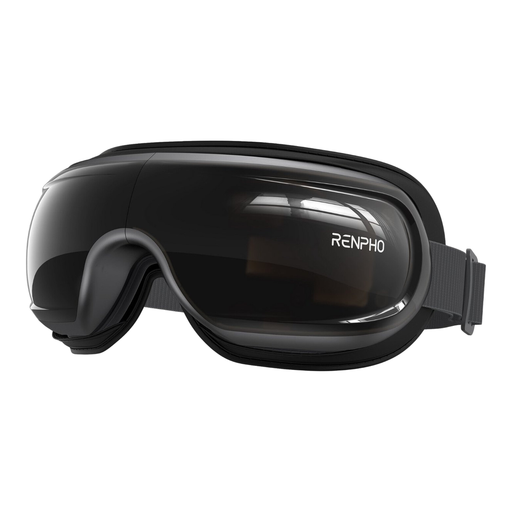
Why it suits this profile: A good fit for users who value Bluetooth music and voice control during their downtime, as well as heat and vibration.
The specifications list three intensity levels, heat, vibration and Bluetooth. This makes it easier to assess the key features individually, rather than relying on marketing claims alone.
Bluetooth, voice control, a heat function and a rechargeable battery. The product information states that it comes with a minimum two-year legal guarantee under EU consumer rules.
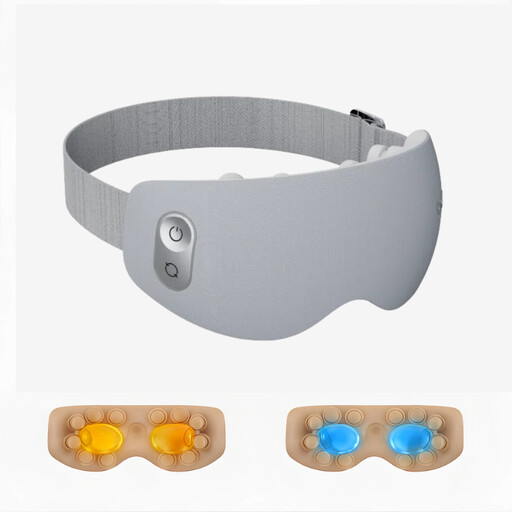
Why it suits this profile: An option for anyone who regularly wants to combine heat, cooling and independent vibration massage in sessions of around 10 minutes.
The temperature and battery details are clearly stated: around 18–20 °C for cooling, 38–42 °C for heat and approximately 80–100 minutes of use per charge.
Heat and cold modes, three vibration levels, USB-C charging and a stated weight of around 290 grams. Claims about effects on puffiness or sleep come from the brand.
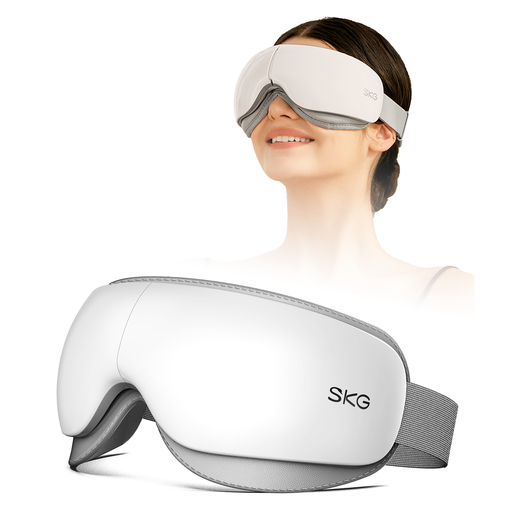
Why it suits this profile: A good match for users who want to use an eye massage mask often and appreciate a low noise level, music and a larger battery.
The description lists a noise level below 45 dB, a 1500 mAh battery and an improved elastic strap. This gives you a clearer idea of what to expect from everyday use.
Three built-in music tracks, Bluetooth for your own music, soft PU padding and, according to the product information, five to eight uses per charge.
We’ve put together a complete, up-to-date list of products that meet these strict selection criteria and the applicable European safety regulations.
Use an eye massager for tired eyes according to the instructions provided, and keep sessions short while you’re getting used to it. Pay particular attention to the following:
Bluetooth music is an extra relaxation feature, not an essential one. If your main aim is to reduce eye strain, taking breaks, using adequate lighting and regularly looking away from the screen can be just as important as the massage programme.
Charge the device, place the eye massager comfortably over your eyes and choose a low intensity. Start with a short session and check that the heat, pressure and vibrations feel comfortable. Always follow the manufacturer’s instructions.
It varies by model and setting. The products listed give operating times ranging from around 80 to 100 minutes to approximately 1.5 hours. Heat, air pressure, Bluetooth and vibrations can all affect battery use.
The direct running costs are generally limited to charging the battery. When choosing a model, focus on battery capacity, charging time and whether a cable is included. Don’t replace the battery yourself unless the manufacturer allows it; if you have a problem, contact the retailer or manufacturer.
