
Switch players with extra guests
You want to know whether each guest can use a separate Joy-Con, and how many players the game and chosen mode support.


Start by choosing a controller that works with your console or PC and with the specific game and game mode. Connecting to a device doesn’t automatically mean a game supports that controller. In a shared bedroom, you’ll also want to consider the number of players, space to move, cables and vibration.
You want to know whether each guest can use a separate Joy-Con, and how many players the game and chosen mode support.
You share a small room and want to factor in motion controls, wrist straps, vibration and where any cables will run.
You’re looking for an extra full-size gamepad for an existing setup, and will first check that the platform and game support it.
First check the exact console, game and game mode, then work out how many controllers you’ll need. After that, choose controls, cables, vibration settings and power options to suit your shared room.
| What to consider | What should you check? | Who is this important for? |
|---|---|---|
| Compatibility with your console, PC and game | Check the console version, full model name, game and controller requirements for the game mode. | If I want to avoid buying a controller that doesn’t work with the game we’re playing together, I check that combination first. Around 31% of consumers make compatibility their top priority. |
| Controllers for the chosen game mode | Count how many controllers you already have and how many the game mode requires; check whether separate left and right controllers can be used individually. | If several guests are joining in, I want to know whether everyone can play with the controllers available. Around 25% of consumers focus on the number of controllers needed. |
| Playing in a shared bedroom | Check whether the game uses motion controls, and consider the space available, wrist straps, cable length and vibration settings. | If I share a small space with a roommate, I want to take movement and potential disruption into account. Around 19% of consumers prioritise practical room arrangements. |
| Controllers and accessories you’ll need | Compare what’s needed for the number of players you want and check which cables, wrist straps and charging options are included. | If I’m setting up an extra place to play, I only want to pay for controllers and accessories that suit the game and setup. Around 13% of consumers focus on the equipment they need. |
| Keeping controllers ready to play | Check how the controller connects and charges, which cable is included and whether a wired controller will suit your setup. | If I don’t want to look for a charging option or a suitable connection during a games night, I check in advance how to keep the controller ready to use. Around 12% of consumers make this their top priority. |
The controls you need vary by game and game mode. For example, Nintendo says that in the original Super Mario Party, each player uses one Joy-Con when playing locally; the PowerA wired controller reviewed here doesn’t support games that require Joy-Con only.
Check the exact game title and mode first, then choose a controller model.
Joy-Con 2 don’t work with the original Switch. Original Joy-Con can be used wirelessly with Switch 2, but attaching them to the console won’t charge them.
Check the generation of the console, controller and wrist strap separately. You’ll need a suitable charging option to charge original Joy-Con with Switch 2.
8BitDo lists Windows and Android compatibility for the Ultimate 2C Wireless, and Switch compatibility for the separate Ultimate 2C Bluetooth. The features of one variant don’t automatically apply to the other.
Compare the full model name and connection type with the manufacturer’s compatibility information.
According to PowerA, the PowerA Enhanced Wired Controller Heroic Link reviewed here has a 3 m cable and only works when the Switch is docked.
Decide where the console and players will sit, and whether you can keep the cable safely out of the way.
Joy-Con for Switch and Joy-Con 2 for Switch 2 are worth considering when a game supports separate controllers or motion controls.
DualSense is a full-size controller option for PS5 and for other devices and games that support it.
The Xbox Wireless Controller is an option for Xbox consoles, Windows PCs and the mobile platforms listed by Xbox.
The full model name matters: the Ultimate 2C Wireless and Ultimate 2C Bluetooth have different compatibility information.
A wired Nintendo controller may suit supported games when the Switch is docked.
These Joybuy products suit Switch and Switch 2 setups, as well as extra gamepads for supported Xbox, PC and PS5 games. Check the controls and number of controllers required for each game and mode.
 No image available
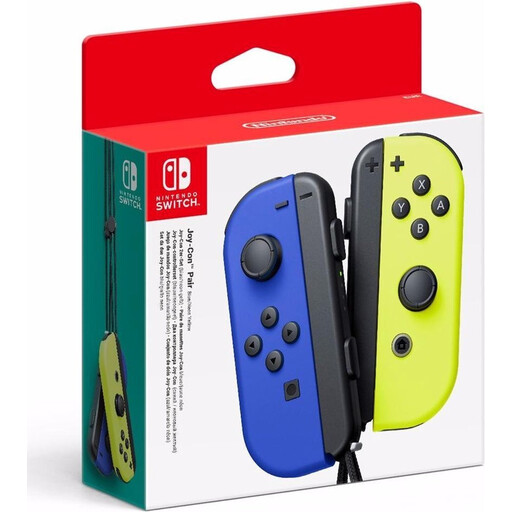
An option for a Switch game that supports separate Joy-Con; the number of players depends on the game and mode.
The title lists the colours Neon Blue and Neon Yellow.
 No image available
A full-size gamepad for a Switch game that supports this controller; not for modes that specifically require separate Joy-Con.
The title lists the colour Black.
 No image available
An option for Xbox or supported PC games; also check whether the specific game supports local multiplayer with this controller.
The product name lists Xbox X, Xbox Series S and PC.
 No image available
An option for PS5 games that support DualSense. Haptic feedback and adaptive triggers only work when the game supports these features.
The Dutch PlayStation product page says the USB cable isn’t included.
 No image available
An option for Switch 2 games that support separate Joy-Con 2; check how many players can join in each game mode.
The title lists Light Blue/Light Red. Nintendo says one Joy-Con 2 set reviewed includes two controllers and two wrist straps; check what’s included with this variant.
Only if the game and mode support separate Joy-Con 2 held horizontally. Nintendo says support depends on the software and play style, so check the game you’ve chosen.
Yes, you can pair them wirelessly with Switch 2, but you can’t attach them to the console. Nintendo says you’ll need an original Switch or a suitable charging accessory to charge them.
On Switch 2, you can turn off vibration via System Settings and Controllers/Accessories. Nintendo says this setting applies to all paired controllers; it won’t automatically mute button or game sounds.
Check whether the game uses motion controls and whether there’s enough clear space. Nintendo recommends attaching the relevant Joy-Con 2 wrist straps when using the controllers wirelessly; original Joy-Con wrist straps aren’t compatible with Joy-Con 2.
In many cases, distance selling comes with a 14-day cooling-off period, subject to exceptions, according to the Dutch government. You’re also entitled to a legal guarantee that the product meets the terms of the agreement. If there’s a fault, contact the seller; according to the Dutch government, the Netherlands doesn’t have one set statutory guarantee period that applies to all products.