
Switch host with extra players
You want to know whether guests can play with individual Joy-Cons, and whether your Switch generation and chosen game support them.


Only buy extra controllers after checking which inputs the party game you’ve chosen supports for each player. Some Jackbox games use phones, while certain Switch games support individual Joy-Cons. Then choose based on your console, the number of players and the controls you want to use in the dark. RGB lighting on the controller’s casing doesn’t automatically mean the button labels are illuminated.
You want to know whether guests can play with individual Joy-Cons, and whether your Switch generation and chosen game support them.
You’re comparing visible controller lighting with how easy the controls are to read, so you don’t choose an unsuitable gamepad just because it has RGB lighting.
You want to check first whether guests can use their own phones as input devices before buying extra gamepads.
| What to consider | What to look for | Who is this important for? |
|---|---|---|
| Compatibility | Make a note of your console, the game title and the input supported for each player. Also check the controller’s full model name. | If I want to make sure my controller works with both my console and the game, I check that combination first. Around 31% of consumers make compatibility their top priority. |
| Input for all players | Check the game’s player limit and controller layout, then count how many suitable controllers you already have. | When guests are joining in, I want to know whether everyone has their own input method supported by the game. Around 25% of consumers prioritise having room for extra players. |
| Visibility in the dark | Check which parts of the exact model light up and whether you can adjust the brightness or lighting effects. | If I want to be able to find my controller in low light, I also check whether the buttons themselves are visible. Around 19% of consumers put visibility first. |
| Do you need an extra gamepad? | Check the game instructions and test in advance whether participants can join in using their phones. | For a party game that uses phones, I don’t want to buy gamepads that players don’t need. Around 13% of consumers want to check first whether the phones they already have will do the job. |
| Battery or cable | Check the stated battery life and charging options, or plan a safe cable route for a wired controller. | If I want to keep playing without interruptions, I need to decide in advance between charging and running a cable through the playing area. Around 12% of consumers focus mainly on power or cable management. |
Specifications for lighting zones describe lights on the controller, but don’t confirm that the button labels light up and are easy to read.
Check exactly where the lights are on the model you’re considering, and whether you can adjust their brightness or effects.
Games can differ in the inputs they support for each player. For example, Jackbox explains how to use a phone or another internet-connected device.
First decide which game you’re playing, how many people are joining in and which input device each player needs.
Nintendo says that Joy-Con 2 only works with Switch 2. The two 8BitDo Ultimate 2C variants also have different stated platform compatibility.
Compare the full model name with your console. If you’re using original Joy-Cons with Switch 2, also check how to charge them.
A wired controller needs a suitable cable route, while a wireless controller needs to be charged sufficiently in advance.
Charge wireless controllers before you play, and keep cables out of walkways.
Joy-Con and Joy-Con 2 are worth considering for supported Switch party games that use individual controllers.
The Afterglow Wave Wireless Controller for Switch 2 is a full-size gamepad with adjustable lighting on the casing.
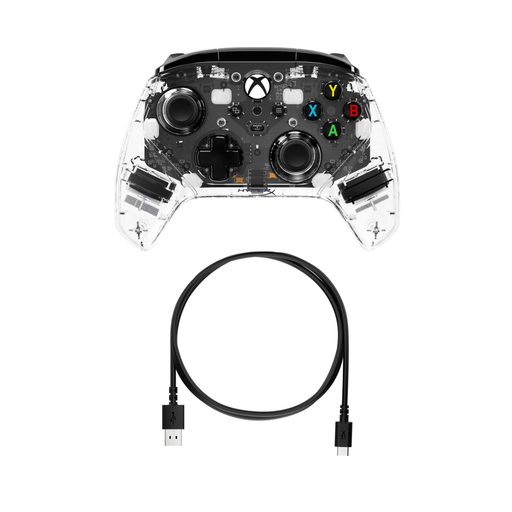
The Spectra Infinity Enhanced Wired Controller is a wired option for a compatible Xbox system.
DualSense is worth considering as an extra controller for PS5 party games that support gamepads.
The Ultimate 2C range shows why you should assess the Wireless and Bluetooth variants separately.
This selection includes individual Joy-Con 2 controllers for Switch 2 and full-size gamepads for a range of console and PC setups. Before you buy, check that the game supports the controller and input method.
 No image available
A wireless gamepad for Switch systems when the game supports full-size controllers; check compatibility with the specific title.
The product name lists Bluetooth, four RGB modes and compatibility with Switch 2, Switch, Switch Lite and Switch OLED. RGB lighting doesn’t automatically mean the button labels are illuminated.
 No image available
A wireless DualSense for a PS5 game that supports gamepad input; check how many controllers and players the game allows.
The product name also lists Mac, Android, iOS and PC. The product information mentions RGB LED lighting, but this doesn’t confirm that the button labels are illuminated.
 No image available
An option for a party game that supports gamepad input on one of the listed platforms; check the connection required and the game’s compatibility.
The product name lists PC, Switch, iOS and Android, RGB lighting and a charging dock, as well as wired and wireless connections.
 No image available
A wired gamepad for a compatible Xbox or PC game. Bear the cable route in mind while playing.
The product information lists Xbox One, Xbox Series X|S and PC, adjustable RGB lighting and rear buttons.
 No image available
Suitable for Switch 2 games that support individual Joy-Con controllers. Nintendo says that Joy-Con 2 only works with Switch 2.
The set includes a left and a right controller. The product information lists wrist straps in the box; use them when playing wirelessly, following Nintendo’s instructions.
Not for the input method Jackbox describes for the games in question: players use a phone or another internet-connected device and enter a room code. Make sure everyone can see the shared game screen.
No. Nintendo says that Joy-Con 2 only works with Switch 2. Original Joy-Cons can be used wirelessly with Switch 2, but they can’t be attached to or charged through that console.
Not necessarily: RGB specifications may describe lighting on the casing without confirming that the button labels light up. Check exactly which parts of the model are illuminated.
Pair them with the PS5 in advance. PlayStation explains how to pair extra controllers wirelessly through the Bluetooth accessory settings; also check how many players the game supports.
Nintendo recommends attaching and wearing the matching wrist straps when using Joy-Con controllers wirelessly. Joy-Con and Joy-Con 2 wrist straps aren’t interchangeable.