
Switch group with extra guests
Wants to know whether their existing controllers or extra individual Joy-Con provide enough player slots for the chosen game. Nintendo describes controller options that vary by software and play style.


Start by checking your console or PC, then make sure your chosen game supports local multiplayer and the controller setup you want. In compatible Switch games, individual Joy-Con controllers can be shared between players; Nintendo says Super Mario Bros. Wonder supports up to four players on one Switch or Switch 2 system. A full-sized gamepad or wired controller is another option, provided it suits your system, game and playing setup.
Wants to know whether their existing controllers or extra individual Joy-Con provide enough player slots for the chosen game. Nintendo describes controller options that vary by software and play style.
Looking for an extra full-sized controller for their Xbox or PS5, and wants to choose a compatible model rather than relying on looks or Bluetooth alone.
Wants to connect multiple gamepads and check both the connection type and whether their particular PC game supports multiple controllers.
Start with the system and game combination, then count the player slots. Only then choose the controller layout and connection that suit your seating arrangement.
| What matters | What to check before buying | Who should pay particular attention |
|---|---|---|
| Compatibility | Make a note of the exact console or PC, then check which controllers the game supports for local play. Nintendo and PlayStation detail compatibility and features by system and game. | If I want to know in advance whether a controller works with both my system and the game I’ve chosen, I put compatibility first. Around 33% of consumers say compatibility with their system and game is their main concern. |
| Player slots | Count the controllers you already have and check the game’s local player limit and permitted controller layouts. Nintendo says Joy-Con can be used individually or together, depending on the software. | If I want guests to join in, I need to know how many individual players the game supports with the controllers available. Around 27% of consumers prioritise the number of player slots. |
| Controls and grip | Check which buttons the game requires and whether an individual Joy-Con, full-sized gamepad or wired controller provides those controls. The PowerA Wired Controller we reviewed lacks features including motion controls. | If I’m choosing a controller with controls my group will find comfortable, I consider the buttons and how it feels to hold. Around 20% of consumers prioritise controls and grip. |
| Connection and setup | Check that your device supports the connection and test pairing and power in advance. For a wired controller, make sure the cable reaches your seat; the PowerA model we reviewed has a 3 m cable. | If I want to get game night started without the hassle of pairing or cables, I check the power and distance to the TV setup beforehand. Around 20% of consumers mainly want a setup that’s ready to use straight away. |
Nintendo describes using Joy-Con individually or using two together as a single controller, depending on the software. This means a pair won’t necessarily be enough for two players in a particular game.
Check the game’s local player limit and available controller layouts before deciding how many controllers you need.
Joy-Con 2 is designed for Switch 2. According to Nintendo, original Joy-Con can be used wirelessly with Switch 2, but they can’t be attached to or charged by the console.
Check which version of Switch you have and how you can charge your existing controllers. You may need a separate charging option for original Joy-Con when using them with Switch 2.
According to the manufacturer, the PowerA Wired Controller we reviewed is intended for use with Switch in docked mode and lacks features including motion controls. That doesn’t make it an obvious choice for every game or play style.
Check whether the game needs any of the missing features and make sure the cable reaches your seat.
An additional manufacturer’s or retailer’s warranty doesn’t replace your statutory protection if a product is faulty.
Compare any extra cover with your existing rights, and contact the retailer if there’s a fault.
Joy-Con for Switch, Joy-Con 2 for Switch 2 and full-sized Pro Controllers offer different controller layouts for compatible games.
The Xbox Wireless Controller is a full-sized controller for compatible Xbox consoles and Windows PCs.
DualSense is an extra full-sized controller for PS5 and compatible games on supported PCs.
A wired Switch controller can suit docked play, provided the cable route and game features fit your setup.
The right Ultimate 2C version depends on your system: Wireless and Bluetooth are different models.
This selection includes extra controllers for Switch and Switch 2, as well as full-sized gamepads for PS5, Xbox or PC. Always check that your chosen game supports local multiplayer and the controller layout you want.
 No image available
A full-sized wireless gamepad for anyone looking for an extra controller for Nintendo Switch.
The product description lists motion controls and HD Rumble.
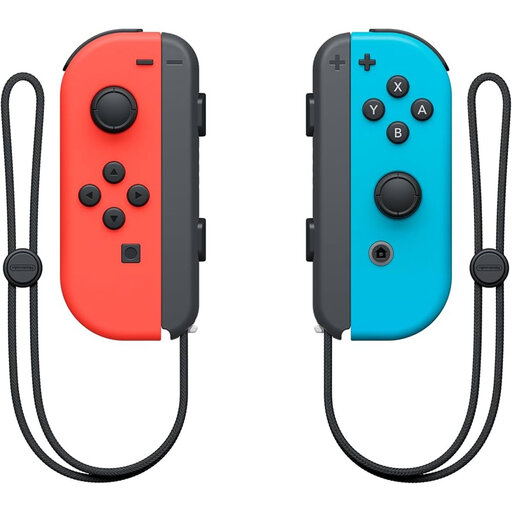 No image available
A pair of individual controllers for Switch games that support single Joy-Con controls.
The two Joy-Con can be used individually; whether they provide two player slots depends on the game. According to Nintendo, original Joy-Con work wirelessly with Switch 2, but can’t be attached to or charged by the console.
 No image available
An extra full-sized gamepad for a PS5 group looking for an additional DualSense controller.
Sony lists USB and Bluetooth for supported devices. Some features may not be available on PC, and adaptive triggers require game support.
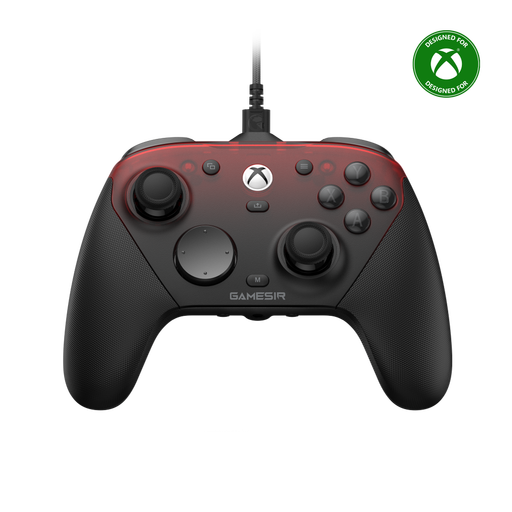 No image available
An option for an Xbox or PC setup; check which connection you need for each device.
The product information lists a wired connection for Xbox, 2.4 GHz for PC and Bluetooth for Android.
 No image available
A left and right controller for Switch 2 games that support individual Joy-Con 2 controls.
The product information lists wireless use. Whether the pair provides separate player slots depends on the controller options in the game.
No, it depends on the software: Nintendo describes using Joy-Con individually or using two together as a single controller. Check how many players and which controller layouts your chosen game supports for local play. Super Mario Bros. Wonder supports up to four players on one Switch or Switch 2 system.
According to Nintendo, you can use original Joy-Con wirelessly with Switch 2, but you can’t attach them to or charge them with the console. Nintendo lists an original Switch or a compatible charging accessory as options for charging them.
First, check that your PC supports the connection you need and that the game recognises multiple controllers as separate players. Sony describes USB and Bluetooth connections between DualSense and supported devices; 8BitDo says the Ultimate 2C Wireless connects to Windows using a USB receiver. Test all the controllers together before game night.
In the Netherlands, online purchases generally come with a statutory cooling-off period of up to 14 days after delivery, with some exceptions; ACM ConsuWijzer explains how this works. A product must also meet what you could reasonably expect. If it’s faulty, the retailer must offer a solution under the conditions of the statutory guarantee; a manufacturer’s warranty doesn’t replace this legal right.