What should you look for in extra controllers?
Start by checking your console or PC and the game’s controller support. Then find out how many players can join in at once, and check that the controls, charging and cable arrangements will work in your club’s space.
| What to consider |
What should you check? |
Who should pay particular attention? |
| Compatibility |
Check the console generation or PC, and whether the specific game supports the controller. Also compare the exact model variant and any firmware requirements. |
If I want to avoid buying an extra controller that won’t work with our console or game, I check both before making a purchase. Around 33% of consumers give compatibility top priority. |
| Player slots |
For each game, check the local player limit, which Joy-Con play styles are supported and how many usable controllers you already have. |
If different club members want to play at the same time, I want to know whether an individual Joy-Con can really work as a separate controller. Around 27% of consumers focus mainly on having enough player slots for everyone to play at once. |
| Power and charging |
Check how each model is powered and charged, and what accessories you’ll need to get the controllers ready between sessions. |
If I want to keep things simple between club nights, I look at charging, batteries and any accessories needed for charging. Around 20% of consumers prioritise upkeep and running costs. |
| Controls and space |
Compare the buttons and features required by the game with those on the controller. For a wired model, check the dock and cable placement too. |
If players are using different games in a shared space, I want controls that suit each game without an awkwardly placed cable. Around 20% of consumers focus mainly on controls and practical playing space. |
Controllers at Joybuy
These controllers suit a range of existing club setups: PS5, Xbox or Windows PC, Nintendo Switch and Switch 2. Check how many players can join in each game and which controller inputs it supports.
 No image available
PS5 DualSense Wireless Controller – Cosmic Red
Suitable for a club playing on PS5; if you’re using it with a PC, check that the game you’ve chosen supports it.
The product description lists haptic feedback, adaptive triggers and a built-in microphone.
View at Joybuy
 No image available
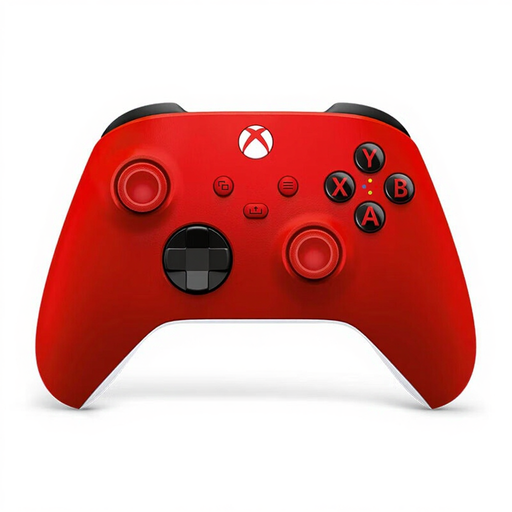
Xbox Wireless Controller – Pulse Red
Suitable for a club with a supported Xbox or Windows PC; check game support on PC too.
Microsoft says controller audio isn’t supported over Bluetooth on Windows.
View at Joybuy
 No image available
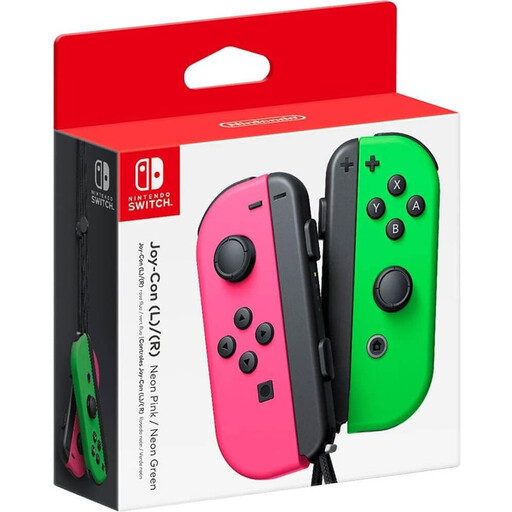
Nintendo Switch Joy-Con Pair – Neon Green/Neon Pink
A pair to consider if your Switch game supports individual Joy-Cons; the game determines whether they provide two player slots.
Original Joy-Cons can be used wirelessly with Switch 2, but can’t be attached to or charged with it.
View at Joybuy
 No image available
Official Nintendo Switch 2 Pro Controller – Black
Suitable for a club with Switch 2 when the game requires full controller controls; one gamepad doesn’t automatically support two players.
The product description lists motion controls, HD Rumble and a USB charging cable included in the box.
View at Joybuy
 No image available
Official Nintendo Switch 2 Joy-Con 2 Pair – Light Blue/Light Red
Suitable for a Switch 2 game that supports individual Joy-Con controls; the game determines whether the pair provides two player slots.
Nintendo lists motion controls and HD Rumble 2. When playing wirelessly, attach the Joy-Con 2 wrist straps as instructed by Nintendo.
View at Joybuy
Frequently asked questions
Are two Joy-Cons always enough for two players?
No, it depends on the game. Nintendo describes using individual Joy-Cons horizontally as one possible way to play, but available play styles vary from one game to another. Check the controller requirements and local player limit for the game you’ve chosen.
How do you get extra Joy-Con 2 controllers ready for your next club night?
Nintendo says they can be charged using a Switch 2 under the stated power conditions, or with a separate Joy-Con 2 charging grip. When playing wirelessly, attach the Joy-Con 2 wrist straps as instructed by Nintendo too.
Can you keep using an original Joy-Con with Switch 2?
Yes, Nintendo says it can be used wirelessly. You can’t attach the controller to or charge it with Switch 2; you’ll need an original Switch or a suitable separate accessory for that. Joy-Con 2 doesn’t work with the original Switch.
Who should you contact if a controller bought in the Netherlands turns out to be faulty?
Contact the retailer to ask for a solution. The Dutch government says statutory warranty rights still apply alongside any additional cover, so check what paid extra cover actually provides.
What rules should you know about when buying a controller online?
According to the Dutch government, many distance purchases come with a 14-day cooling-off period, although there are exceptions. For electronic products sold in the EU, the government lists CE marking as a requirement; check the product information and any relevant safety warnings too.


