First, choose a controller that works with both your console and the local game mode you want to play: a model for Switch, Switch 2, PS5 or Xbox is not automatically interchangeable. Next, count how many players will be racing at once and check which controllers you already have. In supported Switch games, each separate Joy-Con can control one player, while a full gamepad gives one player a controller in a single housing. Check the connection and charging method before you choose, too.
Who is an extra controller suitable for?
Housemates with a Switch
You want to get more racers playing without choosing a controller that isn’t compatible with your console version or game. Nintendo says that the original Switch’s Joy-Con controllers can be used wirelessly with Switch 2, but can’t be attached to the console.
Racers with a PS5 or Xbox
You’re looking for an extra controller for your existing console, and you’ll also check whether your particular racing game supports local multiplayer. PlayStation and Microsoft describe their controllers as being for PS5 and Xbox consoles respectively.
Players sharing a living room
You’ll want to think about how much room you have around the screen and whether a wireless controller or cable is better suited to your setup. Check how each model connects and charges.
What should you look for in an extra controller?
Separate Joy-Con controllers
Choose this if: you want more housemates to play a compatible Switch game and the game supports using a separate Joy-Con as a controller.
Bear in mind: older Joy-Cons work wirelessly with Switch 2, but can’t be attached to it. You’ll need a Switch or a compatible accessory to charge them.
Full gamepad for Nintendo
Choose this if: each player would rather hold a controller in a single housing. The Nintendo Switch Pro Controller is designed for Switch and, according to Nintendo, also works wirelessly with Switch 2.
Bear in mind: according to Nintendo, the Switch 2 Pro Controller is designed exclusively for Switch 2, so check the full model name.
Controller for PS5, Xbox or PC
Choose this if: you play on a PS5, Xbox console or compatible Windows PC and need a controller for that platform.
Bear in mind: connecting a controller doesn’t automatically mean your chosen racing game supports split-screen or local multiplayer.
Wired play
Choose this if: a wired controller that’s confirmed as compatible suits your console, game and setup.
Bear in mind: check the connection type and whether the cable can run safely through your shared play area.
| What to consider | What should you check? | Who is this important for? |
|---|
| Console and racing game |
Make a note of the exact console version and game title. Check both controller compatibility and the local game mode. |
If you want to make sure everything works with your system first, compatibility comes first; around 36% of consumers say this is their main buying concern. |
| One controller per racer |
Count the players, the working controllers you already have at home and the controller layouts supported by the game. |
If your main concern is making sure nobody misses out on the race, start by counting how many sets of controls you’re short of; around 29% of consumers put the number of racers first. |
| Space and connection |
Check which connection type works with your console and controller, and whether a cable would run through a walkway. |
If housemates will be sitting in different places around one screen, having enough room to move matters; around 21% of consumers say connection and playing space are their main concern. |
| Power and accessories |
Check the exact package contents for controllers, cables, a suitable charging option or batteries. |
If you want to know in advance what you already have and how you’ll charge the controllers, check what’s included; around 14% of consumers say this is their main buying concern. |
Common buying mistakes
-
Assuming every Switch controller works with every Switch
According to Nintendo, the Nintendo Switch 2 Pro Controller is designed exclusively for Switch 2. Older Joy-Cons can be used with it wirelessly, but can’t be attached to it.
Check the full model name and console version. If you’re using older Joy-Cons with Switch 2, check how you’ll charge them, too.
-
Assuming every extra controller means one more racer
The number of players and the supported controller layout depend on the racing game’s local game mode.
Check the game mode, then count how many controllers or separate sets of controls you’ll need.
-
Treating very similar model names as if they were the same product
8BitDo says the Ultimate 2C Bluetooth Controller supports Switch and, after a firmware update, Switch 2. For the Ultimate 2C Wireless, the manufacturer lists Windows and Android.
Compare the full variant name, the listed platforms and any firmware requirements.
-
Confusing extra cover with your statutory rights
Additional cover doesn’t replace your statutory rights if a product is faulty. According to the Dutch government, the retailer is your point of contact if you have a problem with a faulty product.
Read what the additional cover includes and compare it with your statutory rights.
Brands to compare
Nintendo
Nintendo makes controllers for Switch and Switch 2. Check which console and game mode each model supports.
- Nintendo says older Joy-Cons can be used wirelessly with Switch 2, and that the Switch Pro Controller works wirelessly with Switch 2.
- Older Joy-Cons can’t be attached to Switch 2 and need a suitable charging method. The Switch 2 Pro Controller isn’t designed for the original Switch.
Sony PlayStation
The DualSense is an extra controller for a PS5 setup. Check the local game mode of your chosen racing game separately.
- Sony describes the DualSense as having haptic feedback and adaptive triggers.
- Haptic feedback and adaptive triggers depend on game support; they don’t confirm that every racing game offers split-screen play.
Microsoft Xbox
The Xbox Wireless Controller is an option for Xbox consoles and compatible Windows PCs.
- Microsoft lists Bluetooth support and button mapping for the controller.
- Check whether AA batteries are included with the exact product you’re considering.
PowerA
According to PowerA, the Enhanced Wireless Controller Rechargeable is a rechargeable alternative for Nintendo Switch and also works with Switch 2.
- PowerA lists a rechargeable battery and two mappable extra buttons for this model.
- According to PowerA, this model doesn’t have a C Button, HD Rumble, IR or amiibo NFC. These features aren’t automatically included with other PowerA models.
8BitDo
According to 8BitDo, the Ultimate 2C Bluetooth is compatible with Switch 2 after a firmware update.
- 8BitDo lists Hall Effect joysticks and motion control for the Ultimate 2C Bluetooth.
- The Ultimate 2C Wireless has a different list of supported platforms. Check the full variant name; the manufacturer’s information isn’t an independent durability test.
Joybuy controllers for racing together
This Joybuy selection includes extra controllers for PS5, Xbox and Nintendo Switch, including separate Joy-Con sets. Check that each model suits your console and the local game mode you want to play.
 No image available
PS5 DualSense Wireless Controller V3 – Cosmic Red
An option if you play on PS5 and are looking for an extra wireless DualSense controller.
View at Joybuy
 No image available
Xbox Wireless Controller – Pulse Red
An option for an Xbox setup that needs an extra Xbox controller.
View at Joybuy
 No image available
Nintendo Switch Pro Controller – black
A full gamepad for one player in a compatible Nintendo Switch setup. Nintendo says the Switch Pro Controller also works wirelessly with Switch 2.
View at Joybuy
 No image available
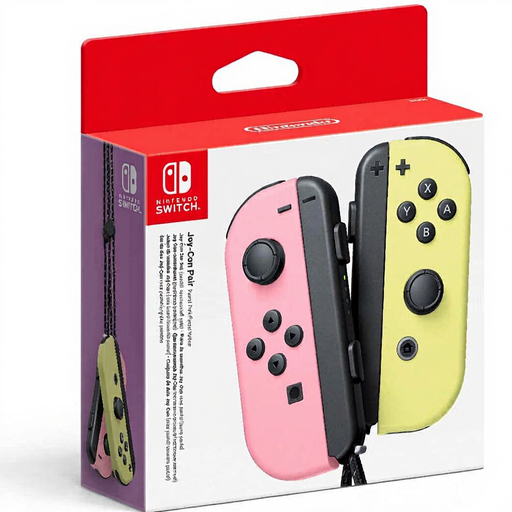
Nintendo Switch Joy-Con Controller Pair – Pastel Pink/Pastel Yellow
A set for Switch players who want to use separate Joy-Cons in a supported local game mode. Check how many players the game allows first.
View at Joybuy
 No image available
Nintendo Switch 2 Joy-Con 2 Pair – Light Blue/Light Red
A left and right controller for wireless use with Switch 2 and local multiplayer in supported games. According to Nintendo, Joy-Con 2 is for Switch 2 only.
View at Joybuy
Frequently asked questions
Can four housemates race on one system?
It depends on the game and console. Nintendo says Mario Kart 8 Deluxe on Switch supports up to four players on a split screen, while Mario Kart World on Switch 2 supports up to four players on the same system. For other racing games, check their local game modes.
Do older Switch Joy-Cons work with Switch 2, and how do you charge them?
Yes. Nintendo says older Joy-Cons can sync wirelessly with Switch 2. They can’t be attached to Switch 2; according to Nintendo, you can charge them using an original Switch or a suitable charging accessory.
How do you pair an extra DualSense with a PS5?
PlayStation explains that you can pair an extra DualSense through the Bluetooth accessory settings when another controller is already connected. Follow PlayStation’s pairing steps; a successful connection doesn’t confirm that your chosen game supports local multiplayer.
Do you need an online subscription to race together locally?
Nintendo’s pages for the games mentioned describe playing on the same system. Check the requirements for the specific game mode and console; requirements for online features don’t automatically apply to local play.
Should you get additional cover in case a controller develops a fault?
You don’t need additional cover to have statutory rights. According to the Dutch government, consumers are entitled to a product that works properly, there’s no fixed statutory guarantee period in the Netherlands, and the retailer is your point of contact if a product is faulty. Read the terms of any additional cover before deciding.


