
Switch players sharing controllers
You want to play together with as few extra controllers as possible and need to know whether your game supports one Joy-Con per player. Nintendo says this depends on the software and the supported play style.


First, choose a controller that works with your console and the specific platform game. Then decide whether players need individual Joy-Cons or a full controller. One Joy-Con per player only works in games that support this play style, and PC features may depend on the game and connection. Playing occasionally during the day doesn’t, in itself, mean you need a different controller.
You want to play together with as few extra controllers as possible and need to know whether your game supports one Joy-Con per player. Nintendo says this depends on the software and the supported play style.
You’re looking for an extra full-size gamepad and want to check that your system and game support the connection and controller. Remember to consider power too: the Xbox Wireless Controller uses AA batteries or a suitable rechargeable power solution.
You’re looking for a second controller for a local platform game and want to know which features might also work on PC. PlayStation says that haptic feedback on PC requires both game support and a USB connection.
Start with your console and the specific game: they determine which controllers and play styles are available. Then check how many controllers the players need, and which controls and power options suit your setup.
| What to consider | What should you check? | Who is this important for? |
|---|---|---|
| Compatibility | Check the exact console, game and supported controller. On PC, also check the required connection. | If I want to avoid buying a controller that doesn’t work with my system or game, I check that combination in advance. Around 36% of consumers prioritise compatibility with their system and game. |
| Number of players | Check how many players can join locally and whether the game supports one Joy-Con per player. | If I want to know whether we already have enough controllers for everyone, I check the game’s supported play style. Around 29% of consumers prioritise having enough usable controllers for all players. |
| Controls and grip | Consider the directional controls, sticks, grip and features required by the game. | If I mainly play platform games, I look for a button layout and grip that suit the way I play. Around 21% of consumers put directional controls and grip ahead of sharing a controller. |
| Connection and power | Check whether you want to play wired or wirelessly, and which cables, batteries or charging options you’ll need. | If I want to know what I’ll need in addition to the controller, and whether the connection will work from where I sit, I check the power supply and cable length. Around 14% of consumers prioritise connectivity and running costs. |
Nintendo says a Joy-Con can be used horizontally as a separate controller, depending on the game and play style. According to the manufacturer, the wired PowerA controller has a detachable 3 m cable and is designed for use with a docked Switch. Microsoft says rechargeable AA batteries are not charged inside the Xbox controller.
A pair of Joy-Cons can be used by two players, but only if the game supports using one Joy-Con per player horizontally. Some games require a different controller setup.
Before buying, check the controller requirements and local player limit for the specific game.
Joy-Con 2 doesn’t work with the original Switch. The 8BitDo Ultimate 2C Wireless and Ultimate 2C Bluetooth are different models with different stated platforms.
Check the full model name and make sure the listed console version or PC is suitable for your needs.
Older Joy-Cons can be used wirelessly with Switch 2, but they can’t be attached to the console. Rechargeable AA batteries don’t charge inside an Xbox controller.
Check which batteries, charging options or cables you’ll need for each extra player.
Joy-Con and Joy-Con 2 are suitable for playing together on Nintendo Switch and Switch 2, when the game supports your chosen play style.
DualSense is designed for PS5 games and can also be used with supported PC games, subject to certain conditions.
The Xbox Wireless Controller is suitable for Xbox consoles and Windows PCs, depending on game support.
According to 8BitDo, the Ultimate 2C Wireless is designed for Windows and Android, while the separate Ultimate 2C Bluetooth version is designed for Switch.
The wired model reviewed is suitable for use with a docked Switch or Switch 2.
This selection includes shareable Joy-Con pairs for Nintendo Switch and Switch 2, as well as full controllers for PS5, Xbox and PC. Check which controller and connection type each game and console supports.
 No image available
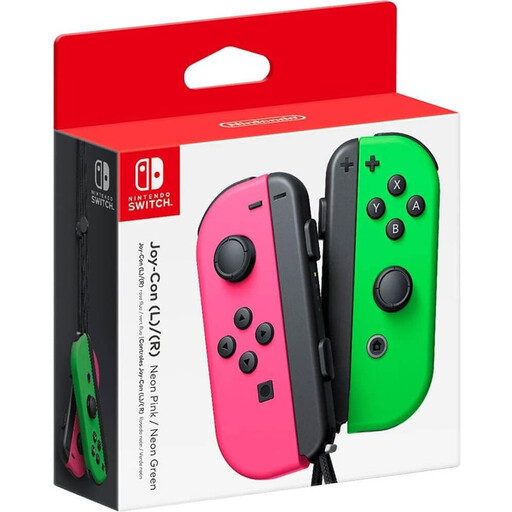
Suitable for playing together on Switch 2 if the game supports one Joy-Con per player.
The set includes one left and one right Joy-Con 2.
 No image available
An option for Switch players who want to share controllers, provided the game supports one Joy-Con per player.
Older Joy-Cons can be used wirelessly with Switch 2, but can’t be attached to the console. Remember to arrange a separate charging option.
 No image available
Suitable for an extra player on PS5. Check the local player limit for the platform game you want to play.
 No image available
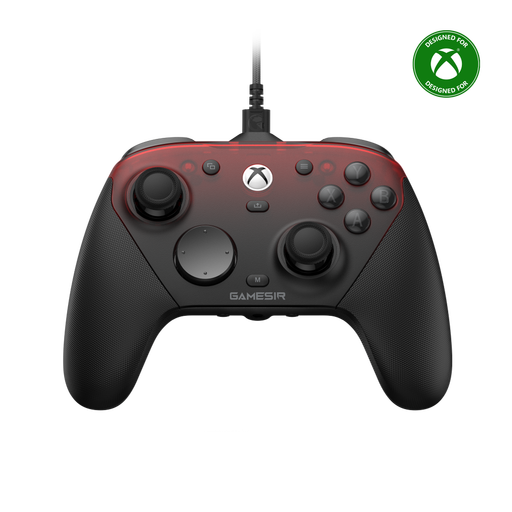
A full controller for anyone looking for an option for Xbox or PC. Check the game and the connection you need.
The product title lists wired use for Xbox and wireless use for PC and mobile.
 No image available
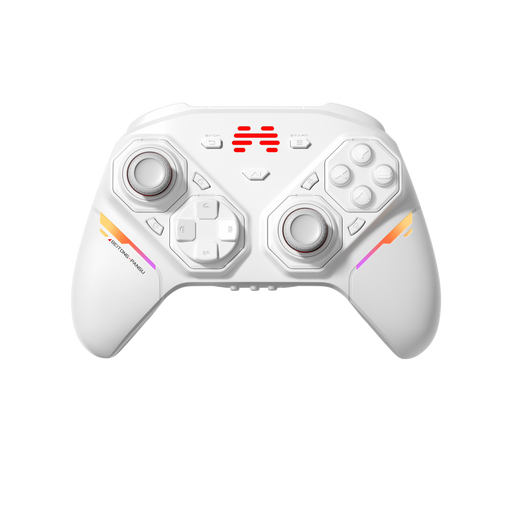
An option for anyone looking for a full controller for one of the listed platforms. Check support for your console version and game.
The product title lists PC, Nintendo Switch, Switch 2, Steam and Android.
No. Nintendo says one Joy-Con per player only works if the game supports that play style. Check the game’s controller requirements before deciding how many player slots you have.
Yes. Nintendo says older Joy-Cons can be paired wirelessly with Switch 2. They can’t be attached to the console, and charging requires a Nintendo Switch or a suitable separate charging solution.
It depends on the distance and the model. The wired PowerA controller reviewed has a detachable 3 m USB cable and, according to PowerA, only works when the Switch is docked.
Microsoft lists AA batteries or a suitable rechargeable battery solution. Rechargeable AA batteries aren’t charged inside the controller.
Not according to the controller specifications mentioned here. Choose a controller based on your system, game, number of players and preferred controls. Consider any issues with seeing the game separately.