
Switch sports players with guests
You want guests to join in with a motion-controlled sports game and need to check which Joy-Con generation works with your game and console. Nintendo says Joy-Con 2 works only with Nintendo Switch 2.


Start by choosing your console and sports game. Then check how many people can play at once in each sport or game mode, and which controllers you’ll need. For motion-controlled sports on Switch, the right Joy-Con controllers are the way to go. For button-based controls on PS5 or Xbox, you’ll need a controller for that platform. The player limit for a game mode isn’t automatically the same as the number of controllers your console can connect.
You want guests to join in with a motion-controlled sports game and need to check which Joy-Con generation works with your game and console. Nintendo says Joy-Con 2 works only with Nintendo Switch 2.
You want several people to play at the same time, rather than taking turns. The player limit and controller setup for your chosen sport or game mode determine how many people can join in.
You already have a console for button-controlled sports games and are looking for an extra controller that works with that platform. Whether local multiplayer is available also depends on the game.
Start with the console and the specific game. Then check the player limit for the game mode you want before choosing the type of controller you need.
| What to consider | What should you check? | Who is this important for? |
|---|---|---|
| Console and game | Note the full console name and game title, then check which controllers are supported by your chosen sport. | I want to buy a controller that works with both my console and sports game, so I don’t end up with the wrong generation. Around 36% of consumers prioritise compatibility. |
| Playing at the same time | Check the offline player limit for the specific sport and whether each player needs one individual controller or a set. | I want my guests to be able to play at the same time, not just have the console connect several controllers. Around 29% of consumers mainly want to increase the number of players who can join in at once. |
| Motion or button controls | Check whether the sport requires motion controls and whether the right wrist straps are included. | I want to play a sport that involves swinging movements and know in advance what controls and preparation I’ll need. Around 21% of consumers prioritise motion-controlled sports. |
| Keeping everything ready to use | Count the controllers and wrist straps you already have. Also check how your chosen controller is charged or powered by batteries. | I want to know what I can already use and how to keep extra controllers ready for a games night. Around 14% of consumers prioritise purchase and running costs. |
A console may be able to connect several controllers, while a specific sport or game mode allows fewer players at once.
First check the offline player limit for the sport you want to play, then check the controller setup you’ll need.
Nintendo Switch Sports does not support the Pro Controller. Joy-Con 2 does not work with the original Switch and won’t fit into the leg strap for this game.
Check the console, game, sport and any leg strap as one complete setup.
What’s included in the box and how the controller is powered vary by controller type.
Count what you already have, then check the box contents and battery or charging requirements before you buy.
Joy-Con for Switch and Joy-Con 2 for Switch 2 are suitable for motion-controlled sports that support these controllers.
DualSense is an option for extra players in a PS5 sports game that supports local multiplayer.
The Xbox Wireless Controller is an option for button-controlled sports games on a supported Xbox console or Windows PC.
This selection of Joybuy products includes Joy-Con controllers for Switch and Switch 2 sports games, plus controllers for button-controlled sports games on PS5 and Xbox.
 Image unavailable
Suitable for a PS5 sports game with a game mode that supports local multiplayer.
PlayStation lists haptic feedback and adaptive triggers as features; how they work depends on game support.
Check the player limit for the game and game mode you’ve chosen.
 Image unavailable
Suitable for a button-controlled sports game on a supported Xbox console or Windows PC.
Keep the battery requirements in mind.
Check whether your chosen game supports local multiplayer; the controller does not determine the player limit.
 Image unavailable
Suitable for supported motion-controlled Switch sports games.
In games that support it, a pair of Joy-Con controllers can be used as two separate controllers.
When playing wirelessly, attach the correct Joy-Con wrist straps as instructed by Nintendo.
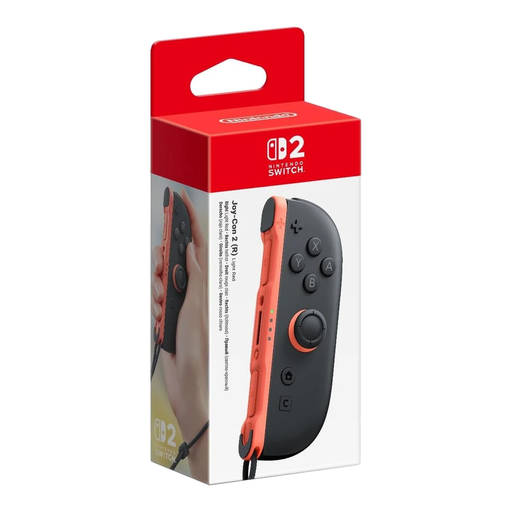 Image unavailable
An option for one extra player in a Switch 2 game that supports this controller.
This is one right Joy-Con 2, not a pair. Joy-Con 2 works only with Nintendo Switch 2.
Check the player limit and controller setup for your chosen sport.
 Image unavailable
Suitable for motion-controlled sports on Switch 2 that support Joy-Con 2.
The set includes one left and one right controller, plus two Joy-Con 2 wrist straps. Joy-Con 2 works only with Nintendo Switch 2.
The number of players who can join in at once depends on the sport or game mode.
Not necessarily. Nintendo says the connection limit can depend on the controller type and features. The game also determines the offline player limit and controls for each sport. Check both for the game mode you want to play.
No. Nintendo Switch Sports does not support a Switch or Switch 2 Pro Controller, or handheld mode.
When playing wirelessly, attach the wrist strap for the correct Joy-Con generation and secure it as instructed by Nintendo. Joy-Con 2 wrist straps are not compatible with the original Joy-Con controllers.
You don’t need an online membership to play together locally on the same system. Nintendo requires a membership for online play and describes playing on the same system separately.
According to ACM ConsuWijzer, online purchases generally come with a 14-day cooling-off period after delivery, although exceptions apply. You’re also covered by the legal guarantee if a product used normally doesn’t meet the expectations you’re entitled to have. The retailer is your point of contact. A manufacturer’s guarantee does not replace your legal guarantee.