Start with your console or PC, then check the game to see which play style it supports and how many full controllers two players need. Nintendo says that individual Joy-Cons can control two players only in games with the right support; for PS5, Xbox or PC, your extra gamepad needs to work with both the system and the game. Playing wired means you don’t have to manage batteries, but it limits how far you can move. Playing occasionally during the day doesn’t change compatibility.
Who is this guide for?
Switch players who play together
You want to know whether two individual Joy-Cons will do, or whether each player needs a full pair. The game and the Switch generation determine which setup works; Nintendo says that using individual Joy-Cons depends on the play style supported by the game.
Console duos who need an extra gamepad
You’re playing a local co-op game on PS5 or Xbox and looking for an extra controller that works with your console.
Occasional PC players gaming from the sofa
You play together now and then, and are weighing up the freedom of wireless gaming against a wired controller that doesn’t need batteries.
What should you look for when buying?
First check that your system and game support the controller. Then count how many usable controllers you have for two players, and choose between a wireless or wired setup.
| What to consider |
What should you check? |
Who is this important for? |
| Compatibility |
Check that both the system and the specific game support the controller. |
If I want to be sure I can use the controller with my console or PC and in my game, I’ll check both before choosing. Around 36% of consumers prioritise compatibility with their system and game. |
| Controls for two players |
Check the game’s controller requirements and supported play styles, and include the controllers you already own. |
I want to avoid buying an extra set only to find I still can’t play with two people. Around 29% of consumers prioritise having enough controls for two players. |
| Power |
Compare charging, AA batteries and wired play; check the power method for the model you choose. |
If I only play occasionally, I want to know in advance whether I’ll need batteries or have to charge the controller. Around 21% of consumers mainly look for the convenience of playing straight away, without having to plan when to charge. |
| Grip and distance |
Consider whether an individual Joy-Con or a full gamepad feels comfortable in your hands; if you’re playing wired, measure the cable route. |
When I’m playing with someone on the sofa, I want enough room to move and controls that feel right in my hands. Around 14% of consumers prioritise grip and distance from the screen. |
Things to watch out for when buying
-
Assuming every Joy-Con generation works with every Switch
Joy-Con 2 only works with Switch 2. Original Joy-Cons can be used wirelessly with Switch 2, but they can’t be attached to the console or charged on it.
Before buying, check which Switch generation you have and how you want to charge your controllers.
-
Assuming a pair of controllers means two-player controls
Whether each player can use one individual Joy-Con depends on the game and the play style it supports.
Check the player and controller requirements for the specific game before choosing an extra set.
-
Confusing an extended warranty with your statutory rights
According to the Dutch government, the retailer remains your point of contact under the statutory guarantee if a product develops a problem. An extended warranty doesn’t replace those rights.
Check what additional cover an extended warranty offers, and keep it separate from your statutory rights.
Relevant brands
Nintendo
Joy-Con, Joy-Con 2 and Pro Controllers are relevant for supported Switch and Switch 2 games.
- Nintendo says that individual Joy-Cons can be used by multiple players in certain games and play styles.
- Joy-Con 2 only works with Switch 2. Original Joy-Cons work wirelessly with it, but can’t be charged on the console.
PlayStation
DualSense is an option if you’re looking for an extra full controller for PS5; PlayStation also lists support for certain other devices.
- PlayStation highlights haptic feedback and adaptive triggers.
- Whether these features are available depends on the game. Connecting to a PC doesn’t automatically mean every PC game supports the controller.
Xbox
The Xbox Wireless Controller is designed for Xbox Series X|S and supported use with Windows PCs.
- Microsoft lists support for Xbox systems and Windows PCs.
- The wireless controller uses AA batteries, so bear in mind that you’ll need to have replacements available.
PowerA
The Enhanced Wired Controller reviewed here is a wired option for Xbox Series X|S, Xbox One and Windows.
- According to PowerA, this specific model has a detachable 3 m USB cable and two mappable buttons.
- The cable limits how far you can sit from your console or PC; these specifications don’t necessarily apply to other PowerA models.
8BitDo
The Ultimate 2C Wireless is an option to check separately for use with Windows or Android.
- 8BitDo lists Windows and Android as compatible systems for the Ultimate 2C Wireless.
- Don’t confuse this model with the separate Ultimate 2C Bluetooth, which is listed for Switch.
Controllers at Joybuy
This selection includes extra controllers for Switch and Switch 2, PS5, Xbox and Windows, with both wireless and wired options.
 No image available
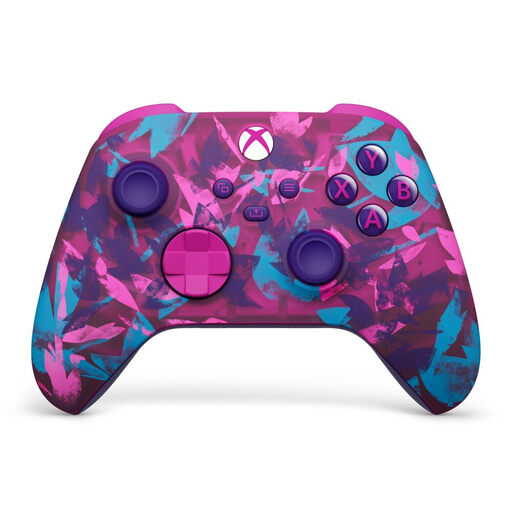
Xbox Wireless Controller Heart Breaker Special Edition
A wireless option for an Xbox or Windows setup; also check that the specific game supports the controller.
Uses two AA batteries; the stated battery life is up to 40 hours.
View at Joybuy
 No image available
PS5 DualSense Wireless Controller V3 Cosmic Red
An extra full gamepad for a PS5 setup. Check that the features are supported in the game you want to play together.
The product name describes it as a wireless controller.
View at Joybuy
 No image available
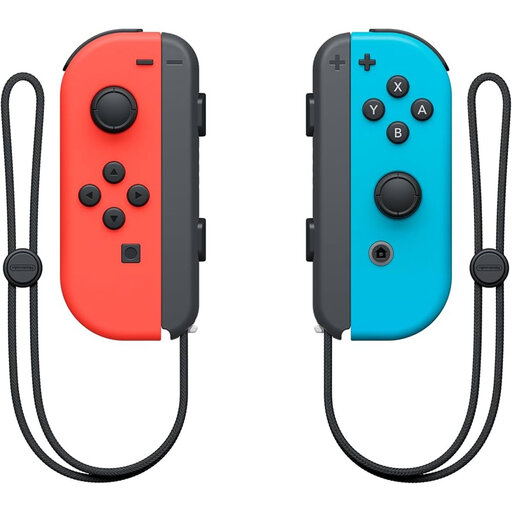
Nintendo Switch Joy-Con Pair Neon Red/Neon Blue
A pair for a Switch setup. Using one Joy-Con per player only works if the specific game supports that play style, as Nintendo explains.
View at Joybuy
 No image available
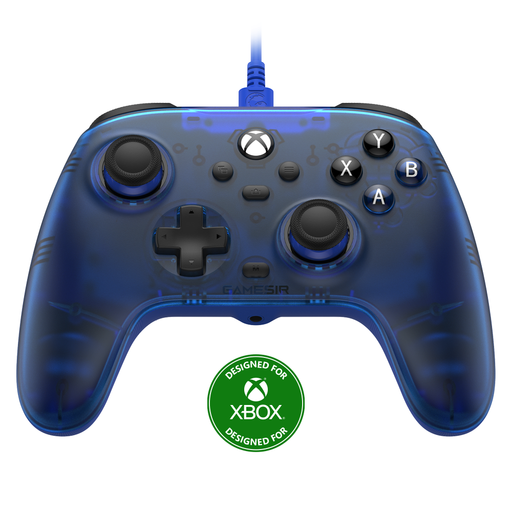
GameSir T7 Wired Xbox Controller (Blue)
A wired option for Xbox Series X|S, Xbox One and Windows 10/11, as stated for this model.
The detachable cable is 3 m long, so bear in mind the distance between where you sit and your system.
View at Joybuy
 No image available
Nintendo Switch 2 Joy-Con 2 Pair Light Blue/Light Red
For Switch 2 only. Check that the game supports the local co-op setup you want to use with Joy-Con 2.
View at Joybuy
Frequently asked questions
Are two Joy-Cons always enough for two players?
No. Nintendo says it depends on the software and the play style the game supports. Check the controller requirements for the game you want to play.
Can I use Joy-Con 2 with the original Nintendo Switch?
No. Nintendo says Joy-Con 2 only works with Switch 2. Original Joy-Cons can be used wirelessly with Switch 2.
How do I charge Joy-Con 2 for my next gaming session?
Nintendo says you can charge them on a Switch 2 that’s connected to a power supply and switched on or in sleep mode, or by using a separate Joy-Con 2 Charging Grip. A full charge takes around 3.5 hours, according to Nintendo.
If my controller develops a fault, am I only covered by the manufacturer’s warranty?
No. According to the Dutch government, purchases made by consumers are covered by statutory rights, and you should contact the retailer to resolve any problems. An extended warranty doesn’t replace those statutory rights.
Can I return a controller bought online in the Netherlands?
According to the Dutch government, in many cases you have 14 days to change your mind when buying at a distance, although exceptions depend on the type of purchase. Check the terms that apply to your purchase.


