Start by checking your console or PC, and the controller setup your co-op game supports for each player. On Switch 2, a Joy-Con 2 can be used on its own in compatible games; on a shared Windows PC, check the connection options and whether it recognises multiple controllers. A wired connection means no charging, but keeps you close to the device. With wireless play, you’ll need to consider pairing and power.
Who is this guide for?
Housemates with different systems
You share a PC or console and want to make sure an extra controller will work with your system and chosen game. Nintendo Support, Xbox Support and PlayStation Support explain that compatibility depends on the system and game.
Co-op groups with a player slot to fill
Someone else might join in. Check whether they need a full controller or whether the game supports a single Joy-Con 2. Nintendo Support explains how to use a Joy-Con 2 on its own in horizontal mode.
Housemates looking for a straightforward spare controller
You’re after an extra controller and weighing up the limitations of a cable against wireless pairing and charging. Xbox Support and Logitech G explain the different connection options and requirements.
What should you look for when buying?
First, check that the controller works with your system and game. Then decide how many individual player slots you need and how you want to connect your controllers.
| What to consider |
What should you check? |
Who is this important for? |
| System and game compatibility |
Check the exact system version, the game’s controller requirements and any features you need. Nintendo Support says that Joy-Con 2 only works with Switch 2; PlayStation notes that support for specific DualSense features on PC depends on the game. |
If I play on different systems, I want to know in advance whether the controller and game support my setup. Around 33% of consumers prioritise compatibility. |
| One controller per player |
Check the number of local players and the controller setup required by the game. Nintendo Support confirms that a Joy-Con 2 can be used horizontally as a separate controller when the software supports that orientation. |
If someone else joins in, I want to know whether they can play with a single Joy-Con 2 or need a full controller. Around 27% of consumers are mainly looking to fill a player slot. |
| Parts you’ll need |
Check what’s in the box and whether you’ll need an extra cable, power supply or accessory. Nintendo says the Joy-Con 2 Charging Grip is sold separately. |
If we’re buying a controller as a shared spare, I want to know in advance what we’ll need for the way we plan to use it. Around 20% of consumers are mainly concerned about the cost of adding an extra player. |
| Connecting and switching between devices |
Check the available USB ports, cable length and options for pairing multiple controllers. Xbox Support warns that multiple Xbox controllers connected over Bluetooth may perform less well. |
If controllers are shared between housemates or devices, I want connecting and pairing them again to be straightforward. Around 20% of consumers prioritise connectivity and day-to-day management. |
Common pitfalls
-
Assuming a pair of Joy-Con 2 controllers automatically counts as two full gamepads
Using each one horizontally on its own depends on the game; together, the Joy-Con 2 controllers make up one control set.
Check the number of players and required controller setup for the specific co-op game you play.
-
Choosing the wrong Switch generation or controller version
Nintendo says Joy-Con 2 does not work with the original Switch. The two 8BitDo Ultimate 2C versions also support different systems.
Check the full model name and system compatibility, not just the product range.
-
Assuming Bluetooth will always be enough for multiple PC controllers
Xbox Support warns that Bluetooth reliability can vary between PCs, and that multiple Xbox controllers connected over Bluetooth may perform less well.
Check your PC’s connections, the distance to your seating area and how the game recognises multiple controllers.
-
Thinking a wired Switch 2 controller is a complete replacement for Joy-Con 2
PowerA says the Advantage Wired can only be used when the Switch 2 is docked. It also lacks features including motion controls and is not designed for games that require Joy-Con.
Compare the features your game needs with the specifications of the exact controller version.
Brands to consider
Nintendo
Worth considering for Joy-Con 2 and full controllers for Switch 2; the right setup depends on the game.
- Nintendo Support confirms that a Joy-Con 2 can be used on its own horizontally when the game supports that orientation.
- Joy-Con 2 does not work with the original Switch; a Pro Controller counts as one controller.
Xbox
An option for Xbox and Windows PCs where players want to use a full gamepad.
- Xbox Support lists USB, Xbox Wireless and Bluetooth as connection options for Windows.
- Xbox Support says Bluetooth performance can vary between PCs; multiple Xbox controllers connected over Bluetooth may perform less well.
Sony PlayStation
DualSense is a good fit for PS5 and PC games that support the controller.
- PlayStation Support lists USB-C and Bluetooth for connecting to a PC.
- On PC, support for specific features depends on the game; PlayStation says haptic feedback requires a USB connection.
Logitech G
The F310 is a wired option for PC if the cable can reach your seating area.
- Logitech G lists XInput and DirectInput, as well as a 6-foot USB cable.
- Logitech G says the DirectInput mode requires software installation; the listed specifications do not confirm console compatibility.
8BitDo
The Ultimate 2C range includes versions with different system compatibility.
- 8BitDo says the Ultimate 2C Wireless is designed for Windows and Android, while the Ultimate 2C Bluetooth is designed for Switch.
- 8BitDo says the Bluetooth version needs a firmware update for Switch 2 support. Check the full version name.
PowerA
The Advantage Wired is a wired option for a docked Switch 2.
- PowerA lists a detachable USB-C cable for this version.
- PowerA says it lacks features including motion controls, HD Rumble, an IR camera and amiibo NFC; it is not suitable for games that require Joy-Con.
Joybuy products for local co-op
This selection includes controllers for PC, PlayStation 5 and Nintendo Switch systems. Check the compatibility of each model with your game to see which controller setup it supports.
 No image available
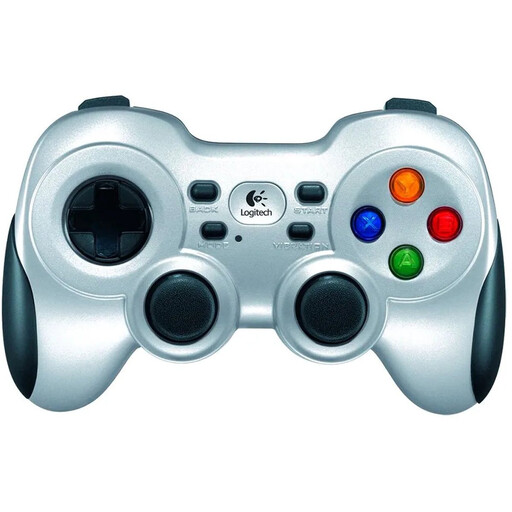
Logitech F710 wireless game controller for PC
A wireless option for an extra player on PC; check that your game recognises multiple controllers as separate players.
View at Joybuy
 No image available
Nintendo Switch Joy-Con controller pair, Neon Red/Neon Blue
An extra Joy-Con pair for a Nintendo Switch; check your exact Switch generation and whether your game supports this controller setup.
View at Joybuy
 No image available
Sony PlayStation 5 DualSense wireless controller, white
A full controller for PS5 co-op or a compatible PC game. PlayStation Support lists USB-C and Bluetooth for PC; haptic feedback on PC requires a USB connection and support from the game.
View at Joybuy
 No image available
Nintendo Switch 2 Pro Controller, black
For a Switch 2 player who needs a full controller; Nintendo says this counts as one controller, not a pair that can be split between players.
View at Joybuy
 No image available
Nintendo Switch 2 Joy-Con 2 pair, light blue/light red
For local co-op on Switch 2 when the game lets each player use a Joy-Con 2 horizontally. Nintendo Support recommends attaching the wrist straps when using the controllers wirelessly.
View at Joybuy
Frequently asked questions
Are two Joy-Con 2 controllers always enough for two players?
No, it depends on the game. On Switch 2, each Joy-Con 2 can be used on its own horizontally if the software supports that orientation. Check the number of players and the controller setup your game requires.
How do you connect multiple controllers to a Windows PC?
Xbox Support lists USB, Xbox Wireless and Bluetooth as connection options. Xbox warns that multiple Xbox controllers connected over Bluetooth may perform less well. Check your PC’s connections and whether the game recognises each controller as a separate player.
Do you need to use the Joy-Con 2 wrist straps?
Nintendo Netherlands instructs users to attach the wrist straps whenever Joy-Con 2 is used wirelessly. This instruction applies to wireless use.
What if a controller breaks too soon during normal use in the Netherlands?
According to ACM ConsuWijzer, the retailer is responsible for the statutory guarantee. If a product breaks during normal use sooner than could reasonably be expected, the retailer must offer an appropriate free solution, such as a repair or replacement, or in some cases a refund. There is no single fixed statutory guarantee period that automatically applies to every controller.


