
Players with a dedicated console
You’re looking for an extra controller for Switch 2, PS5 or Xbox. First, check that both your system and the game you’ve chosen support the local multiplayer setup you want.


Choose an extra controller based on your console or PC and the requirements of the game you’ve picked: an extra controller doesn’t automatically mean an extra player can join in. Nintendo says that a single Joy-Con 2 can work as a controller for one player in games that support this setup; a Switch 2 Pro Controller counts as one controller. PlayStation lists support for up to four controllers at once on PS5, while on Xbox and Windows PC you should also check the specific game’s support and the connection required.
You’re looking for an extra controller for Switch 2, PS5 or Xbox. First, check that both your system and the game you’ve chosen support the local multiplayer setup you want.
You want to know in advance how many controllers or controller halves you’ll need, so everyone can join in.
You want an extra controller that suits your setup, and you’re weighing up wired and wireless options, as well as reusing controllers you already own.
Choose this when: the game supports each player using a single Joy-Con 2 and you want the flexibility to add extra players.
Bear in mind: the game determines whether one Joy-Con per player is enough; also check how many controllers are required.
Choose this when: one player wants a full-size controller, or you want to check whether a controller you already own will work.
Bear in mind: Nintendo counts the Switch 2 Pro Controller as one controller. Older Joy-Cons can’t be attached to Switch 2 and need a different charging option.
Choose this when: you want another player to join in on a PS5 with a local multiplayer game.
Bear in mind: PlayStation lists support for up to four controllers at once on PS5; the game itself determines the number of players and the controls required.
Choose this when: you’re playing on a supported Xbox console or Windows PC, and the game supports local co-op with controllers.
Bear in mind: check the connection and game support. A USB-C cable is only included with the specific version sold with a cable.
Choose this when: you play in TV mode and want a wired connection.
Bear in mind: according to PowerA, the PowerA Wired Controller for Nintendo Switch reviewed here only works when the Switch is docked, and doesn’t support motion controls or HD Rumble.
| What to consider | What to look for when buying | Who is this most important for? |
|---|---|---|
| Compatibility | Check the exact system, whether the game supports local play and which controllers it requires. | If I want to avoid buying a controller or game that doesn’t suit my setup, I put compatibility first; around 31% of consumers say the system and game are their main considerations. |
| Player slots | Count the available controllers and guests; check whether each player needs a Joy-Con, a pair or a full controller. | If I want to make sure everyone can join in, I check how many players the available controls will support; around 25% of consumers say having enough player slots is their top priority. |
| Connection and power | Check how the exact version connects, what’s included and how to charge the controllers. | If I don’t want to work out which connection or charging option I need during the evening, I check in advance; around 19% of consumers put connection and power first. |
| Overall setup | First, see which controllers you already own and compare what you’ll need for the total number of players. | If I want to reuse existing controllers without overlooking anything, I consider the complete setup; around 13% of consumers make the total cost their top priority. |
| Grip and buttons | Check which buttons and features the game requires, and whether the controller feels comfortable in your hands. | If I need a particular grip or specific buttons, I compare them with the game’s requirements; around 12% of consumers prioritise comfort and controls. |
Whether a single Joy-Con works as a controller for one player depends on the game.
Before you buy, check the player count and the controllers required for the game you’ve chosen.
If the game doesn’t support single Joy-Con controls, you may need a full controller or an extra pair.
Nintendo says original Joy-Cons can connect wirelessly to Switch 2, but can’t be attached to the system. You’ll need an original Switch or a compatible accessory to charge them.
Plan ahead for how you’ll charge your existing Joy-Cons between gaming sessions.
According to PowerA, the PowerA Wired Controller for Nintendo Switch reviewed here only works while the Switch is docked.
Check that the exact model suits your setup and the features required by the game you’ve chosen.
According to PlayStation, haptic feedback on PC requires a supported game and a USB connection.
For PC use, check that the game supports the features you want with your chosen connection.
Joy-Con 2 sets and Switch 2 Pro Controllers offer different control setups for Switch 2. Existing Switch controllers may also work in certain circumstances.
DualSense is an option for PS5 players looking for an extra controller for a local multiplayer game; using it with a PC requires separate checks.
According to Microsoft, Xbox controllers are designed for supported Xbox consoles and Windows PCs, with both wireless and wired connection options available.
According to 8BitDo, the Ultimate 2 Bluetooth Controller is designed for supported uses on Switch and Windows.
The Wired Controller for Nintendo Switch reviewed here is a wired option for a docked Switch or Switch 2.
This selection includes extra controllers for Switch 2, PS5 and Xbox or Windows PC, plus a wired HORI option for Switch and Switch 2. Check which controls each game requires.
 Image unavailable
A wired option for a fixed Switch or Switch 2 setup.
The product name lists support for Switch and Switch 2.
The USB cable isn’t included.
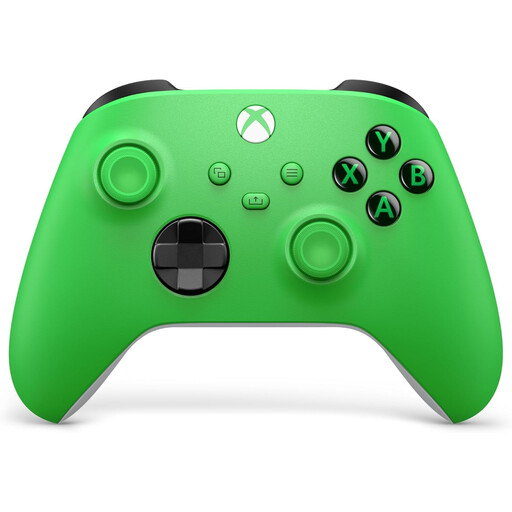 Image unavailable
An extra controller for Xbox or Windows PC, for a game that supports local co-op with controllers.
The product information lists support for Xbox Series X|S, Xbox One and Windows PCs.
The listed connections are USB-C and Bluetooth; the controller has a hybrid D-pad and textured grips.
 Image unavailable
An extra controller for a PS5 player when the game supports local multiplayer.
The product information lists haptic feedback, adaptive triggers and a built-in microphone.
The controller is wireless and, according to the product information, can be charged via USB-C.
 Image unavailable
A full controller for one Switch 2 player; Nintendo counts this model as one controller.
The product information lists HD Rumble, motion controls and amiibo functionality.
According to the product information, a USB cable is included for charging.
 Image unavailable
A left and right controller for Switch 2; whether each can be used by a separate player depends on the game you’ve chosen.
The product information lists motion controls, HD Rumble 2 and two wrist straps.
No, it depends on the game you’ve chosen. Nintendo describes individual use in supported games, so check the game information for the player count and controllers required.
Nintendo lists wireless compatibility for original Joy-Cons and the Switch Pro Controller. Older Joy-Cons don’t attach to Switch 2; you’ll need an original Switch or a compatible charging accessory to charge them.
Check the game information for the player count and controls required, connect the controllers you need and test the player order. Make sure the controllers are charged or that you have the right cable to hand.
Check whether you need a cable, batteries or a suitable charging option. What you need will depend on the controller and your setup.