
Switch host
Wants to check whether their existing Joy-Cons and any extras provide enough separate controls for the chosen cooking game, without buying an unsuitable Switch version. Nintendo explains that the supported play style depends on the game.


Start with your console or PC and check that the game supports your chosen controller and play style: compatibility with one system doesn’t automatically mean a controller will work with another. Then count how many controllers you need. On a Switch, Joy-Cons can be used separately if the game supports it, while a full-size controller offers a different grip, and a wired model needs a cable that can reach your seat.
Wants to check whether their existing Joy-Cons and any extras provide enough separate controls for the chosen cooking game, without buying an unsuitable Switch version. Nintendo explains that the supported play style depends on the game.
Looking for an extra full-size controller that works with their console and can be paired before game night. Check the compatibility information for the specific controller.
Wants to arrange separate controls for players and distinguish between PC controllers and versions made for other systems. Microsoft lists Windows support for the Xbox controller; 8BitDo lists different systems for the two Ultimate 2C versions.
For a night of co-operative cooking games, start by checking the gaming system and local play rules. Then work out how many people will be playing at once and whether the connection and seating arrangement suit your chosen controller.
| What to consider | What should you check? | Who is this important for? |
|---|---|---|
| System compatibility | Check the full model name against the supported systems and any firmware or system version requirements. | If I want to be sure the controller works with my Switch, Xbox, PS5 or PC, I’ll pay close attention to the exact version. Around 36% of consumers say compatibility with their own system is their top priority. |
| Controls for the group | Count the controllers available and check how many local players the game supports, as well as which Joy-Con play styles are available. | When I invite guests, I want to make sure everyone has a suitable controller. Around 29% of consumers prioritise having enough separate controls. |
| Ready to play | Check how to pair the controller, whether a firmware update is required and whether a wired cable will reach your seat. | If I want to keep setup to a minimum before my guests arrive, I’ll check pairing, charging and cable length. Around 21% of consumers prioritise getting started quickly. |
| Grip and seating | Decide whether a single Joy-Con or a full-size controller is right for you; for a wired model, measure the distance to the dock. | If I prefer a particular grip or don’t want to sit close to the dock, the shape of the controller and room to move matter to me. Around 14% of consumers focus mainly on grip and seating. |
Nintendo says Joy-Con 2 can only be used with Nintendo Switch 2. A controller for the wrong generation won’t suit your setup.
Before buying, check whether the version is called Joy-Con or Joy-Con 2 and which Switch version it’s designed for.
According to Nintendo, whether a single Joy-Con can be used on its own depends on the game and the play styles it supports.
Check the controller layout for the specific cooking game before deciding how many extra controllers you need.
PowerA says the Wired Controller researched here has a 3 m cable and is designed for use when the Switch is docked.
Measure the distance between the dock and your seat, and check that playing in docked mode suits your setup.
8BitDo lists different compatible systems for these versions. So, despite their similar names, they aren’t designed for the same setup.
Check the full product name and compatibility list. For Switch 2, 8BitDo also lists a firmware and system version requirement for the Bluetooth version.
Joy-Con and Joy-Con 2 are options for supported single-controller play styles; the Switch 2 Pro Controller is a full-size controller for Switch 2.
The Xbox Wireless Controller is an option for an Xbox or Windows PC setup.
DualSense is a full-size controller for a PS5 setup and can also connect to supported PCs.
The Wired Controller for Nintendo Switch reviewed here is a wired option for playing with the console docked.
The Ultimate 2C name is used for versions designed for different systems.
This selection includes controllers for Xbox and PC setups, Nintendo Switch, PS5 and several other listed platforms. Before buying, check that the exact version is compatible with your system and game.
 No image available
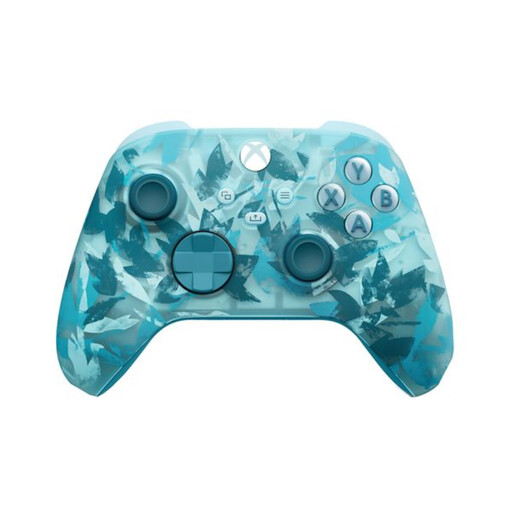
An option for a separate controller in an Xbox or Windows PC setup; check that your system and game support it.
The product information lists Xbox Series X|S, Xbox One and Windows 10/11 PCs, Xbox Wireless, Bluetooth and included AA batteries.
 No image available
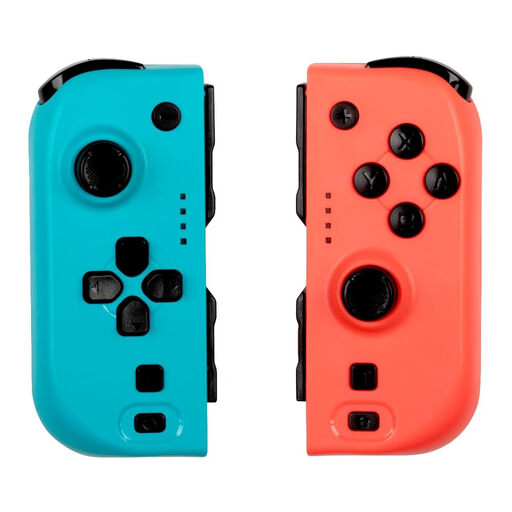
A pair of controllers for a Switch setup. Check which local play styles your chosen game supports before deciding how many people can play.
The product information lists Bluetooth, vibration and up to 8 hours of battery life. Compatibility is listed for Nintendo Switch, Switch OLED and Switch 2.
 No image available
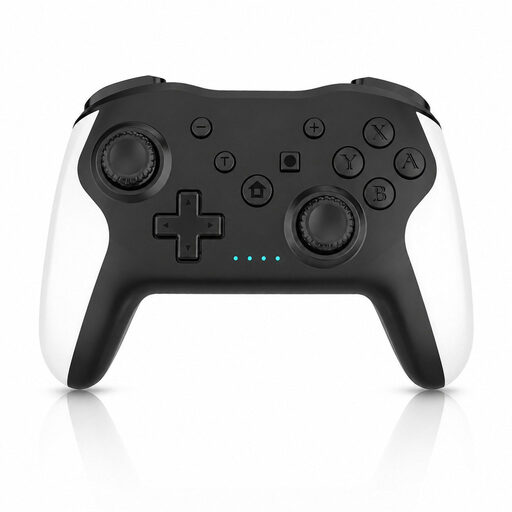
Worth considering for a Switch or PC setup; check that this specific controller works with your chosen cooking game.
The product name lists dual vibration and gyro. The platforms listed are Switch and PC.
 No image available
A separate wireless controller for a PS5 setup; check that it’s paired with the right system before game night.
The product name lists PS5 and a wireless controller. The product information mentions Bluetooth and USB-C.
 No image available
An option to consider if you’re looking for a controller for a Switch or PC setup; check which connection type works with your system.
The product name lists support for PC, Switch, iOS and Android, TMR sticks, two-in-one triggers and a charging dock.
Yes. Team17 lists up to four players in local or online multiplayer for Overcooked! 2. Also check the controller layout for the version and system you’re playing on.
On the Switch, open the Controllers menu and select ‘Change Grip/Order’. Hold the Joy-Con horizontally and press SL and SR. Nintendo notes that the available play style depends on the game.
Nintendo says you can connect up to eight wireless controllers in most cases, depending on the controller and its features. If a Bluetooth audio device is connected, Nintendo says no more than two players can connect. The game’s player limit also applies.
When you buy from a business at a distance, you usually have 14 days to change your mind; the seller must tell you about this, according to the Dutch government. This is separate from your legal rights if a product is faulty.
Radio equipment placed on the market in the Netherlands must meet European requirements, including the Radio Equipment Directive. The Dutch Authority for Digital Infrastructure says manufacturers apply the CE mark when equipment meets all the requirements. The presence of a CE mark alone doesn’t prove that a specific model meets every requirement.