
Housemates with a Switch
Want to know whether one Joy-Con per player is enough or whether their game requires full controllers. Nintendo says the supported play style varies by game; also check whether you have a Switch or Switch 2.


Start with the console you already own, then check how many players the specific game supports locally and which controller layout it requires. In supported Switch games, a pair of Joy-Cons can accommodate two players. For PS5, Xbox or games that require full controllers, choose an extra controller that matches your system, and check the connection, seating distance and charging equipment you’ll need.
Want to know whether one Joy-Con per player is enough or whether their game requires full controllers. Nintendo says the supported play style varies by game; also check whether you have a Switch or Switch 2.
Are looking for an extra controller for their existing console and want to check before buying whether their chosen game supports local multiplayer. Sony and Xbox describe controllers for their respective systems.
Want to connect controllers without the connection, cables or game support getting in the way of playing together. Sony describes how to connect a DualSense to a PC; Xbox notes that Bluetooth reliability on PC also depends on the adapter.
First check your console and the game’s local multiplayer options. Then compare the controller layout and connection with where you’ll be sitting and the controllers you already have.
| What to consider | What should you check? | Who is this important for? |
|---|---|---|
| System compatibility | Check the exact console generation or PC platform, and which connections are supported. | If I’m looking for a controller for the system I already have at home, I want to be sure it’s compatible. Around 33% of consumers prioritise compatibility with their existing system. |
| Player positions | Check how many local players the game supports and which controller layout it requires. | If housemates want to play an adventure together, it matters whether everyone has a supported player position. Around 27% of consumers focus mainly on having enough suitable player positions for the game. |
| Connection and seating distance | Weigh up wireless use against the connection and power available. For wired play, check the cable length and console setup. | If the console isn’t right next to the seating area, I want to know whether a cable will reach comfortably or whether a wireless connection suits my setup. Around 20% of consumers focus mainly on freedom of movement and connection. |
| What you’ll need | Count the controllers you already have and check whether your chosen console needs any additional charging or connection equipment. | I want to check in advance what I’ll need to play with my existing controllers and the new one, so I don’t put together a set with unnecessary extras. Around 20% of consumers focus mainly on the complete co-op setup they need. |
Whether one Joy-Con per player works depends on the play style supported by the specific game. Nintendo explains that this varies from game to game.
Check the controller requirements for the adventure you want to play together before counting the set as two player positions.
Nintendo says Joy-Con 2 only works with Switch 2. Original Joy-Cons can be used wirelessly with Switch 2, but can’t be attached to the console for charging.
Check your console generation and how you plan to charge the controllers before choosing a set.
PowerA lists a detachable 3 m cable for the Wired Controller reviewed here, and says it can be used while the Switch is docked. According to PowerA, it doesn’t include motion controls, HD Rumble, NFC or a C Button.
Check which features your game needs and whether the cable will reach from the docked console to your seats.
Joy-Con and Joy-Con 2 are relevant options for supported Switch and Switch 2 games.
DualSense is an option as an extra controller for PS5 and can also connect to supported PC devices.
The Xbox Wireless Controller is suitable for Xbox consoles and Windows PCs.
The Ultimate 2 Bluetooth and Ultimate 2C Wireless are models designed for different platform combinations.
The Wired Controller reviewed here is a wired option for a docked Switch.
These Joybuy product picks are intended as extra controllers for Xbox, Windows PC, PS5 and Nintendo Switch or Switch 2 setups. For each game, check how many local players it supports and which controller layout is required.
 No image available
An option if you’re looking for an extra controller for Xbox or a Windows PC. Check whether your chosen game supports local co-op.
The product description lists Xbox Series X|S, Xbox One and Windows PC.
Listed connections: Xbox Wireless and Bluetooth. According to the description, two AA batteries are included.
 No image available
A good fit if you’re looking for an extra DualSense for PS5. The game determines whether local multiplayer and the features you want are supported.
The product description lists PS5 compatibility, Bluetooth, haptic feedback and adaptive triggers. Sony also describes connecting to a PC via USB-C or Bluetooth; check support for each PC game.
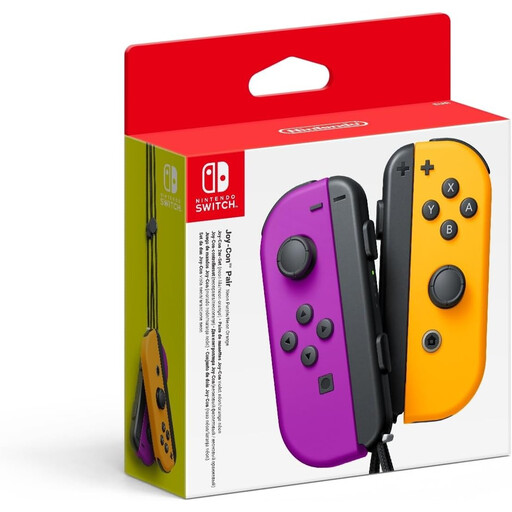 No image available
Can provide two player positions if your Switch game supports using Joy-Cons individually.
The product description lists individual use, motion sensors, HD Rumble and a wireless connection. Nintendo says the suitable play style varies by game.
 No image available
An extra controller option for Nintendo Switch. Check your game’s local multiplayer and controller requirements.
The product description lists a wireless connection, motion controls and HD Rumble.
 No image available
An option for an extra player position or set on Switch 2, provided the game supports the chosen Joy-Con layout.
Nintendo says Joy-Con 2 only works with Switch 2. The product description lists a left and right controller, motion controls, HD Rumble 2 and wireless use.
Only if the specific game supports using Joy-Cons individually, held horizontally. Nintendo says the available player positions vary by game, so check your game’s requirements.
Yes. Nintendo says original Joy-Cons can be used wirelessly with Switch 2. You can’t attach them to Switch 2 to charge them; Nintendo recommends using an original Switch or a suitable licensed charging accessory. Joy-Con 2 doesn’t work with the original Switch.
Sony describes connecting via a USB-C cable or Bluetooth. Also check whether your chosen PC game supports multiple controllers and local players.
For online purchases, ACM ConsuWijzer generally refers to a statutory cooling-off period of up to 14 days after delivery. Before returning an item, check which terms and exceptions apply to your purchase.
According to the Dutch government, you can contact the seller to find a solution. The Netherlands doesn’t have a fixed statutory two-year guarantee period; what you can expect from a product depends, among other things, on the product itself and the information you were given when you bought it.