Choose an extra controller based on your system, the specific game and how many people want to play at the same time. On a Switch, separate Joy-Con controllers can each be used by one player in supported games, while a Pro Controller gives one player a full controller layout. A wired controller also needs a suitable port and a cable that reaches your seating area. PC and PS5 each have their own compatibility requirements, so check the exact model and the game's controller requirements.
Who is this guide for?
Housemates with a Switch
You want enough separate player positions for a supported local game. Nintendo distinguishes between a pair of Joy-Con used by one player and individual Joy-Con that separate players can use, depending on the software and play style.
Housemates with a PC
You’re looking for controllers that suit your Windows set-up and the game you’ve chosen. 8BitDo lists Windows and Android compatibility for the Ultimate 2C Wireless; check the full model name, as the Ultimate 2C Bluetooth is the Switch version.
Housemates with a PS5
You want an extra controller for local co-op and need to consider charging and features that may vary between games. PlayStation says the DualSense can connect to a PC via USB-C or Bluetooth. Special feedback features depend on the game and may require a USB connection.
What should you look for?
First, check that your system and game support the local play mode you want. Then count how many people want to play at once, and only then choose the controller layout and connection type.
| What to consider |
What should you check? |
Who is this important for? |
| System and game compatibility |
Make a note of your system and the full model name; check that the game supports local co-op and the controller layout you want to use. |
I want to know before buying that both the controller and game will work with our set-up. Around 31% of consumers prioritise compatibility with their system and game. |
| Enough player positions |
Count how many people will be playing at once and check how many players the game allows with each supported controller layout. |
If everyone wants to play at the same time, I don’t want to count only the number of connected controllers. Around 25% of consumers prioritise having enough separate player positions. |
| The right controls |
Check which buttons and features the game requires; a wired Switch controller doesn’t automatically support all Joy-Con features. |
I want to use the button layout required by the platform game, without paying for features I don’t need. Around 19% of consumers focus mainly on the controls. |
| Putting together the player set-up |
Check how many controllers are included and whether your preferred way to play requires extra charging options or accessories. |
If several housemates want to join in, I want to know in advance what the whole group will need. Around 13% of consumers prioritise buying everything the group needs. |
| Cables and charging |
For a wired controller, measure the distance to your seat and check how the exact model is charged. |
I want to sit comfortably or avoid a flat battery interrupting our gaming session. Around 12% of consumers prioritise a practical seating and charging set-up. |
Common buying mistakes
-
Assuming two paired Joy-Con automatically mean two player positions
A game may use a pair of Joy-Con for one player, so the number of connected controllers alone doesn’t tell you how many people can play at the same time.
Check each game’s local play mode and required controller layout before working out how many extra controllers you need.
-
Buying an Ultimate 2C without checking the version
8BitDo lists Windows and Android compatibility for the Ultimate 2C Wireless, and Switch compatibility for the Ultimate 2C Bluetooth. The shared product family name doesn’t mean the versions are interchangeable.
Compare the full model name and compatibility information with the system you’ll be playing on.
-
Assuming a wired controller is a complete replacement for Joy-Con
For the Enhanced Wired Controller reviewed, PowerA lists no motion controls, HD rumble, IR or NFC. The model is also unsuitable for games that support Joy-Con only.
Check the game’s requirements, make sure you have a free port and confirm the cable will reach your sofa before choosing a wired controller.
-
Not planning how to charge original Switch Joy-Con on Switch 2
Nintendo says original Switch Joy-Con cannot be attached to a Switch 2 for charging; they can only be used wirelessly with it.
Check whether you have a suitable Switch or a licensed charging accessory. Otherwise, you may need a separate charging solution.
Brands to consider
Nintendo
The Joy-Con reviewed are designed for supported Switch play modes; the Switch Pro Controller gives one player a full controller layout.
- Nintendo says individual Joy-Con can be used separately in supported games. It also states that the Switch Pro Controller works with Switch and Switch 2.
- Original Switch Joy-Con cannot be attached to or charged by Switch 2. Check which play mode the game supports.
PowerA
The Enhanced Wired Controller reviewed is an extra wired controller for a docked Switch.
- PowerA lists a detachable 3 m cable for this version, and no batteries are required.
- According to PowerA, this model lacks HD rumble, IR, motion controls and NFC; it isn’t suitable for games that support Joy-Con only. This applies to the version reviewed, not necessarily the entire range.
8BitDo
The Ultimate 2C versions reviewed vary by system: Wireless for Windows and Android, and Bluetooth for Switch.
- The manufacturer lists the system compatibility for each version.
- For Switch, don’t buy based on the name Ultimate 2C Wireless alone. For Switch 2, also check the firmware requirement 8BitDo lists for the Bluetooth version.
PlayStation
The DualSense is designed for a PS5 set-up and can also be used with a supported PC game.
- PlayStation says it can connect to a PC via USB-C or Bluetooth.
- Haptic feedback and adaptive triggers require game support and may need a USB connection. PlayStation Direct states that a cable is not included with the white version reviewed for the Netherlands.
Controller options at Joybuy
These options are aimed at extra controllers for shared co-op on Nintendo Switch systems and PS5, including wired, wireless and individually used options. Check which play modes and controllers each game supports.
 No image available
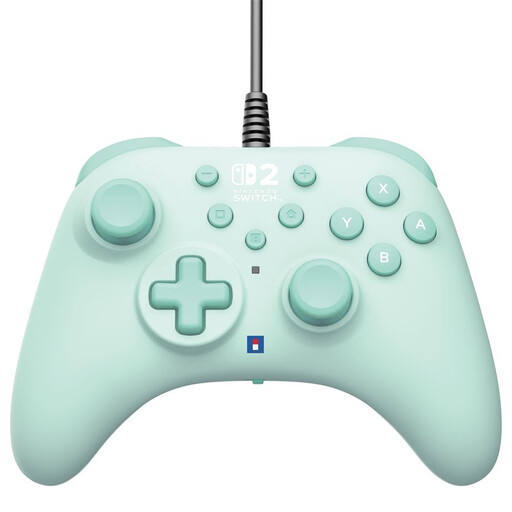
Hori Wired Controller Horipad Turbo for Switch and Switch 2 - Green
A wired option for a fixed Switch set-up, provided the cable reaches your seat.
3 m USB-A cable, programmable rear buttons and a Turbo function. Check that the available port and cable length are suitable before buying.
Joybuy
 No image available
KONIX JoyPad Controller Pair for Nintendo Switch, Switch OLED and Switch 2 - Blue and Red
A pair for a Switch set-up if you’re looking for two extra controllers; check that the local play mode you want works with each game.
The product description lists Bluetooth, a gyroscope, NFC, vibration and a stated battery life of up to 8 hours.
Joybuy
 No image available
Nintendo Switch Pro Controller - Black
A full controller for one player on Switch; Nintendo says the Switch Pro Controller also works with Switch 2.
The product description lists wireless connectivity, a built-in battery, motion controls and HD Rumble. The box contains one controller.
Joybuy
 No image available
Nintendo Switch Joy-Con Pair - Neon Green/Neon Pink
A pair of Joy-Con for extra player positions when the game supports individual Joy-Con; Nintendo says the permitted play style can vary by software.
The product description lists wireless use, HD Rumble and motion controls. Whether one Joy-Con can be used per player depends on the game mode and controller layout.
Joybuy
 No image available
Sony PlayStation 5 DualSense Wireless Controller - White
An extra PS5 controller for local co-op when the game you’ve chosen supports individual controllers.
The product description lists Bluetooth and USB-C. Haptic feedback and adaptive triggers work when supported by the game; PlayStation says a cable is not included with this white version for the Netherlands.
Joybuy
Frequently asked questions
Can two players always share one set of Joy-Con?
No, it depends on the game and the supported play style. Nintendo says Joy-Con can be used separately, but check whether the platform game you’ve chosen lets each player use one Joy-Con.
How do you pair a Switch Pro Controller for your next gaming session?
Nintendo explains how to pair it using the USB cable connected to the dock, or by going to Controllers > Change Grip/Order and pressing the SYNC button. These instructions apply to Switch and Switch 2.
Can original Switch Joy-Con be charged on a Switch 2?
Not by attaching them to the Switch 2: Nintendo says they only connect wirelessly to it. To charge them, you’ll need a Switch or a suitable licensed accessory.
What can you do in the Netherlands if you’re unhappy with a controller bought online, or it breaks too soon during normal use?
For an online purchase, ACM ConsuWijzer says you generally have a statutory cooling-off period of up to 14 days after delivery; check which exceptions apply to your purchase. This is separate from the statutory guarantee: if a product breaks during normal use sooner than you could reasonably expect, the seller must resolve the problem free of charge, according to ACM ConsuWijzer.


