What should you look for?
Start with the system you play on, then check the local player limit and controller requirements for the specific game. After that, you can decide whether a wireless or wired connection is better suited to your space.
| Buying consideration |
What should you check? |
Who is this important to? |
| Compatibility |
Check that the exact model works with your console or PC. Don’t rely on the button layout alone; for example, the 8BitDo Ultimate 2C Wired is listed for Windows and Android, not Xbox. |
If you’re looking for an extra controller that works straight away with your existing system, you’ll want to confirm compatibility for the exact model. Around 31% of consumers prioritise system compatibility above all else. |
| Room to move around |
Think about where the players will sit and where the console or PC is. For wired models, check the cable length; PowerA says its controller has a 3 m cable. |
In a small living room, you’ll want to keep cables out of the walkway. Around 25% of consumers prioritise having clear space to move around above all else. |
| Number of local players |
Check both the local player limit and the controller requirements for your game and edition. Nintendo directs players to the specific software title for details of the controllers required. |
If several people want to play at once, you’ll want to know whether everyone has a suitable controller. Around 19% of consumers prioritise the number of local players above all else. |
| Comfort and controls |
Compare the shape and button layout of models that work with your system. Try the grip for yourself if possible; the features listed on paper can’t tell you which model feels comfortable in your hands. |
If you’re looking for a controller that feels comfortable to hold, you can consider its shape and controls without treating extra features as essential. Around 13% of consumers prioritise comfort and controls above all else. |
| Total cost of use |
Check which cables and other parts are included, and how many compatible controllers the game requires. Sony says that a USB cable is not included with the white DualSense model it lists. |
If you’re putting together a complete local gaming set-up, you’ll want to know in advance which parts you already have and how many controllers the game requires. Around 12% of consumers prioritise the total cost of use above all else. |
Controllers on Joybuy
This selection includes wireless controllers for Xbox and Switch 2, as well as a wired Xbox controller. Before buying, check that the exact model works with your device and basketball game.
 No image available
Xbox Wireless Controller – Heart Breaker Special Edition
A wireless option for an Xbox or Windows set-up if you want to keep controller cables out of your gaming space.
The product information lists Xbox and Windows compatibility, Xbox Wireless and Bluetooth.
The description lists textured grips, button mapping and two included AA batteries.
View on Joybuy
 No image available
KONIX JoyPad controller pair for Nintendo Switch and Switch OLED, blue and red
The product description says this controller pair is for a Switch 2 set-up; check whether your basketball game supports this model and the controls you want to use.
The product information lists Bluetooth, vibration and battery life of up to 8 hours.
View on Joybuy
 No image available
Nintendo Switch 2 Official Pro Controller – Black
A Pro Controller for a Switch 2 set-up; also check your basketball game’s controller requirements.
The product information lists a wireless Bluetooth connection, a rechargeable battery and an included USB cable.
HD Rumble and motion controls are also listed.
View on Joybuy
 No image available
Nintendo Switch 2 Official Joy-Con 2 pair – Light Blue/Light Red
A left and right controller for Switch 2; whether you can use them as controllers for two players in your basketball game depends on the game.
The product information lists Bluetooth, motion controls, HD Rumble 2 and battery life of up to 20 hours.
View on Joybuy
 No image available
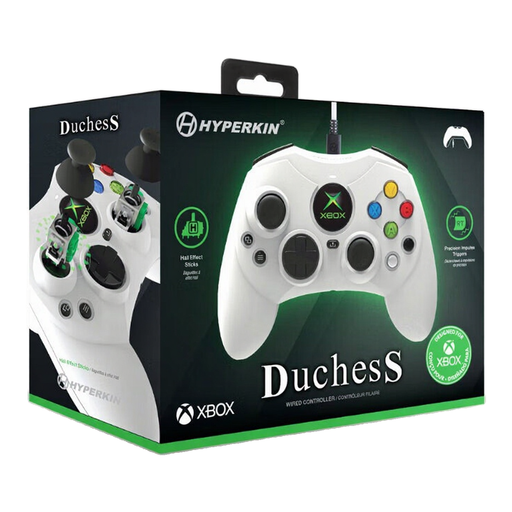
Hyperkin Duchess Wired Controller – White
A wired option for a compatible Xbox or Windows set-up if you can keep the cable out of the walkway.
The product information lists Xbox Series X|S, Xbox One and Windows 10/11 as compatible systems, and a detachable 3 m USB-C cable.
The description lists Hall Effect sticks and dynamic impulse triggers.
View on Joybuy
Frequently asked questions
Are two Joy-Con 2 controllers always enough to play basketball together?
No, you can’t assume that just because you’ve bought a pair. Nintendo says local multiplayer and the controllers required depend on the software; check the player and controller information for your basketball game.
How do I add controllers for local players on a Switch 2?
Register and connect each player’s controller to the console. Nintendo lists the SL and SR buttons for using a Joy-Con 2 horizontally; check separately whether your game supports this control option.
Do I also need a USB cable for an extra white DualSense?
That depends on whether you already have a suitable cable. Sony says a USB cable isn’t included with the white DualSense model it lists, and recommends using the cable supplied with the PS5 console to connect or charge it.
Who can help if a controller bought in the Netherlands doesn’t work properly?
According to the Dutch government, the seller must provide a solution if there’s a problem; your statutory guarantee applies alongside any manufacturer’s warranty. Contact the seller if you have an issue.
Do online purchases in the Netherlands always come with a 14-day cooling-off period?
No, not in every case. The Dutch government says that a 14-day cooling-off period applies to many distance purchases, but there are exceptions; check the terms and conditions for your specific purchase.


