
Vandaag of morgen in huis

Kwaliteit gegarandeerd

Welkomstaanbiedingen ontgrendelen: GRATIS bezorging | Tot 80% korting | Gratis 30 dagen JoyPlus-proefperiode
Download de app
An external SSD is useful for storing, backing up and taking your photos, videos, documents and games with you. Compared with a traditional hard drive, a portable SSD is compact, quiet and generally faster. However, a high speed shown on the packaging does not automatically mean that your laptop, smartphone or games console will achieve it.
The right choice depends on your connection, storage requirements and how you plan to use it. The checks below will help you avoid paying for performance your device cannot take advantage of.
Manufacturers often quote the maximum sequential read speed. For example, according to its product specification, a USB 3.2 Gen 2x2 SSD can read at up to around 2,000 MB/s, but you need both a suitable USB port and the right cable to achieve this. Speeds will be lower when using an older USB connection.
The type of files also makes a difference. Large video files are usually copied faster than thousands of small documents. Treat the speed shown on the product page as a maximum under specific conditions, rather than a guaranteed everyday performance.
USB-C describes the shape of the connector, not necessarily the transfer speed or the features supported by every device. So check:
An SSD for iPhone requires extra attention. According to its product specification, the DigiEra Magnetic Portable SSD is designed for iPhone 15 and newer models, and not for iPhone 14 or earlier versions. Simply having a physical USB-C connection is therefore no guarantee of direct recording or file transfer.
A 1TB SSD provides room for everyday use, photo archives and documents. For 4K video, large game libraries or long-term projects, a 2TB SSD may be more practical. The usable capacity is always slightly lower than the capacity shown on the packaging because of formatting and system functions.
Make a simple estimate in advance:
For general use, USB 3.2 Gen 2 with speeds of around 1,000 MB/s is often sufficient. According to its product specification, the Samsung Portable SSD T7 2TB offers read speeds of up to 1,050 MB/s and write speeds of up to 1,000 MB/s. It comes with USB-C-to-C and USB-C-to-A cables, making it easier to connect to different computers.
If you regularly move large video projects, you may want to consider a USB 3.2 Gen 2x2 SSD. According to their product specifications, the SanDisk Extreme Pro Portable SSD 1TB and DigiEra 1TB Magnetic Portable SSD offer read speeds of up to 2,000 MB/s. However, check that your computer or other source device supports USB 3.2 Gen 2x2.
An NVMe SSD in M.2 format is generally intended for direct installation in a laptop, desktop or compatible handheld device. It is not the same as an external SSD: you need a suitable M.2 slot or a separate enclosure with the appropriate interface.
An external solid-state drive has no moving disk components, but it is still vulnerable to drops, moisture, heat and damaged cables. For commuting or travelling, a sturdy enclosure and clearly stated drop or water resistance can be useful.
According to the SanDisk Extreme Pro Portable SSD’s product specification, this model has an IP65 rating and drop protection from heights of up to 3 metres. IP65 does not mean that the SSD can be used underwater. Clean and dry the drive after exposure to water before reconnecting it.
An SSD is not a replacement for a backup strategy. Ideally, keep important files in at least two different locations. Only format a new drive after checking which file systems your devices support. exFAT, for example, is practical when exchanging large files between Windows and macOS devices, but always check your equipment’s requirements.
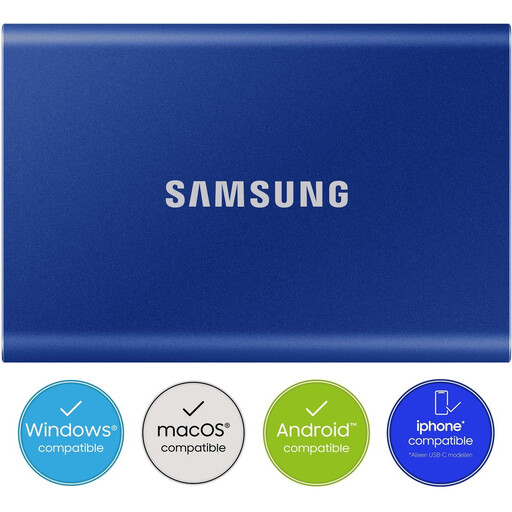
Why it suits this profile: The 2TB capacity provides room for files, photos and games without immediately requiring server or desktop storage. The USB-C and USB-A cables make it easier to use with different computers.
The quoted read speed of 1,050 MB/s applies when used with suitable equipment; the product specification clearly states the interface and supplied cables.
2TB storage, read speeds of up to 1,050 MB/s, USB 3.2 Gen 2 and AES 256-bit hardware encryption according to the product specification.
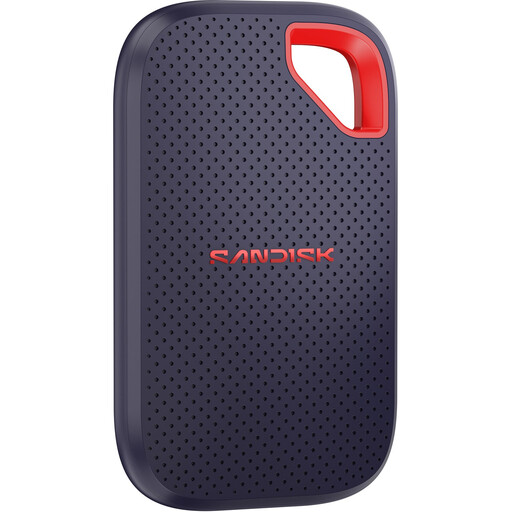
Why it suits this profile: This model is aimed at users who regularly move large files and want a portable enclosure with additional protection.
The product specification states that 2,000 MB/s requires a compatible USB 3.2 Gen 2x2 host. This makes the key speed requirement clear.
1TB capacity, read speeds of up to 2,000 MB/s, IP65 rating, drop protection from heights of up to 3 metres and password protection according to the product specification.
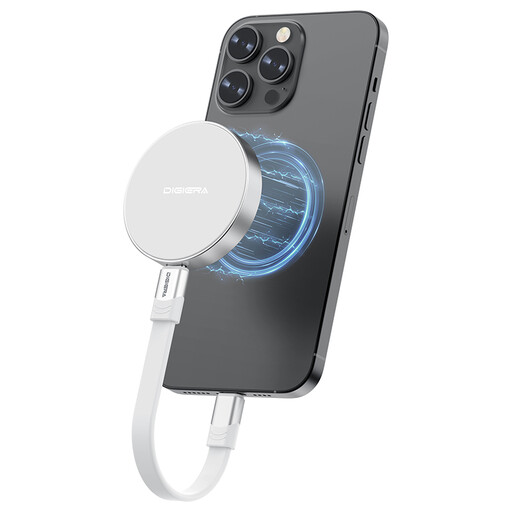
Why it suits this profile: According to its product specification, this USB-C SSD is designed for mobile creators who want to save files or ProRes video directly from a compatible iPhone.
The compatibility limitation is clearly stated: iPhone 15 and newer, not iPhone 14 or earlier. Also check whether your USB-C device supports Gen 2x2.
1TB storage, USB 3.2 Gen 2x2, read speeds of up to 2,000 MB/s, magnetic attachment and a weight of approximately 46 grams according to the product specification.
We have put together a complete, up-to-date list of products that fully meet these strict selection criteria and the applicable European safety regulations.
Yes, an external SSD can be used for game installations, storing game files and moving games. However, check the requirements of your PC, PlayStation or other console. With some consoles, you can store games on external storage, but you must first move them to the internal storage before you can play them.
Its lifespan depends on write workload, temperature, connection quality and conditions of use. An SSD mainly wears out through frequent writing. A separate backup is still essential for important files, even when the drive has a high quoted MTBF rating or a manufacturer’s warranty.
A portable SSD generally has no moving motor or spinning disks and operates via USB power. Actual energy consumption varies by model and usage. With a laptop, it can be convenient that you do not need a separate adapter, but extended transfers can still put a strain on the battery.
