
Vandaag of morgen in huis

Kwaliteit gegarandeerd

Welkomstaanbiedingen ontgrendelen: GRATIS bezorging | Tot 80% korting | Gratis 30 dagen JoyPlus-proefperiode
Download de app
An external SSD is useful for backups, large media files, games and expanding the storage of a laptop or smartphone. However, a high speed quoted on the packaging does not tell you everything. A USB-C SSD may, for example, be faster than your laptop’s port, meaning you achieve lower speeds in practice. A USB stick, USB-C flash drive and portable SSD are also often presented as similar solutions, even though they are designed for different use cases.
Pay particular attention to the connection, compatibility, capacity and protection. Below, you’ll discover which pitfalls are often overlooked and which models suit different types of user.
Manufacturers generally state a maximum sequential read or write speed. This figure only applies under suitable conditions. An SSD with USB 3.2 Gen 2x2 can, for example, reach up to 2,000 MB/s, but you’ll also need a device and cable that support this standard.
The drive will usually work with an older USB port, but at a lower transfer speed. So check the following:
An NVMe SSD, M.2 SSD or SATA SSD is generally designed to be installed inside a computer. The Kingston NV3 M.2 2280, for example, is an internal PCIe 4.0 NVMe SSD. This type of drive only fits a device with a suitable M.2 slot and requires installation, formatting and sometimes system migration.
If you want to carry files between devices, choose an external solid-state drive with a USB connection. An internal SSD without an enclosure is not plug-and-play and cannot simply be connected to a laptop or smartphone.
A 1TB external SSD provides space for photos, videos, documents and games, but the available storage is always slightly lower than the capacity stated on the packaging. What’s more, an SSD does not automatically protect your files from loss, theft or hardware failure.
Store important data according to the principle of keeping multiple copies. An external SSD can be a practical backup, but it’s best to keep valuable files in a second location or in another backup solution as well.
USB-C mainly describes the shape of the connector; it does not automatically indicate the speed. So also check the USB standard. A USB-C SSD with USB 3.2 Gen 2 delivers different performance from a model with USB 3.2 Gen 2x2.
For an SSD for Mac and Windows, it’s important to check which file system is used. You may need to format the drive the first time you use it. This can affect compatibility with other devices. For an SSD for iPhone, not every iPhone supports an external drive in the same way. Check the exact model and the cable required.
For documents, study files and occasional backups, a speed of around 400 to 1,050 MB/s is often sufficient. For video editing, large RAW photos or an SSD for gaming, a higher speed can be beneficial.
Pay attention to the difference between reading and writing:
The stated speed is a product specification, not a guarantee of the same performance in every situation.
A 500GB external SSD is suitable for documents, photos and a limited collection of games. With a 1TB external SSD, you get more room for videos and projects. A 2TB external SSD is more practical for large media libraries, multiple games or long-term backups.
If you often work on the go, you should also consider:
An IP rating indicates the conditions against which a product has been tested in accordance with the stated standard. IP65 does not, for example, mean that a drive can be used underwater. Always follow the manufacturer’s safety instructions.
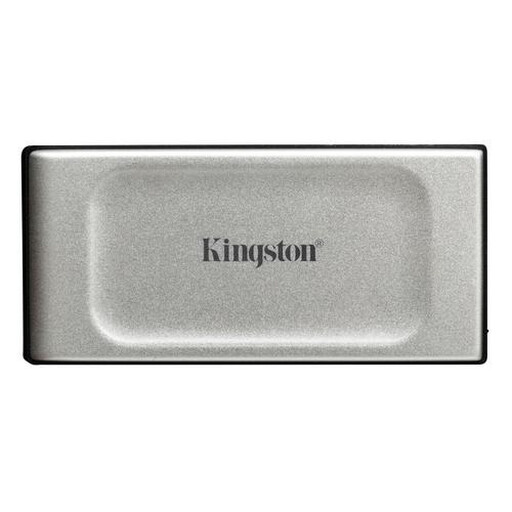
Why it suits this type of user: This compact model is suitable for daily backups, documents and photos. The USB-C connection and supplied cable make initial setup easy on compatible devices.
The storage capacity is clearly stated as 500GB, and this is a portable SSD rather than an internal M.2 drive. The quoted speed of up to 2,000 MB/s does require a suitable USB 3.2 Gen 2x2 port.
58.3 grams, USB 3.2 Gen 2x2 and, according to the product specifications, IP55-rated dust and water resistance.
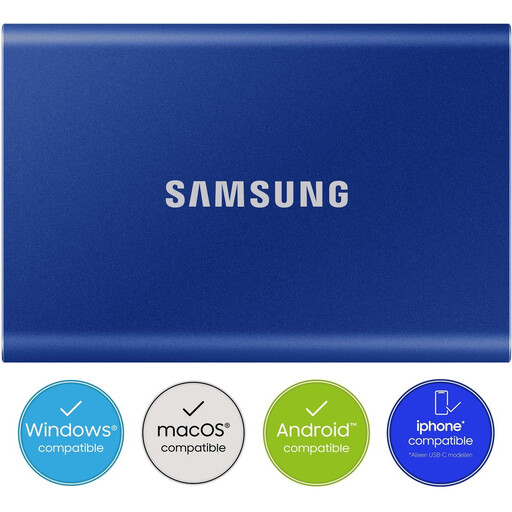
Why it suits this type of user: The 2TB capacity, two supplied cables and support for Windows, macOS, Android, cameras and games consoles make this model suitable for a range of working environments.
The USB-C-to-C and USB-C-to-A cables help to avoid connection issues. The maximum speeds of 1,050 MB/s read and 1,000 MB/s write still depend on the USB port and connected device.
2TB of storage, AES 256-bit encryption with password protection and an aluminium enclosure with a stated drop resistance of up to 2 metres.
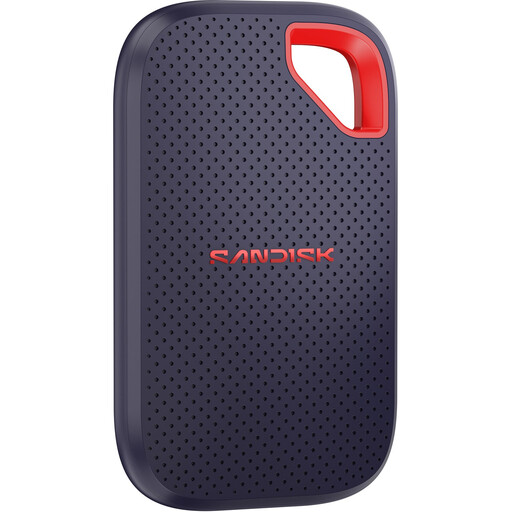
Why it suits this type of user: Photographers, videographers and professionals who often work on the go get a compact USB-C SSD with 1TB of storage and protection for mobile use.
The product specifications explicitly state that 2,000 MB/s is only achievable with USB 3.2 Gen 2x2. A USB-C cable and USB-A adapter are also included.
IP65 rating, stated drop protection of up to 3 metres and password protection with 256-bit AES hardware encryption.

Why it suits this type of user: This model is aimed at users with USB-C devices, including compatible iPhone 15 and 16 models, laptops, tablets, cameras and games consoles.
The compatibility limitation is clearly stated: iPhone 14 and older models are not supported. Speeds of up to 2,000 MB/s require USB 3.2 Gen 2x2.
Magnetic attachment, 1TB of storage, USB 3.2 Gen 2x2 and a stated write speed of up to 1,800 MB/s.
We’ve put together a complete, up-to-date list of products that fully meet these strict selection criteria and the applicable European safety regulations.
Usually, yes, when transferring large files over longer periods, but the connection and model determine the actual performance. A USB-C flash drive, such as a Samsung model with a stated read speed of up to 400 MB/s, may be sufficient for documents and photos. For video editing or large backups, a portable SSD is generally more practical.
Its lifespan depends on write usage, temperature, storage quality and physical conditions. There is no fixed period that applies to every user. Back up your data regularly and safely disconnect the drive. Also check the warranty and product conditions for the model you choose.
Yes, provided the connection and file system are suitable. Some drives come with USB-C-to-C and USB-C-to-A cables, making them easier to connect. If you use the drive with both Mac and Windows, formatting may be necessary. Check in advance whether you want to edit files on both systems and which file system is best suited to this.
