
Vandaag of morgen in huis

Kwaliteit gegarandeerd

Welkomstaanbiedingen ontgrendelen: GRATIS bezorging | Tot 80% korting | Gratis 30 dagen JoyPlus-proefperiode
Download de app
An external SSD is useful for backups, photos, videos, games and extra storage for your laptop or smartphone. However, not every portable SSD is suitable for every situation. For example, a high speed stated on the packaging means little if your laptop only has a slower USB port.
The most common buying mistakes arise from three pitfalls:
Check both the SSD’s connector and the connector on the device you intend to use it with. A USB-C SSD physically fits many modern laptops, tablets and smartphones, but the transfer speed depends on the USB standard.
Pay attention to these differences:
A USB-C-to-A cable can be useful for older laptops. Check that the supplied cable supports the speed you want; otherwise, the external storage may operate below the level stated in the product specifications.
Choose the capacity based on your files, not just the amount of free space currently available on your laptop.
Allow for formatting and system files: the usable space will be slightly lower than the figure shown on the packaging. For use with Windows and Mac, exFAT can be useful, particularly when you want to move files larger than 4 GB.
An SSD uses flash memory and has no rotating disks. As a result, a portable SSD is generally quieter, lighter and better able to withstand normal movement during transport. This makes it suitable for use with a laptop in a lecture theatre, in a camera bag or as part of a mobile workstation.
An external hard drive, such as WD Elements or WD My Passport, often provides more gigabytes for the same budget. The trade-off is lower transfer speeds and greater sensitivity to shocks. You should move an HDD as little as possible while it is actively transferring data.
Neither type of storage replaces a backup. Ideally, important files should be stored in at least two different locations.
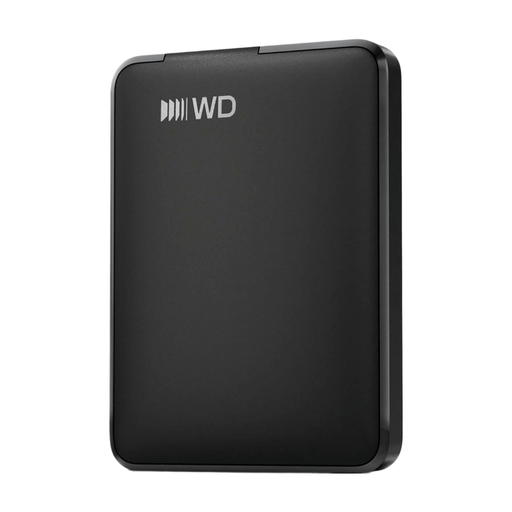
Why it suits this profile: This external hard drive provides simple plug-and-play storage for documents, photos and videos. The USB-C connection works with many modern laptops and devices.
The product description clearly states that this is an HDD. So do not expect SSD speeds; choose it for affordable capacity and straightforward backups.
1TB of storage, USB-C, plug-and-play functionality and a casing made with more than 50% recycled material, according to the product information.
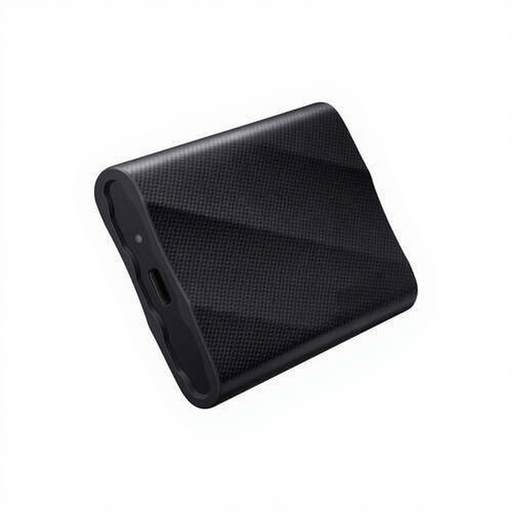
Why it suits this profile: The Samsung T9 combines 2TB of storage with quoted read and write speeds of up to 2,000 MB/s. That makes it suitable for large media files and frequent transfers.
The capacity helps prevent a video library from filling up quickly. However, check that your computer supports USB 3.2 Gen 2x2 if you want to take advantage of the stated speed.
2TB capacity, USB 3.2 Gen 2x2, hardware encryption and supplied USB-C-to-C and USB-C-to-A cables, according to the product details.

Why it suits this profile: This magnetic SSD is designed for mobile creators using a USB-C iPhone, laptop, tablet, camera or console. The product description mentions direct ProRes recording for supported iPhone models.
The compatibility limitation is clearly stated: the magnetic attachment is intended for iPhone 15 and newer, not iPhone 14 or older.
Quoted read and write speeds of up to 2,000 and 1,800 MB/s, a weight of approximately 46 grams and USB 3.2 Gen 2x2 Type-C.
We have put together a complete, up-to-date list of products that fully meet these strict selection criteria and the applicable European safety regulations.
Usually, yes, provided the connector, file system and cable are suitable. An SSD for MacBook and laptop may be pre-formatted for Windows. For use with both systems, exFAT is often practical. Always check the instructions for the specific model.
Its lifespan depends on usage, write operations, heat, cable quality and how it is handled physically. Keep the SSD dry, avoid prolonged exposure to heat and safely eject it. You should also make a second backup regularly, as an SSD can fail too.
A compatible external SSD can be used for additional storage. PS4 games can be played from external storage; according to Samsung’s product information, PS5 games must first be moved to the internal storage before you can play them. Check your console’s requirements and use a suitable USB port.
