Choose a capacity based on your current video library, how much you expect it to grow and how much room you want to keep for older versions. A desktop HDD suits a permanent workstation and an archive where capacity is the priority. A portable HDD is easier to take with you, while an SSD may be worth considering if you often move large files. No external drive is, by itself, a second copy stored separately. Plan how you’ll restore your files, and test that recovery process.
Who is this choice relevant to?
Collector with a fast-growing video archive
If you’re storing more and more videos at a permanent workstation, you’ll need to balance capacity against future growth and the space needed for older backup versions. The Consumentenbond discusses external drives as additional storage for photo and video collections.
Video creator who takes files with them
If you regularly move large video files between locations, portability and transfer speeds matter alongside available storage space. Toshiba and Samsung describe portable storage options for files you want to take with you or transfer.
Owner of irreplaceable videos
If you want to be able to restore recordings after they’ve been deleted, damaged or lost, simply buying an external drive isn’t enough. US-CERT and Carnegie Mellon University point out that keeping just one backup copy may not be sufficient. Microsoft explains how to restore selected libraries using File History.
What should you look for in an external backup drive?
External desktop HDD
Suitable for: a permanent workstation where capacity is the priority. WD lists models from 4 to 26 TB, and Seagate from 4 to 28 TB, across the desktop ranges reviewed.
Keep in mind: these ranges use a mains adapter, and a large drive doesn’t automatically count as a second backup copy.
Portable HDD
Suitable for: a backup drive you can take between locations. Toshiba lists models up to 4 TB in the Canvio Basics range reviewed.
Keep in mind: check that there’s room for growth and older versions, and that the file system is compatible with your computer.
External SSD
Suitable for: regularly moving large files or working from the drive while you’re out and about. Samsung lists sequential speeds of up to 1.050 MB/s read and 1.000 MB/s write for the 4 TB T7 Shield.
Keep in mind: these figures are manufacturer specifications, not a guarantee of the speed of a full backup on your computer. Also check that the capacity is sufficient.
First, work out how much storage you need. Then decide whether a permanent setup, portability or frequent file transfers matters most.
| Consideration |
What should you look for? |
Which consumers is this for? |
| Capacity for growth |
Calculate the size of your current video folders, estimate your own growth and allow for older versions. Check the capacity of the exact model. |
I want room for new videos and older versions of my archive. Around 33% of consumers prioritise capacity for a growing archive. |
| Ability to restore files |
Decide where a separate copy will be stored, which folders and versions will be included, and whether you can test restoring files. |
If my videos are irreplaceable, I want to know I can restore them from a separate copy. Around 33% of consumers prioritise recoverability. |
| Taking it with you and connecting it |
Check the ports, cable, power supply and file system for every device you want to use the videos on. |
I take my backup between locations or computers and want to know in advance whether I can connect the drive there. Around 20% of consumers prioritise portability. |
| Transfer time |
Compare the USB specifications of your computer and drive. Treat quoted sequential speeds as specifications, not as a measure of backup time. |
I often transfer large files and want to know whether my computer and drive are suitable for the job. Around 14% of consumers prioritise transfer speed. |
Things to consider when choosing
-
Assuming a larger drive is a complete backup strategy
A single drive is still just one storage location. If it fails or goes missing, the copy stored on it may also become inaccessible.
Keep separate copies and test whether you can actually restore a video.
A second storage location requires additional storage space.
-
Choosing capacity based on today’s library
New videos and saved older versions also take up space, so a capacity that’s sufficient now may not be enough later.
Before choosing a model, calculate the current size of your library, estimate how much it will grow and decide how much space you want to keep for older versions.
If your collection and older versions no longer fit, you may need additional or replacement storage.
-
Reading a USB specification as a guaranteed backup speed
A manufacturer’s quoted sequential transfer speed doesn’t tell you how long a full backup will take on your computer.
Check the connection on both the drive and computer, and don’t treat quoted maximum speeds as real-world test results.
Brands to compare
Western Digital
The WD Elements Desktop range is worth considering for a growing archive kept at a permanent workstation. Western Digital’s EMEA data sheet lists models from 4 to 26 TB.
- For the range reviewed, Western Digital lists USB 3.2 Gen 1/USB 3.0 and a mains adapter included in the box.
- Check compatibility and the file system for the exact model. Windows compatibility doesn’t automatically mean it will work with macOS without reformatting.
Seagate
Expansion Desktop is a desktop HDD range for anyone looking for a permanent storage solution. Seagate lists specific models with capacities of up to 28 TB.
- For the desktop range reviewed, Seagate lists USB 3.0 and a mains adapter included in the box.
- Seagate says reformatting is required to use the drive with Time Machine. Check the requirements for the exact model and your computer.
Toshiba
Canvio Basics is a portable, USB-powered HDD for consumers who want to take their video copy with them. The EMEA range reviewed goes up to 4 TB.
- For the 4 TB model, Toshiba lists a connection using a single USB cable.
- The drive reviewed is formatted as NTFS for Windows, and Toshiba says it needs reformatting for macOS. Check that the capacity will accommodate the growth of your archive.
Samsung
The Portable SSD T7 Shield is worth considering if you regularly transfer large files or need to use the drive on the move. For the 4 TB model sold in the Netherlands, Samsung lists USB 3.2 Gen 2 and sequential speeds of up to 1.050 MB/s read and 1.000 MB/s write.
- These figures are manufacturer specifications for the specific model, not independent test results or a guarantee of the speed of every video backup.
- Your computer and connection affect the speed you can achieve. Weigh up the capacity you need against how you plan to use the drive.
Joybuy products
These Joybuy products include desktop HDDs for a permanent workstation, as well as portable HDDs and SSDs for storage you want to take with you or transfer files from regularly.
 No image available
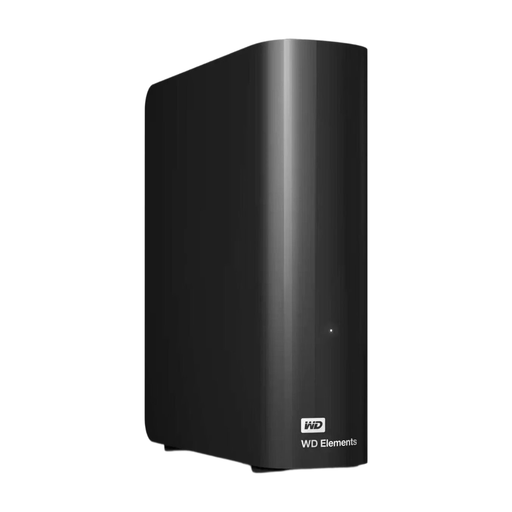
WD Elements Desktop 16 TB
Suitable for a growing archive at a permanent workstation where 16 TB of storage is required.
USB 3.0 and mains adapter. Reformatting may be required for use with macOS. Formatting erases data.
A single drive isn’t a separate second copy. Keep another backup and test that you can restore your files.
Joybuy
 No image available
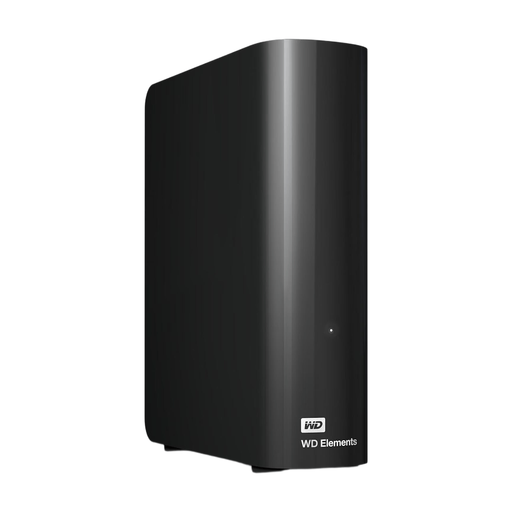
WD Elements Desktop 10 TB
Suitable for a permanent workstation if 10 TB is enough for the size and growth of your video library, including backup versions.
The product description lists USB 3.0 and a mains adapter included in the box. Reformatting may be required for use with macOS. Formatting erases data.
Also keep a separate copy and test that you can restore your files.
Joybuy
 No image available
WD Elements Portable 2 TB
Suitable for consumers who want to take a portable copy of their videos between locations and have enough space with 2 TB.
The product description lists USB 3.2 Gen 1.
Keep a separate copy as well, and test that you can restore your files.
Joybuy
 No image available
Toshiba Canvio Basics 4 TB
Suitable for a portable video copy if 4 TB provides enough space for your current files and expected growth.
The product description lists USB 3.2 Gen 1 and power through a single USB cable. The drive is formatted for Windows; reformatting is required for macOS.
Before formatting, check whether the drive contains any files you want to keep, and maintain a separate second copy.
Joybuy
 No image available
Samsung Portable SSD T7 2 TB
Suitable for regularly transferring large files if 2 TB provides enough space for your archive.
The product description lists USB 3.2 Gen 2 and sequential maximum speeds of 1.050 MB/s read and 1.000 MB/s write. Samsung quotes these as product specifications; your connection and computer affect the speed you can achieve.
An SSD is still only one copy: keep a separate backup and test that you can restore your files.
Joybuy
Frequently asked questions
Is moving files to an external drive enough to back them up?
No, not if that drive then becomes the only place they’re stored. Keep separate copies available and try restoring a file. The 3-2-1 rule is a security guideline, not a legal requirement in the Netherlands.
How do you back up your video folders in Windows?
Microsoft describes using File History for libraries, including Videos, with an external drive or network location as the destination. If your videos are outside these libraries, follow Microsoft’s instructions to add the folder to a library, then test a restore to check that the files you want have been included.
Do you need to reformat a Toshiba Canvio Basics for your Mac?
For the Toshiba Canvio Basics model reviewed, Toshiba lists NTFS formatting for Windows and says reformatting is required for macOS. Before formatting, check whether the drive contains any files you want to keep.
What can you do if a drive bought in the Netherlands develops a fault?
According to the Dutch government, you’re entitled to a product that works properly, and the seller must provide a solution if it doesn’t. The Netherlands has no fixed statutory guarantee period: what you can reasonably expect depends on the product and the circumstances of the purchase. A manufacturer’s guarantee is additional; your statutory rights don’t mean lost video files will be recovered.


